

A return to Linux Tech Support

Good Morning from my Robotics Lab! This is Shadow_8472, and today, I am trying to install an old favorite game of mine, Sim Coaster, onto my Linux test machine, Derpy Chips. Let’s get started.

As a note, while trying to get this game to play again, I have come across documentation calling it Theme Park Inc. I believe it’s the same game except just outside the US, so in my research, I am paying attention to both titles of the name. On the other hand, this game is not Sim Theme Park.

I believe I have talked about Wine before, but since it’s been a while, Wine is a compatibility layer between Linux and programs meant for Windows; meaning when writing software for a particular OS, you can expect certain chunks of code to be there. Linux would lack any of those “libraries” of code written for Windows, but if something were there to provide the same functionality, the CPU could still run the program.

Now, this all sounds great, but due to the branching version nature of Linux, it is really hard to find the correct, decent help. You might stumble across some workable instruction set right away, or you might goof something badly by following advice meant for the next game or Linux version over.

That’s about where I am with getting Sim Coaster to run right now. WineHQ says it should install and run perfectly (all be it based on a single, old report). I have it installed, but it isn’t working. Apparently, my old favorite has a number of similar enough (and more popular) competing games from the same era that Coaster doesn’t have a dedicated support section.

In an unrelated incident, my Derpy Chips computer lived up to its name, but not the way it earned it. While getting ready to set up a modded MineCraft server for use my my family on Sabbath, the screen zoomed way in, the Unity interface’s side bar taking up a quarter of the screen. The graphical interface was useless; I ended up opening up a terminal and tried to use my Windows machine to look up a fix, the xrandr command. Nothing seemed to come of that, but I swapped around my monitors until I seemingly fixed it, but I ended up giving up in defeat and putting it on the server machine when I put the screens back to their respective computers. (Normally the Windows machine has the HDMI and a smaller screen on DVI, but Derpy Chips gets the DVI when I’m using it.)

After Sabbath, I came back to the Derpy Chips problem to unscramble it, and it was all fixed. NOTHING is more frustrating than an evasive solution that comes on its own, at least for now.

Final Question: Have you ever gotten something working on you when it shouldn’t?

***

GAAAA! Zoomed in interface is back!
Ya, I can fly.

Good Morning from my Robotics Lab! This is Shadow_8472, and today, I am reviewing my first full week with my fancy new drone. Let’s get started.

My rough learning curve went about like so:
Uncontrolled hover-bounce at ground level (Perfect for tangling the propellers)
Race car around the house
Learning trim to balance the controls
Uncontrolled elevation introduction (Perfect stage for crashing into objects and causing damage to the drone)
Uncontrolled Yaw (left/right) introduction (Perfect for disorienting you if you aren’t careful)
Teaching sister what I knew, only to feel showed up
Early use of the flip functions
Understanding of the trim controls
Hover refinement
Race drone around the house
Finer movements

Getting the second battery was a really good idea. Sure I didn’t have a second charger, but it made for a longer flight session when I just had to swap the battery out and they were both charged.

Early on, when I was still getting used to the controls, I tried dodging the drone and catching it… OUCH! The throttle wasn’t down in time. I still have the remains of a tiny blood blister on my right ring finger.

Flying the drone across the ground actually reminded me of a favorite Star Wars podracing game I used to love. Technology marches on, I guess, unless I can get it running in Wine on Linux some day.

Crashing and bending a blade does not mean a drone is unflyable. You just need to adjust the trim and keep learning on the damaged gear. My two front propellers each have nicks and a back one has a bend in the plastic.

It’s a good and fortunate thing both my batteries were discharged at one point. One of them turned up after being missing and it had a fresh puncture in it. I am thankful to God none of the animals got hurt and our house didn’t burn down, but I am still a bit emotionally charged at losing a battery. At least the event triggered me to go get a binder for some drawings I made up as part of a role play.

Nothing groundbreaking has happened since then, I continue to get better, maybe I can try out the level 2 maneuverability settings, but I haven’t given that much thought yet. I have enough control to usually land on someone’s FLAT hand if the drone is flying propellers up, but I still goof the drone into something every so often. I’ve tried interacting with the animals with it, mainly by blowing some air their way, but I don’t feel that is wise after my dog tried to catch it mid-flight. I tried to dodge, but he was faster and I had to cut the throttle.

Final Question: Ever have a side project crash one of your problems and move you to fix it? If so, what was it?

Early Experiences With a Drone

Good Morning from my Robotics Lab! This is Shadow_8472, and today, I am introducing myself to the world of drones. Let’s get started.

While my ultimate goal is to print my own drone, I decided to try have my first flights on a pre-built machine. That way, any observed mistakes should be user error. I visited a local hobby shop for a fairly cheap drone. Nothing too fancy, the Invezo Stunt Drone RTF. Mine doesn’t camera but it is supposed do flips mid-air.

It was an open-package deal, so I got a significant discount. I had a short first flight, during most of which I let my sister borrow the controls. All of a sudden, it quit. Low Voltage Cutoff (LVC), I later learned. I unplugged the battery…

The black wire separated from the plug. Sure, I could just stick it back in there, but that’s not how it’s supposed to work. I did that a little, and got the USB battery charger plugged into a USB rapid charger. I read through the manual, where I learned about LVC and not to over or under charge the battery. I tried running it with the wire loose, but the drone wouldn’t respond to the controls.

Later, my father and I went in to repair the loose wire. I examined the tiny piece and concluded the pins could come out for service, but my father obviously had had some experience with such a plug before, so I followed his lead and we jammed the wire back in and pushed on the exposed part to crimp it back together…

After butchering the repair job, we took the drone back in the next day. I told them the situation, and they confirmed my suspicion about pulling out the pin to repair while making me feel like a fool by demonstrating its ability to obey the controller. We bought a replacement part and a spare battery.

The repair went more smoothly than we prepared for. First of all, the soldering iron came in and was brought up to temperature. I pulled out the pins for the replacement socket and swapped them so red would still be going to red and (blue) would be going to black.

After playing with some shrinkwrap wire jackets, I idly tried the old, good pin from the red wire, and it worked with the new socket. I used some wire cutters to cut into the old socket again and retrieved the other pin. That pin was the hardest part of the repair. My father sent it flying twice while trying to hold it with the needle nose pliers, and both times, I found it within seconds, the first time, I heard it hit the hardwood floor. The second, I spotted it in my lap on the way to look for it on the doormat.

We ended up pulling a three handed operation and crimped the old pin onto the old wire and after I had given up on account of it being squished just a little bit too far past the crimp proper, my father managed to get it stuck in there.

I had a battery on the charger, this time in an actual computer (The old machine I gave my new SSD to and named Derpy Chips (I was wondering how long it would take someone to notice the name…)), like the shop guys said. I charged up one battery, then the other and started flying the thing around the house.

Drones are clumsy. At least at first. Elevation is super hard to keep steady, as are forwards and backwards. There is supposed to be some adjustment available on the controller for each axis of motion (Forward and Backward, Left and Right, and Yaw(rotation) left and right.), but throttle is on the pilot.

Running into obstacles seems to be a staple of learning to pilot a drone. This is where this model’s ability to flip comes in handy. Every little nick messes with the rotation, such that I lost track of where what part on it was facing. The orange and black propellers help point forwards, though.

Hair in the propellers seems to be worth a paragraph in and of itself. Hair gets stuck, it stops the propeller, the drone stops. A partial slow is also possible, though, and can introduce an annoying, diagonal drift in your otherwise perfectly balanced hover settings.

Problems aside, my family’s small dog took an interest in the tiny hovering creature, going so far as to try to socialize with it like a cat. While curious about it, she didn’t appreciate it approaching. If she got too close, I could just jam the throttle up and get it out of the way.

Final Question: What is a favorite time one of your animals interacted with your technology to humorous ends?

Massive Print Job

Good Morning from my Robotics Lab! This is Shadow_8472, and today, I am playing around with my 3D printer a little more. Let’s get started.

So, I’ve been watching Tango Tek, a Youtube personality [Link to his YouTube], off and on for a few years now. I’m currently a member of his Patreon MineCraft server and there’s a meet n greet for his patrons coming up (already past as of posting). I wanted to make a little something to give him, so I started with pocking about in Blender and turned Tango’s logo into a neat, little coin.

The 3D model is fairly simple. I took a short cylinder and carved the double T into a flattened sphere. I then overlapped the two, selected both pieces, and exported to .stl.

I found an acceptable use for the fast print. For my first coin I sized the print at 1 in. diameter. It didn’t look the greatest; but I figured that was because the printer doesn’t have the finest resolution on the layer thickness, and a 3 inch one I wanted to make would be fine.

Wrong.

The big one suffered from the same aesthetic problems. I ended up going back to Blender and reworking the cutout sphere. Stretching it into a more pronounced dome, I exported again.

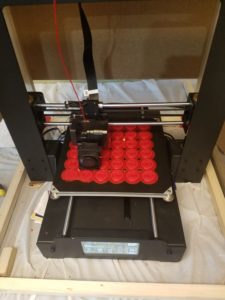
I did a pair of test prints and decided the 1 in. coins would be neat to hand out to everyone at the meet and greet, so at present, I’m printing up 36 of them at once. The raft is finishing up, but there are two spots where I think the coins will be lost. The first little bit of the raft just didn’t stick in that area. If those were solo prints, I’d abort them, but I’m not going to do so at the cost of the others.
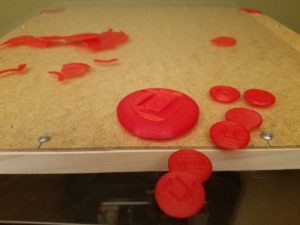
I did what I could and cut away the bumps where the raft didn’t stick correctly. I had to work on the raft while the printer head was in motion (the left and right axis) because the pause feature parked the extruder head right above the damaged sections without a chance to get under them. Update: another layer on the raft brought the bumps back. With the bed moving this layer, I can only hope the defect doesn’t cost the other coins.

***

The printer finished after going all night and into the next afternoon. Three of the coins didn’t turn out well enough to give away. One didn’t even come off the raft at all. It turns out I was rushed in setting up the print. The close, left corner was aligned too low. That’s why the first layer of the raft didn’t stick. But in failure, I learned a little more about the structure of the raft. The outlines serve as a base for the first layer and so on and so forth until you get to the product.

As an extra little stunt, I’m making an extra, 3 in. coin along with a few smaller coins to replace the goofed ones and bring my total good coin count to about 40.

***

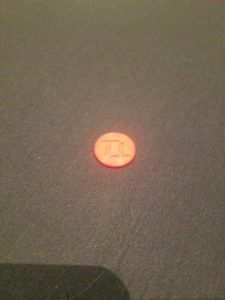
My stunt failed. I think the way I modeled it is to blame. The middle detail between the relief peeled. One of the eight smaller coins didn’t peel from the raft. In the end, I’m taking 42 coins to pass out.
***

I don’t have time to remodel. As a last ditch effort to make a bigger one for Tango, I’m printing up three 1.5 in. coins. *** Nope, they didn’t work. The printer switched to a short infill based layer to finish the dome. That’s why all my big ones and the very first prototype were goofs. Other than that, I would rather both T’s be of equal depth. Something must have gone accidentally right half way when modeling these.

***

The Tango Tokens were a hit. Even though they weren’t perfect, they made for a cool, little souvenir for everyone. If I ever make more, I will want to remodel the coin and fuse all the pieces before they leave Blender. The printer was printing an internal membrane which led to the weak spot. On the other hand, maybe I can label future tokens with the event meetup. When I hold pretty much any 3D printed object to the light, I can see the infill lines. I want to try inserting a label in there to differentiate the production runs.
Final Question: have you ever made custom party favors, if so, what? And what for?

The Prototyping Process

Good Morning from my Robotics Lab! This is Shadow_8472, and today, I’m going over a short, but important side project I did this week. Let’s get started.

So, a few weeks ago, my mother made a request for a simple shirt clip. Using my skills I revived last week, I was able to get a satisfactory one in three prototypes. While learning the modeling software is an important step for me, I do not plan on providing a tutorial myself. When I go back and watch a tutorial, I will give the first lesson a link. What I do want to do is give tips on what I learn on my own.

The basic concept is a circle with a crossbar. I used a torus and a cylinder to model it in Blender. I didn’t have to go searching for the command to combine meshes, I just had to select both before exporting to a .stl file.

When it came time to print, the raft was a circle, probably because only the torus was digitally touching the print bed. My first and second prototypes were made from the same, tiny model; Cura saw Blender’s unitless distance in the .stl file as millimeters when I wanted inches. I learned to reliably scale models to a predictable size. When the second prototype came off the bed (the putty knife had a hard time with the uniform curve of the raft) there was this ridge that touched down to the bed. A few rough spots made it unsuitable for use on a shirt without first sanding it.

The third and current prototype had a model where the cylinder shared a radius with the height of the torus. This created a circle-slash raft, and it didn’t have so many problems with sharp artifacts from its manufacture. I wonder if the second prototype’s ridge on the bottom was an automatic support structure. I’ll need to print something that needs one to find out.

***

I have good news and bad news for myself. The good is that I figured out what the extra ridge on the second prototype was. The bad news is that it was a failed part of the print and not a support structure. I programmed up what looked like a lopsided sphere on a stick and told Cura to print it with and without a support structure. The only difference was that I got a raft with the shadow of the print instead of the contact point of it.

Final Question: I have heard about support structures sometimes being printed out of a different material. Are they ever printed like a raft you can peel off and sand down when needed?

From Blender to the Real World

Good Morning from my Robotics Lab! This is Shadow_8472, and today, I am learning to print a model from Blender. If all goes well, this should be a short post, but even if it isn’t, I should have my suspicions confirmed or refuted about the Z-axis progression. Let’s get started.

OK, so I did play around with Blender a few years ago. This time, I just want to make something simple as a proof of concept. A pyramid. I can set up my phone to take a picture every minute while I’m printing and then graph the progress with respect to time.

I won’t cover the setup and learning curve of Blender; there are a lot of tutorials out there. Just do not try to learn it by trial and error. You’re likely to get washed away with all the buttons and menus. My understanding is that it is NOT beginning user friendly, but at the same time, I understand it is basically the definitive free, open source 3D modeling software. Once you learn the core skills, you can move onto many other fields; like animation, still renders, game graphics, and (in this case) 3D printing.

I’ve had a desire to learn it for games, but I am still to develop my sills there.

***

The 3D printer is once again printing. The filament was a bit more painful to load than I remember. Good thing I didn’t unload it between each one. Anyway, I managed to use an old install of Blender to program up a pyramid to print. I actually took a cube and squished the top face down as far as it could go without actually making it an actual 5 pointed model. It’s close enough to what I need. I had to export it to a .stl file, not save, it.

This is my first print in the new case. Leveling the table was a little tight, but if it keeps the cat out, I can live with it. Anyway, there was a little bit of plastic messing with my leveling procedures. I need to get in the habit of cleaning the extruder tip while it is still warm. I suppose it shouldn’t matter too much. That’s what I think the raft is for, to get the print to a predictable place.

I chose to make a pyramid so I could graph the percent completion with respect to time. That was the hardest part of this week’s project. While I could have just sat there for two hours and recorded the percent every ten minutes, I went ahead and searched for an app to take a picture every one minute.

When I looked for such an app, I was assaulted by apps that offer to take time lapse videos of one sort or another, all these fancy fancy features and social connectivity… NO! I just want something to click the button every 60 sec. and make a separate file I can scroll through, and graph the results.

But I would say the hardest thing was setting up for the recording. I had to charge my phone, and rig a mount for it. Here’s the app I ended up using [Link], Timer Camera by Three Starfish.

My father actually did the bulk of the hardware arrangement. Nothing too fancy; the camcorder and tripod I used on the video posts usually lives at my church where we use it to stream our services on Saturday mornings. We didn’t bring it home this week, and I don’t intend to post these pictures anyway. Simple data collection.

***

I graphed the data. For every photo, I took  It’s almost linear, but there’s an inflection point where it speeds up rapidly after about 40 minutes. If this were simply a transition from raft and base layer to infill layers, that would explain things if it were z axis progression, but the second, faster part seems like it wants to be linear, but I’d need more data points for that. All I can do at this point is rule out percent time taken. I’d need a bigger/higher quality pyramid and a proper video of the progress bar.

Long story short: I took measurements of percent completion (almost) every minute. Now I want the min./sec. each percent is accomplished. It would be interesting to graph other shapes.

Final Question: I’ve eliminated time completed as the possible basis for percent completed. Maybe if I print up two more pyramids side by side (one after the other) that would give me more information. Anyway, What kind of shape would produce a graph that would look different if its completion was in plastic laid or z axis?

Ready for more

Good Morning from my Robotics Lab! This is Shadow_8472, and today, I am sidequesting into the world of drones for my first actual bot. Let’s get started!

I was seriously considering going for the PIXXY platform for what seemed like the longest time. Right now, I don’t know where I stand on what to build. I just want to find something I know I won’t run out of non-printable parts for. PIXXY appears to be a dead platform at second glance as many of the parts listed for it 404 on me. I’m willing to look into alternative parts for the same platform, though.

***

The first penetration attempt into the field was a big let down. Preassembled drones can run cheaper than the electronic goodies needed to build an open source design, and I am not ready to design my own chassis based off a stripped down model, or even a kit. The experience felt a little… bitter, even if it was only over the phone.

On the other hand, getting a preassembled drone would give me a quicker feel for how a drone is supposed to fly.

Another thing to consider: replacing a drone from a factory will cost more if it breaks than printing up a single replacement part. Besides, one of the rules I laid out for myself is to only use free, open source stuff whenever possible.

***

OK, OK, I gave it some more thought, a prearranged kit (not preassembled) wouldn’t be so bad if all the parts are standardized anyway. I would still want to make sure the parts are ones that will fit with whatever drone I decide to print.

***

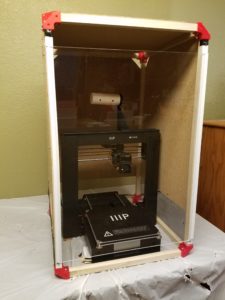
I didn’t seem to come to any substantial conclusions this week, but my father and I did finish the temporary case once and for all. The breathing holes on the sides have window screening stapled to them and we got some cheap J channel to hold the door, which is now a slide up model. Screws hold the rails for the door in place, and a little black duct tape protects the clear panel from further scratches as it slides.

Final Question: If I don’t go with building the Pixxy, what printable model should I go for?

Construction of the 3D Printer Case Part III

Good Morning from my Robotics Lab! This is Shadow_8472, and today, I am finishing my 3D printer’s case. Let’s get started.

Last week, I printed the brackets, and oh, did that thing drone on and on. I’m not looking to print anything else for now, so I finally unloaded the filament and put it away. PLA filament is supposed to be stored in an airtight container, and I am fortunate a gallon Ziploc bag can barely swallow it. One tip I heard when first researching 3D printing before setting the printer up: on the side of the spool, there is a place to feed the filament so it doesn’t tangle while in storage.

Besides the brackets, my father and I are using some cheap wood for the frame and some spare Masonite panels for the siding. The door is being made of an acrylic sheet. Instead of hinges, I’m planning of making it slide out the top.

Construction this time has been much more straightforward than previously. We used a skill saw to cut three six foot pieces of 3/4 in lumber down to size… “Measure twice, cut once.” Good thing we bought extra for stock. Of course, after sending the ‘finished’ pieces back out for a round of quality control on the skill saw, we assembled the frame with the stunted, vertical edges. Those got swapped out after inspection. Had they gone unnoticed, the filament spool would have required accommodation through the roof, defeating the whole point of the project; to keep the cats off the printer.

As stated before, the side panels are fashioned from some Masonite we had occupying garage space. We cut a couple of pieces to form the back, sides, and top of the case. The side and back panels do not reach all the way down. The gap provides access to the power chord, switch, and various ports on the side. The bottom panel is absent; if anything bumps the case, it is isolated from the printer and won’t transfer the shock as readily. The top corners are cut to facilitate ventilation and dodge the corner brackets. The front panel, will be different. My father and I have run out of time this week, but the current plan is to make a panel to slide out the top instead of a hinged door.

Over the course of this project, the materials at hand have not always lent themselves to the exact plan. The hardware store didn’t have appropriate corner brackets, so I ended up printing them. The calculations for the wood for the frame were actually made with the assumption of eight foot pieces, they came in six. It’s only when you look for hinges that you realize just how many choices there are and how many won’t work for you. Roughly nothing about this case is untouched by design revisions.

Final Question: What projects have you adjusted for available materials?

Construction of the 3D Printer Case Part II

This week’s edition is available on my YouTube channel.

Good Morning from my Robotics Lab! This is Shadow_8472, and today, I am printing up the remaining corner brackets for my 3D printer case. Let’s get started.

This week, I decided to explore the different quality settings for my printer’s slicer program, Cura. As I start writing this week’s post, I’m printing out the third of eight corner brackets, each one so far sliced at different quality level. The only obvious difference is the time required to print. As I posted last week, I suspect the raft comes off more easily the higher the print quality, but I’m waiting on drawing final conclusions for now, since the easy raft removals were from .gcode patterns that shipped with the printer and I have no way of knowing what level of quality they were sliced with.

I’m also noticing this webbing stuff across crevices in all three bracket qualities. Judging by the print in progress, I’m guessing the infill is spaced progressively tighter on the higher quality prints, but the official call will wait until I have my final sample. Of note: the printer sounds fairly consistent no matter the printing quality.

***

Progress bars are wonderful estimation tools. The Printer has one. But I don’t think it measures progress in terms of either time or plastic used so far. There are times when it feels like the job is lagging behind schedule as it chugs through big layers only for the progress bar to catch up as it blitzes through smaller, faster layers. I believe the printer is simply measuring percent completion in terms of Z axis progress. Another easily programmable possibility would be to report percentage of the .gcode file executed. But exploring that question should be a topic for another week where I also cover learning the basics of Blender.

With that said, the third bracket just came off the printer. Toward the end, the printer screen dropped the print job monitor in favor of the main menu. What’s going on with that? End of .gcode file? I’ll need to keep that quirk under observation in the future.

***

The webbing seems to be about the same density and strand size no matter what quality I print on. The brackets each weigh in at .7 oz; if they differ at all, I don’t have a precise enough scale to tell. The rafts from high and normal quality jobs came off cleanly within seconds by hand, but the low quality raft split on removal, requiring additional cleanup later. The webs will also require some tools to extract, but the toughest thing about them is the tricky angle for fingers. The infill on the high and normal settings is the same, but the fast print is only 2/5 as frequent. Interestingly, the sides of the normal bracket and not the low quality one, are the roughest. Ironically the top tips of the corners of the “high” quality print didn’t stick correctly and broke off. In conclusion: I’m going to use the normal setting for the remaining brackets.

***

I messed around in Cura some more and I started printing the next two brackets at once. I wonder what the overall quality difference will be. The extruder tip is alternating brackets, laying a layer down on one then the other. It takes a little longer, but combining jobs saves time on resetting the printer. I can only guess that there will be a bunch of webbing connecting these print bed twins.

All the rafts for these brackets so far are triangular, but on all the normal prints, and only on the normal prints, one or two corners of the raft get omitted, including each of the twins. Messing with Cura again, I found the size controls to make objects bigger or smaller. Those get left alone for now.

***

The twin brackets are almost done. They do indeed have a bit of webbing between them, but it isn’t so bad. I’m not sure, but there might be less self webbing per bracket than any of the singles. I’ll need to run many more print cycles to know for sure.

***

Filming for this week’s presentation was riddled with challenges. I tried filming the twins, but I quickly ran out of storage on the camera. Bracket number six was printed on low quality so the camera could swallow filming it  from start to finish. Unfortunately, the sun went down and the lights inside were off, so that take was botched due to low light at the end. The raft didn’t peel nicely either, instead it royally fractured along where bracket met raft. I ended up bumping the quality on the camera down a level to capture the single, normal-quality bracket number seven being printed. After this one is done, I’ll have one more to print up before next week’s topic where I finish the printer case.

***

Final Question: Do you know a lot about 3D printing? What’s going on with all these plastic fibers?

Construction of the 3D Printer Case Part I

Good Morning from my Robotics Lab! This is Shadow_8472, and today, I am printing out the corner brackets of the anti-cat case for my 3D printer. Let’s get started.

The best projects are those that build upto higher existing goals. This week is printing files from online. The Cura software my 3D printer came with is apparently what is known as a slicer. From my research, you can model up any 3d object with as much precision as the limitations of your computer will let you. But in the end, the 3D printer can only print so small. A slicer translates a 3D object file of pure mathematics into a set of instructions for the printer to follow. For the purposes of this blog, Cura is a software extension of my printer.

There are two ways to get the sliced pattern to the printer. SD card, or USB cable. I don’t have enough USB extensions to reach the printer, so I’m operating on SD card right now. I only have one USB card reader on a modern machine, but I remembered one of our old computers in the garage having a multi-card reader. I extracted the module, but quickly learned there weren’t any appropriate internal connectors. The old computer in question was using PATA cables, which look like ribbons instead of the more wire shaped SATA cables of more recent years. Maybe in the future, I’ll see if soldering something up is an option.

I used the rest of my sample filament to print up a potential bracket to hold my 3D printer case. I knew I’d run out before the printer finished, but the sample produced was enough to know a finished version, even one scaled up to be big enough wouldn’t work. Of note, I told Cura to do a fast job on the piece, and I had a harder time separating the raft from the bracket. I’m going to do some more experimentation when I print up the upper corners. The regular print speed is estimated at 6+ hours and the fast at about 3+. Expect the full results next week.

The part I am printing for this project can be found here. The linked page provides the download and says it’s in what’s known as Creative Commons. While I don’t know exactly what that means, I understand it to mean the file creator gives permission to anyone to use their part for whatever purpose without royalties, even if it is part of your product you sell.

***

I have started the first corner, on fast, and it should take between 3 and 3.5 hours. I opened up my first full spool of filament. Setting up this job took longer than expected. First of all, the 1KG spool didn’t fit on the spool rack, so my father and I had to improvise a wide enough one. A more permanent fix may involve printing up a part to fit correctly.

I also had trouble loading the new filament. The instructions said to cut an inch off at an angle, and I did, but it kept having trouble grabbing it. The last, little bit  of the white sample filament was still in there, so I set it up and told it to go. The thing started printing a ghost raft.

The filament wasn’t loaded properly. I tried preheating and loading a few times, but I told it to load, it kept making a clicking noise like it couldn’t grab the end. I had to cut it again at a steeper angle before the machine took it. The extruder oozed a white string that turned red as it went. I was secretly hoping to have the color change happen on the raft for the bracket, but seeing it working correctly was also good. In pulling the tangle away, the hot plastic formed a fine thread, as fine as human hair, though it didn’t feel as strong.

***

Half done, and no major problems remaining so far. I am noticing a bunch of places where the filament is forming like a web in places where it isn’t required. My guess is that’s the fast mode complaining a little. I’ll have to clean the visible ones out. I’m also not getting the Forbidden Planet feeling like before. Either I’m getting used to the sound of the printer or it’s the fast mode. Maybe I’ll print up one on each setting and compare them side by side. Weight, Raft separation, and print time should come into play. I should also take note which corner is which in the case one of them cracks while the case is being assembled or later during use.

Of note, some of my first builds seemed to have some stuff printed into them. I wonder if some stuff from my hands got onto the sample filament and the printer passed it.

***

The print job finished. I’m going to leave the raft on until I have the “normal” and “high” quality prints of the same job done. Final Question: I had to ward my cat off of my printer part way through. Have you ever had a pet almost hurt themselves on a hobby project?