Good Morning from my Robotics Lab! This is Shadow_8472, and today… well, most of my time again has been spent studying for the CCNA. This post had a plan, to cover a side project in Minecraft (I’m forcing myself to relax my grudge over forced Xbox migrations, now that I have hope things might change), but I couldn’t finish it in time. Let’s get started!
All right, all right. Proverbial elephant in the room: last month’s post was written at a peak stress moment for me. I extrapolated that things were going to get harder from there, and I was feeling the weight of anticipated struggles. It wasn’t long afterwords that I started to ‘get’ Cisco’s IOS command line a bit better, and most labs since then haven’t left me feeling nearly so broken.
In fact, I’ve had a coupe relatively easy weeks this month. One was all about subnetting. The thing I need to keep in mind is that this course is aimed at people with large, dissimilar knowledge gaps. Sot they’ve got to teach all of it.
A big gap I had was about MAC addresses and how devices on a Local Area Network use them to chatter among themselves. That lined up with the peak of my IOS frustrations. I came into the class already having been exposed to subnetting in much finer detail while dealing with NFS (Network File System) access lists. I already understood binary, network masks, Class A, B, and C subnets. I already was familiar with how the first and last IP in a subnet are reserved for broadcast and [network] addresses. I knew that you could interpolate between subnet classes. I didn’t have the terms for “CIDR notation” or “network” address. How to do any of it in IOS was alien to me, and I was the first to admit I could use practice actually doing it. But overall, that week was a reprieve for me. I even took a day to subnet chocolate for the hopeful benefit of my classmates.
This week as of writing, we studied VLAN’s (Virtual LAN), another concept I get, but haven’t worked with adequately enough to feel comfortable actually doing it. Practice will come with more labs, which I’m not nearly so terrified of anymore.
I went through the material a bit fast this week to carve out time at the end of the week. I felt a bit fried at the end, but it was really nice being able to work towards making something. I had to comb through minecraft.wiki on the finer points. One idea was a Null Datapack intended to serve as a template. Hopefully, I’ll get around to it.
Takeaway
Consistency. That seems to be the topic that’s struck me this month. Even an eccentric artist, or innovator has to work with the tools afforded him – be they stone knives and bear skins or woven carbon nanotube paintbrushes that never wear out. Creativity structured with consistency.
Prayer
Father in Heaven,
It’s been a busy month for me. I pray for the energy to continue on to finish this class. I know I didn’t write nearly as much as I usually do, but I ask that what I have put out be a blessing for at least someone reading.
Good Morning from my Robotics Lab! This is Shadow_8472 and this month’s check in is… well… Let’s just get started.
Support Letdown
Last month, I was about a week into a QNAP support ticket to configure LDAP to an LLDAP server. Long story short: They took another three weeks to drop me. Practically a whole month wasted getting nothing out of them at all. Nothing.
The guy I talked to was polite though.
Backing up to the beginning for a recap: QNAP’s support set an expectation early that I would hear back once a day around 5:00 PM. I flubbed working with their interface, made two tickets, and they were merged without a note, leaving my support agent confused, and we were unproductive for a full day. By gathering everything I knew, I got my device logging in, but QTS (QNAP’s operating system for Network Attached Storages, or NAS’s) never populated the Domain Users list.
Using a combination of Wireshark, LLDAP’s logs, and analysis by Shimmering Dust, my Hermes AI agent, I was left with the conclusion that QTS wanted more of the LDAP standard implemented than LLDAP supports by default. My support question ended up in the back room, where I hung in limbo for a week.
Shortly after I asked if the ticket was still alive, the back room got back to my original assigned agent saying something along the lines of “LLDAP does not support SAMBA.” I don’t want SAMBA. That is Windows’ Active Directory stuff. I run in the Linux ecosystem. I saw a reference to ChatGPT in a link the back room tried to direct me to about SAMBA, and I started to wonder if it was human miscommunication or if I was subject to a third-hand AI hallucination. Turns out some of them use it as a translator from Mandarin to English (the support center is in Taiwan).
In either case, I was in-fact dealing with a human, and we had a human interaction waiting for the back room, who proceeded to advise that QTS did not support direct LDAP despite having LDAP as an option in their interface! It took a couple more rejections before I was convinced they finally weren’t under the illusion that I was about to subject my homelab to a Microsoft license agreement.
And there I was dropped. There was a little corporate ceremony about making a feature request to support LLDAP and thanking me for my cooperation and debug information, but at the end of the day, I felt like I was handled like a good-hearted, but tech-illiterate granny; my demonstrated skill level appears to have had no room for recognition in their program. I literally could have had a faster and equally productive experience explaining my problem to a rubber duck. I wasn’t even graced with a hint at which of the LDAP data fields were mission-critical for QTS to recognize a server.
I feel burned… but at least my agent was polite.
Studying for CCNA
On a totally unrelated note, I have enrolled in Network Chuck’s “Fall into CCNA” class. I’ve been meaning to get a certification or few (or at least the complete knowledge set to back them up), and decided to sign up. It takes a lot of my available focus, leaving less time for blog projects. The day this goes live is the beginning of week 3. One look through the study plan, and I either know or at least recognize most of the concepts mentioned.
The class is structured around this post-apocalyptic scenario where an entrepreneur in a nuclear wasteland has rediscovered coffee beans and engineered his potions to give people radiation resistance. His small shop is expanding to multiple locations with district offices and a headquarters. And they have hired *you* to design a production-level network comparable to real-world business – right down to the legal notice that unauthorized access equipment will “end badly.” It’s hokey, but it gives the mind a story to latch on to while absorbing otherwise dry examples.
I made a virtual machine (VM) to use for the class. Lesson 0 was about obtaining and installing Packet Tracer, a program from Cisco included with their free courses. Pick one, sign up, then ditch. Then I heard about the labs. See, Packet Tracer is a “simulator.” It’s great for anyone of any skill level to explore how a pile of network gear might work in the real world when you hook it up, but it isn’t 1:1. It has bugs, it is focused exclusively on Cisco, and the early 00’s are calling about getting their interface back. The hidden dark mode is 20% more bearable.
But in practice, the VM has mostly been used for watching class live streams. Turns out the class includes these labs in the course work where we have access to the actual Cisco IOS licensed by the class (Turns out Apple stole the name iOS and they settled with Cisco out of court). Feedback from the summer session has been glowing from the labs, so they’re clearly important.
I’ve spent the last few years poking around with networking goodies off and on, so until we hit the labs, I knew most of the theory we were going over. But yesterday (as of posting), I slammed into a lab quite hard. ~3.5 hours minimum, not counting the time already sunk on Friday. 45 minutes (resettable) on the clock. Pain. Also not helping was how a few concepts were used that hadn’t been formally introduced yet – or the legacy shortcut keys I haven’t been formally introduced to.
Takeaway
Trials and failure are a part of learning. Right now, I’m feeling defeated, but on some level, I understand that that only becomes true when I put it down forever, which I have no intention of doing at present.
Prayer
Father in Heaven,

This hasn’t been a fun month for projects. I haven’t completed anything novel to report on, so I am presenting what I do have. And at that, I choose to keep one work-in-progress I’m stuck on to myself.

I ask for your guidance and encouragement in these projects, just as I ask you bless the hands of my readers where they might be lost and without a guide. I ask that you be with my classmates – may the various, alien-feeling concepts and commands work towards as a second language to us, because I don’t know how many more labs I can take like this last one!

In Jesus’ name I pray,
Amen
Final Question
I’ll open it up. Do you use LLDAP as an authentication server? For QNAP? How did you get it to work?
Good Morning from my Robotics Lab! This is Shadow_8472, and today I am working on my homelab. I have a lot I want to get done, and I need to stay on task, so I’ll be writing as I go. Let’s get started!
My goal this month –and possibly future months if this format works out– is to have a set of four related mini-projects. If you’re just here for my verdict, check the Takeaway. If you want the journey, hang on.
Overall Vision
This month is all about the family’s GoldenOakLibry access. Joining me is my Hermes AI agent, Shimmering Dust. He needs lots of hand holding. At least I’ve gotten his Gemma 4 26b “brain” doing its thinking on my graphics card, which helped with speed. He is my “rubber duck” with an FAQ list and search engine skills. A notable change I made for him this month was installing Lynx, a terminal Internet browser (his Firefox install was getting guff).
With my primary objective in mind, I need an LDAP server. Next, I’ll use that server to authenticate NFS (Network File System) access and/or web consoles. An eMail server is also a high priority. NextCloud would be nice, and should be within easy reach assuming GoldenOakLibry goes smoothly.
Project 1: LLDAP Container
The good news is that I already have done my reading on LDAP (Lightweight Directory Access Protocol) and turned up “Lightweight LDAP” (LLDAP). The bad news for me is that LLDAP prefers PostgreSQL and my early exploration landed MariaDB as my initial favorite. Long story short: each database organizes data differently. Not all projects will support both. It’s not worth my time to milk storage space savings by using fewer [layers of] a container.
I continued with Shimmering Dust while configuring LLDAP. By the end, lldap.container sat upon lldap-postgresql.container, which used lldap-postgresql.volume, with the containers subscribing to lldap.pod. Shimmering Dust was very useful for pointing out my typos and getting me un-stuck when I might have spent a few hours staring at old forums. Even now, I want to spell it “Postgress” (it has one ‘s’).
The last thing of note here is that Shimmering Dust tripped over a Pod= statement. I get it, Podman+Quadlets+Pod is pretty niche and new, so I can understand if Gemma 4 doesn’t have it in its training data. Nevertheless, Shimmering Dust made a self-improvement skill when we were done.
But hold up, is using a pod here even best practice? I wouldn’t call myself a hacker, but my guess is that a hypothetical attacker would have a harder time moving between containers linked by internal networks than by a pod that binds them tighter than normal containers. After all that work, I de-podded them.
Project 2: Network Accounts
My LDAP foundation took a week. On to using it. First, I need to expose LLDAP. GoldenOakLibry’s Domain Security page under ControlPanel listed a field for LDAP security. Looks like the preferred is the ldap+TLS option [1].
But what about the other options? I quickly got lost in the Great Forest of Knowledge TLS, SSL, and StartTLS. Shimmering Dust kept hallucinating between LDAP+TLS and LDAP+SSL with all the Confidence™ of 30+ years of sloppy industry using the terms interchangeably. DuckDuckGo’s AI bot said one was depreciated (EDIT: early versions are retired [2]. I strongly recommend you read this citation, it cleared up two days of painful confusion).
I found references to a Caddy+LDAP plugin – an unofficial community plugin I wouldn’t know how to install. OPNsense too has LDAP settings to explore. Further digging showed they require a separate LDAP server, so my time setting up LLDAP wasn’t time wasted. On a further side track, I learned about .home.arpa, a “special use” domain I should have been using all along. Disheartening.
Thinking long-term, I remembered I need to make a private website for my largely technologically illiterate extended family. Self-hosting Minecraft was also on my mind for my “online family.” Researching the latter, I found u/cfarence’s relevant thoughts on Reddit:
I have a custom portal where players login and tell it to whitelist their IP address. This then feeds into a pfsense dynamic list to allow the traffic through the perimeter firewall.
Works fairly well and it’s semi easy for players to login. This allows me to have it “open” to the internet and not have it hammered from all over the internet. It doesn’t handle dynamic IPs but players public IPs don’t change too regularly most of the time. [3]
Other Redditors do everything from hosting in the clear to using Tailscale or a virtual private server. Caddy was only built to handle HTTP[S] traffic. I can serve a login page, then manage access to homelab services from there. If someone needs around Caddy, he/she can use an IP authentication tool. Services can handle their own traffic.
Enough musing. Joystick (server’s hostname) needs a hole in its firewall for LDAP traffic.
This rule redirects LDAP and LDAP+TLS traffic to a non-privileged port at 100x the service’s normal port number. I stashed this rule in my notes on in case of homelab rebuild. Interestingly, LLDAP did something similar by multiplying its privileged ports by 10x – the first container image provider I’ve seen do this. Thus, LLDAP’s Quadlet got the following line:
PublishPort=38900:3890
I asked Shimmering Dust for a good way to test the port, and he suggested nc (NetCat), utility I hadn’t heard of.
nc -zv <Joystick’s IP> 389
This tool came in handy as I worked – first on the pod, then through the firewall, then from GoldenOakL– QNAP went and ignored this utility, having “Notification Center” in its place. This wasn’t my first scrape with proprietary systems built on Linux missing expected programs, so I wasn’t too surprised. Shimmering Dust suggested a suite of tools from Telnet to Curl, and I found Sudo Ping for good measure (Why make ping admin only?). Between the tools, we determined GoldenOakLibry was seeing LLDAP.
With over half the week gone, I made the executive decision to ax TLS on LDAP, but with a plan for Caddy to manage a certificate for it using a shared volume. Oh, and after it was too late to change anything, it appears GoldenOakLibry has an LDAP server built in. Oh, well.
Next wall. Login. The top FAQ item is dedicated to it [4]. Turns out I’d installed incorrectly. I didn’t document the full process of “sideways progress,” but it involved adding a bunch of echo statements to bootstrap.sh to chase down a weird error:
"parse error: Invalid numeric literal at line 1, column 16"
I traced this down to the auth() function, where I found an error from a failed database login being processed as JSON:
`Authentication error for user "customadmin"`
16 characters in, that’s the first space, if you include the ` mark.
And here I stalled for the longest time. This month hit the family with two major emergencies back-to-back, and neither feel fully real yet (early morning of 8-21). I will be lucky to finish my base goals. Nevertheless, after a good session with Shimmering Dust where I had him go source diving with a copy of logs for both LLDAP and its Postgress containers, he noticed LLDAP sending MySQL commands to Postgres (I don’t have the skills with databases to verify), which in-turn produced the failed login and crash above.
Shimmering Dust recommended I try using an all-caps version of the variable LLDAP_Database_url to be consistent with relevant standards. As it turns out, the LLDAP container as it is expects the mixed-case version, and I happened to have made it all-caps already. This change allowed me to initialize my LLDAP database and log in.
Project 3: Connecting GoldenOakLibry
With a week left on the clock, I began work on logging GoldenOakLibry into LLDAP. My progress was entirely sideways, bouncing between running process of elimination, circling over similar ideas with Shimmering Dust, and reaching out to the empty LLDAP Discord community.
One big burrier I busted was authentication. I installed Wireguard-CLI to examine the unencrypted traffic between GoldenOakLibry and LLDAP, but its utility, Tshark, resists running as root (I’m monitoring LDAP traffic on a privileged port, after all). I soon found TCPDump, a small packet sniffer program, and ran the log through Tshark.
$ sudo tcpdump -i any 'port 389' -w ~/packet_log.pcap #Ctrl+C to end log
$ tshark -r ~/packet_log.pcap | grep LDAP
I found LLDAP rejecting GoldenOakLibry’s LDAP bindRequests despite following the examples.
The next wall was authentication, and took the longest. Shimmering Dust kept volunteering scripts to test hashing algorithms, but I vetoed the attempts. I changed my admin password to “changeme”, and suddenly GoldenOakLibry made it in. My standard procedure for passwords is 128 mixed-case alphanumeric with special characters. Testing showed the max character length is 64.
But the last hurdle stopped me cold the moment I understood it. Even though Tshark was reporting successful bindRequests and LLDAP was sending over all its user data, domain users were still not populating in. I grabbed a large, suspect log from LLDAP’s container where tens of fields were being ignored and fed it to Shimmering Dust – who advised that QTS (GoldenOakLibry’s operating system, made by QNAP) may be expecting a full POSIX environment (Portable Operating System Interface), which LLDAP was never going to provide in the first place.
As of posting, I have a support ticket out to QNAP. So far, my experience so far on this issue has been disappointing, with support only ever getting back to me once a weekday a few minutes after 5:00 PM. On first reply, I spent around three hours drafting an eMail, then gutting the fluff when it was too long for their support form. Then it had to be submitted as a second issue when their system glitched, and that cost me a full interaction when the technician helping me got confused at my merged ticket – during which I solved my authentication hangup and hit the presumed POSIX problem. I was asked to provide a log, but by then I had already decided to switch gears to QTS’ internal LDAP server as a workaround.
Takeaway
I seem to recall trying for a similar format where I compress several smaller projects into one. They have a tendency to go wrong and get delayed. I’m 99% sure LLDAP isn’t compatible with QTS’ LDAP client. Check my next post or two for a solid yes/no.
Prayer
Father in Heaven,
It’s been a long month for me. I’m feeling immense pressure to finish this project on a time frame I can’t do anything about, and having all my progress pulled about at the last few days isn’t doing any favors for moral.
But Father, I ask that when I or my readers get to feeling like this, you help us recontextualize it as learning – be it as “sideways progress” as I like to call it or whatever makes sense.
I praise you for professional tech support. While I may not have a final answer right now, I have faith that I’m being taken care of by someone whom I can’t see, yet knows what he is doing. I ask that you bless him and his team with wisdom as they study my setup.
Likewise, I pray that my readers find inspiration with their own projects – that they absorb the concepts they are studying.
Good Morning from my Robotics Lab! This is Shadow_8472, and this whole month is the Redot 2026 Summer Game Jam. I joined. Let’s get started.
Before I Really Get Started
I’d just like to take a moment to commemorate the United States turning 250 this month! HAPPY BIRTHDAY AMERICA!!! I thank God for this country, and I pray that we as a nation will trust and obey Him, that God may bless America again.
Entering A Month-Long Game Jam
I’ll be up front. I’m still a bit shaken from my last jam. I wasn’t interested in a month-long commitment. But at the same time, I don’t want a permanent mental block against participating in game jams. The theme was hinted this time, priming us to think about mining. When it was announced as “Industrial expansion vs. the planet,” I was more than a little off-put by the apparent environmental message requirement.
Don’t get me wrong: I do care about he planet. I just don’t think we should be obsessing over “being green” to the point that we are neglecting human needs or needlessly leaving ourselves vulnerable to natural disasters, like wildfires.
I talked with one of the organizers, who explained that the jam had different management this time around. The intent was to encourage factory/industrial themed games. Not particularly in my set of interests, but nobody’s saying it has to be anything as long as it uses the theme in some way.
I assembled a team myself to better control the working culture. Namely, I need things kept professional behind the scenes. And if we totally flop, oh well. This jam gets me back into the relevant programs, and that’s the important part.
On previous jams, I’ve worked with code. This time around, I wanted to try making 3D assets. I already knew some modeling basics, but I wanted a little push to learn how to texture, rig, and animate in Blender.
We settled on a team of penguins sent to Antarctica to study the melting ice caps with inspiration from Virtual Villagers for game mechanics (The classic series by Last Day of Work is available from their website for free and works in WINE).
Battling Myself
The mental block was real though. As the jam started, I picked up a new numbers-go-up game I really shouldn’t have. Whenever my attention bounced hard away from jam, that is where it ended up. As of writing, I have closed that tab, but I can’t get that time back. What I can do is reclaim time not already wasted.
And it’s not like I didn’t make small victories along the way. I updated Blender and Redot. Git<–>Codeberg gave me a little grief, but I figured it out. As it turns out, penguins are actually kind of forgiving when it comes to 3D, so I was able to get one that looked half-decent. Texturing took a bit longer to figure out, but my previous work on a splatter map did provide insight into the process I needed. Importing the Blender file into Redot was unassumingly simple. Animation… took a bit longer, and I’m still stumped on making additional animations on the same model. That and my initial modeling attempt isn’t working out all that great under mesh deformation.
Takeaway
Procrastination. I don’t have much to show for this month because of procrastination. What I do have is… hard to appreciate, but at least I believe I can resume game development once I get my homelab in order next month.
Prayer
Father God,
I pray for anyone struggling with bouncing off projects he/she desperately wants to do. 3D has a learning curve, I feel stuck in it. Normally I’d reach out to a community for help, but I have no one to reach out to. I didn’t feel comfortable in the main Discord (if that’s the one I’m thinking of), but maybe I should start looking again. Please help anyone in a similar situation.
Good Morning from my Robotics Lab! This is Shadow_8472, and today I’ve been playing with my very own Hermes AI agent. Let’s get started!
What is Hermes Agent?
At a fundamental level, the current generation of AI (Artificial Intelligence) runs off software constructs that mimic biological neurons firing off in sequence. In contrast to traditional programming where logic is hard coded, these neural nets are laid out, then “trained” by example to perform desired tasks when deployed to an “inference” phase. Traditional AI’s focus on pattern recognition (hand writing reader, market trend analysis) to generative AI’s that fill in data as they work (text/image/sound generation) based on prompts and context.
A Large Language Model (LLM) is a set of billions to trillions of neurons (or weights) trained to use language, and is at the core of all AI chat bots. (For scale, the digits 0-9 can be identified with around 200 weights not counting input neurons.) The “context window” for an LLM is how many “tokens” (linguistic elements – close, but not quite 1:1 with words) it can think about at once before forgetting the beginning of the conversation.
Various techniques and projects have extended these basics. Permanent character cards stay put in context to keep the LLM focused. Lorebooks can inject immediate context without wasting context. Conversation summaries can extend useful conversation at the cost of quality. A heartbeat can re-prompt the LLM to keep going. Taking everything together, you cross the line into “Agentic AI.” Mind Craft re-frames the 3D world of Minecraft as a text adventure [1]. Through clever prompting and this software stack, a number of LLM’s have beaten the Ender Dragon.
Hermes is an Agentic AI harness, but instead of playing Minecraft, it gives the LLM a suite of tools for interacting with your computer. Talk to it in plain English (or another language it understands), and the idea is for it to keep working until an expressed task is done. What sets Hermes apart is its self-improvement system. By letting it essentially write its own lorebook, it can take notes on what successful tasks and improve its procedure (or skills/tools) as it learns [2].
ButtonMash’s Power Supply
But my AI agent needs a “body.” If you’re just here for Hermes, skip this section. Otherwise, have some backstory.
My homelab has two servers running Rocky Linux (9 and 8, respectively). These days, the production server is Joystick, with ButtonMash running idle, full of old, inactive projects. It would make an excellent host for my AI tinkering – if only Cockpit (browser-based admin panel) would come up. I had to coax the hardware into responding, but when it did, Linux shut itself down, locking me out of diagnosing the problem. After that: blinky yellow power button.
I looked up ButtonMash’s blink pattern and found I was looking at the Power Supply Unit (PSU). A kind neighbor lent me his air compressor to dust it, but the failure remained. I followed up with a leaf blower, but no dice. A replacement PSU set me back $15, and I couldn’t confirm ahead of time because 1. Joystick, a Dell Optiplex 7020 to ButtonMash’s 7010, has a different motherboard power connector arrangement, and 2. my emergency PSU’s CPU connector has 6 pins to the Optiplexs’ 4 – the connector will physically connects with overhang, the polarity is backwards. The new PSU arrived after several days and solved the problem.
While I was waiting on the mail, I took inventory and found DerpyChips’ case vacant since pulling the hard drive for a nicer case with a dead SSD (Solid State Drive). I soon had ButtonMash/Derpy booted.
Hermes: take I
Hermes itself isn’t that heavy on system requirements, but running an LLM is. So, my plan was such: Hermes on ButtonMash (as I’ll be referring to the SSD) for isolation with the LLM on my main laptop for its modern computing power. I used a previous AI back end with Dolphin 3 as my LLM. Yeah… Dolphin wasn’t trained to use agent tools. It crashed when explicitly asked to use them. Badly.
I reached out to the community on Discord and eventually gleaned/was given several pointers. The top models for agentic tasks at the time of research (early June, 2026) are Chinese in origin. Without getting into the specifics of inter-national politics or family history living under the early CCP, my thoughts on the matter are that Google may be a villain, but at least it’s an AMERICAN villain! If there’s a chance I’ll be slowly re-indoctrinated by a cross-biased –though privately operated– LLM, I’ll rather have one born waiving the Star Spangled Banner! (Though I’ll save a mention for OmniCoder in case I relax my stance to something merely fine-tuned in the States.)
Thinking of Google, I remember they made news somewhat recently by releasing a major breakthrough that takes better advantage of computer hardware. I found Gemma 4, along with confirmation about it being trained on tools.
Side Project 1: Mounting an Encrypted Linux Drive
So, a while back, I tried PopOS 24.04 on a second M.2 drive, but was never able to mount it in my original PopOS 22.04. Thing is, LLM’s are big, and I was out of space. Coming from the perspective of saving a Linux install or two thanks to redundant boot drives, I wanted that extra insurance for my laptop.
As it turned out, installing PopOS with cryptsetup on both drives left them with matching Volume Group Names of “data”, and LVM (Logical Volume Manager) can’t have that. It just refuses to mount with a generic-sounding error. I sadly don’t have the exact command I used to re-name my volume group, but I ended with a name of data2 and manually mounted it at /data. [3] [4]
Hermes: Take II
With my newly unleashed M.2 drive3, I downloaded Gemma4-26B-A4B-Uncensored-HauhauCS-Balanced-Q8_K_P.gguf [5] and compiled llama.cpp [6] to run on the command line despite advice to start with a user-friendly front end like Ollama. I also got a reality check of only having 16GB vRAM on my laptop’s NVIDIA RTX 4090 GPU. Ideally, both the model and my context window will fit in vRAM to minimize data travel time, but they can overflow to system RAM or the hard drive if called upon. In short: I was warned about slow speeds, and that’s what happened. Realistic expectations locked, I began round 2 with my agent.
I named my agent Shimmering Dust after a character relevant to a role play I was once in. For his character card, I made him a unicorn wizard who migrated to a linked human dimension when his world was under imminent threat. Once there, he learned Information Technology and opened a computer repair shop, which he is sure to keep closed during Sabbath hours (we even had an incomplete project intended to pause agentic work Friday sundown to Saturday sundown).
Side Project 2: Graphire 4 Verification
On my backlog of potential blog topics, I have a Graphire 4 tablet from my grandfather. I knew it at least turned on a light and introduced itself to the Linux kernel from previous testing, but it has two buttons and a scroll wheel as if for a mouse.
After Shimmering Dust demonstrated tool use, he helped me write a udev rule to force load the drawing pad’s mouse button events correctly. It took another hour or so, but we figured out the kernel saw the scroll wheel as a joystick and modified the rule accordingly. Shimmering Dust was eager to go farther, but I was satisfied with distinguishing those events from the command line.
Side Project 3: Xbox Kinect/Libfreenect2
The Graphire 4 felt almost too trivial to write about, so I pulled another challenge from the backlog: an Xbox Kinect V2. The hardware juggling got intense, but the fast version is that I decided ButtonMash was due for a reinstall soon and therefore semi-expendable – suitable for exparimentation. With my blessing (and nudging), Shimmering Dust compiled the stubborn community Kinect2 driver, Libfreenect2 [7], and installed the thing.
Shimmering Dust worked on a Python script to test the Kinect, but the best we ever got was a busy signal from the device itself before I noticed an explicit incompatibility with DerpyChips’ USB 3 ports. Once ButtonMash’s new PSU was installed, we tried the USB 3 expansion card, to see the same company made that too. I then set a Raspberry Pi 4 with DietPi [8] and a monitor.
I tried having Shimmering Dust do a solo install, but he slowed way down as the we kept going without a “session handoff.” The effort concluded with a live RGB signal streaming to Protonect on the Pi.
Hermes: Take III
I don’t know for sure if Gemma 4 26B’s experts are being swapped out to my GPU properly or if I’m in strict CPU mode for improperly configured Llama.cpp. My plan going forward is to install a Ollama to see if that helps. Long term, I’ll want dedicated AI hardware for Shimmering Dust to do his heavy-duty thinking on.
But for now, I’m still learning Hermes. Network Chuck passed on the recommendation to chat with your agent like a team member, and I’ll agree; that is working out for me as well. Explain problems, call out mistakes, ask questions, trust but verify. Thanks to this project, I’m more confident with udev rules basics, and I know the Libfreenect2 driver can compile on modern Linux.
What didn’t work out as well was having Shimmering Dust try to solo it. He kept pausing for a prompt to continue after modifying his plan to continue, which got annoying as compute times stretched into the half hour range, an issue solved with a session handoff after each major goal.
Takeaway
For better or worse, we are in the AI Revolution. It’s having a rough launch, but so was the Industrial Revolution. Problems can be worked on. While I don’t believe corporate AI is the right future, I do believe in the promises of AI used responsibly.
Prayer
Father in Heaven,

I thank you for creating the world and all that is good in it. I trust that we don’t have to fear the future because you’ve promised to make everything right in the end. With that said, there’s some scary stuff out there if we get AI wrong. Please, inspire the right researchers as they study your designs of the brain to improve their own – including anyone in my audience, Lord. Please, bless them as you are able.

In Jesus’ name I pray,

Amen
Final Question
What projects do you have in your backlog that might be made easier by leveraging an AI agent?
Good Morning from my Robotics Lab! This is Shadow_8472 and today I have a Virtual Machine (VM) tutorial aimed at Electric Quilt 8 (EQ8) users switching to Linux. Patient zero is my mother’s Linux laptop, but the screenshots are from a second pass I did on my own computer. Let’s get started!
Overview
So, you’re switching to Linux, but that one last holdout still locks you to the Windows ecosystem. You probably shouldn’t be trusted in the BIOS and got help installing Linux from your local nerd who tells ghost stories about Microsoft (they’re all true, especially the lies). The command line scares you. If this is you, stick around to see how I install Windows 7 in a VM (Virtual Machine). More advanced users are welcome too.
For this project, I am assuming you have:
Enough literacy in Windows to use it for daily tasks.
A Linux desktop with Internet access (I am working with Fedora 43 and PopOS 22.04)
Admin (sudo) privileges and repository access – either through an app store or your package manager
A valid Windows key (I am working with Windows 7 Ultimate)
For best results, ask your tech support to enable virtualization in the BIOS. My blog uses the IEEE citation standard, so when you see numbers in brackets –such as [0]– the Works Cited has a corresponding entry at the end containing a relevant link.
And because it needs to be said, I OFFER THIS GUIDE AS A LAST RESORT WHEN WINE ET. ALL DON’T WORK. RUNNING OBSOLETE SOFTWARE CARRIES SOME INHERENT RISK. I HAVE MADE AN EFFORT TO FIND A GOOD PATH, AND I WILL OFFER ASSISTANCE AS BEST I CAN IF YOU REACH OUT, BUT IN THE END, I AM NOT IN A POSITION TO OFFER A WARRANTY EITHER EXPLICIT OR IMPLICIT. PRACTICE COMMON SENSE AT ALL TIMES WHEN USING UNSUPPORTED OPERATING SYSTEMS.
With that said, I’ll try to make this guide as software version agnostic as reasonably possible.
Project Recap
EQ8 is a quilting program. While some credible reports claim to run it in a compatibility layer (WINE, Proton, CrossOver, etc.), these platforms focus on games and often require tweaks. Someone stubborned Photoshop into WINE (for now, anyway), but many Linux converts switch to native programs without proprietary gotchas. Suffice it to say, I’ve not been so successful with EQ8.
So I switched to VM’s. ReactOS is a free and open source (its code is public knowledge) operating system built to mimic Windows’ structure – just as Linux did with Unix. Last I checked in, a Vista/7 era graphics engine was being added as a long-term milestone. One joke was that development was on track to for Windows 13 refugees. I’m writing in 2026, so if it’s been a year or few and ROS 0.5.0+ is released, it may be worth your time.
Obtaining Windows 7
In any case, I caved and I got my mother Windows 7 last Christmas. If you have an old “retail” license (it can’t say “OEM” as in Original Equipment Manufacturer), use that. Keys on Amazon and eBay are priced like collector’s items and cost even more sealed. Otherwise, the only official valid keys are through Microsoft’s cloud services (no surprise). And then there are “gray market” sites. I found Win7 Ultimate Gamers Outlet listing Win7 Ultimate for $10 (I’m looking at $9.35 writing my 1st draft) [1]. It’s suspiciously cheap, but MajorGeeks.com vouches for them, pointing out how discount key sellers can 1). bulk buy, 2). exploit regional pricing, 3). deal only the keys (no box, paraphernalia, or shipping thereof), and 4). streamline operations for low overhead costs [2].
Now, I have had two good experiences so far, but while editing, I found several claims from 3 years ago about people getting second-hand OEM keys that might get invalidated in a month/year or by changing hardware too much. While Win7 Ultimate OEM was a real product, ShowKeyPlus displayed my keys as Retail.
Remember to save your key somewhere. I saved mine like I would a password –in BitWarden password manager– with the download link from Gamers Outlet, which I had to fiddle with by the time I got around to downloading. For mine, I downloaded from Archive.org. If you have original disks, use those. Otherwise I recommend adding sp1 to your search.
Verifying Your Download With Shasum
If you download your installation media, be aware of dirty downloads preloaded with malware that can affect your VM. You really should check your download’s hash with shasum on your download before proceeding. (Basically A Shasum does some math on a file and returns a number. If you get the expected number, you almost guaranteed have a copy of the original file.) Here is a guide with both graphical and command line instructions: https://itsfoss.com/checksum-tools-guide-linux/ [3]. And if you get lost, you can skip this step for now but be sure to ask your computer guy to run it for you later.
For my download, I verified my sha256sum given with the Archive.org download, but to be on the safe side, I also ran sha1sum and looked for the result in a list of sha1sum results compiled by ifelsee on GitHub: https://gist.github.com/ifelsee/16219e4f927bf75fcb469c16e69b9476 [4].
As an extra step, I attempted to lookup ifelsee’s corresponding Microsoft link in an archive. The Wayback Machine supposedly has a couple dozen captures of the page with the shasum I was after, but I just got a 404 error. I found a similar archive site, but of the three captures, Microsoft was seemingly having errors at the time, and the third was after the goods were gone.
GNOME Boxes
When the big day came, I chose GNOME-Boxes as a VM manager. Learn Linux TV did an excellent video on GNOME-Boxes, so I highly recommend his video [5]. He installs a Linux VM on a Linux host, so not everything lines up, but it’s still useful.
Power Users: QEMU/KVM with Virtual Machine Manager (VMM) does a the same job with more tools. If you install both, either can examine VM’s VMM lists under `QEMU/KVM User session`. In fact, while getting screenshots, I had something go wrong with 7 while it was out of focus and needed the extra power to force it into a shutdown state.
Find and install Gnome-Boxes – either from from your app store or by copy-pasting the following lines into a terminal according to your Linux distribution:
Power Users: Boxes is also on Flatpak and usually better updated.
Installing Windows 7
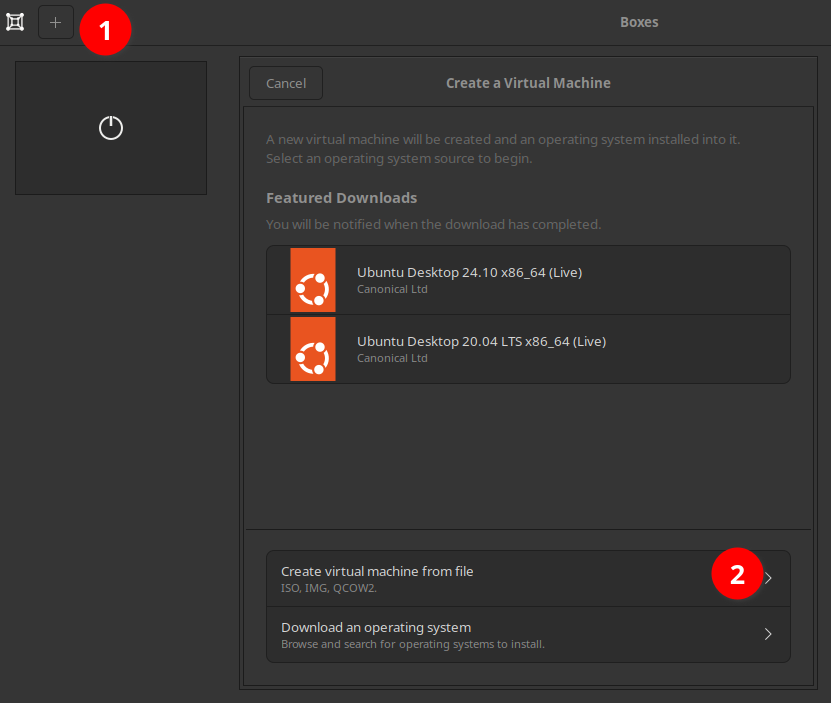
Open Boxes. Create a new VM by clicking the + button in the upper left corner (1 in the screenshot). Create virtual machine from file (2).
Find your Win7 download (I conveniently found mine under recent files).
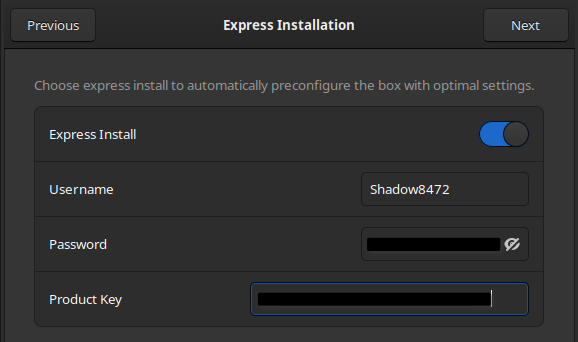
Enter a username, password, and your product key on the express installation page. Alternatively, you can disable Express Install as I did on my first pass, but I won’t be covering that route in as much detail.
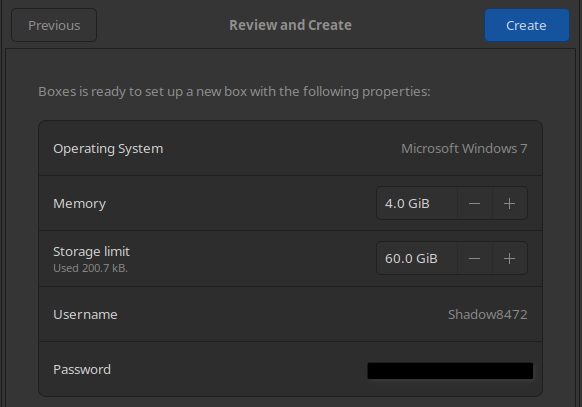
The recommended specs for Windows 7 are 4GB RAM and 60GB disk space – roughly twice that Boxes will give it by default. Edit those figures and hit Create.
Wait for the gear to stop spinning, then open your new VM.
Quality of Life Break
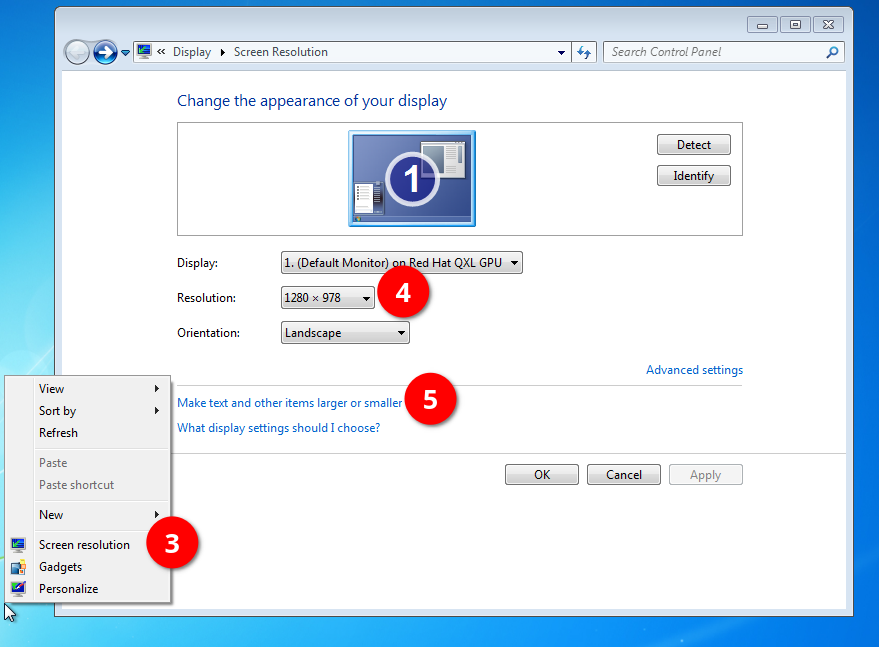
When I did this on my mother’s computer, I squinted through a manual installation on her either 2k or 4k monitor. If you have a black boarder and/or everything appears tiny, bring up a right-click menu on the desktop and click Screen resolution (3). Adjust your Resolution (4) and Make text and other items larger or smaller (5) as desired. Express Install set good defaults for my 7 installation, however.
If “Large” UI elements like window boarders and the Start bar still aren’t big enough for your needs, I found a tutorial on SevenForums.net [6] with instructions on how to set a custom DPI (Dots Per Inch), but have not tested it yet as of writing.
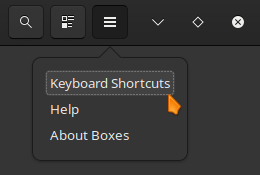
Left Ctrl + Left Alt releases focus from the VM to Linux. This was especially useful when installing my mother’s copy on a single screen, but less so on my dual screen setup. While editing my first draft, I found where Boxes lists its keyboard shortcuts from a menu in the upper-right – including F11 for toggling full screen.
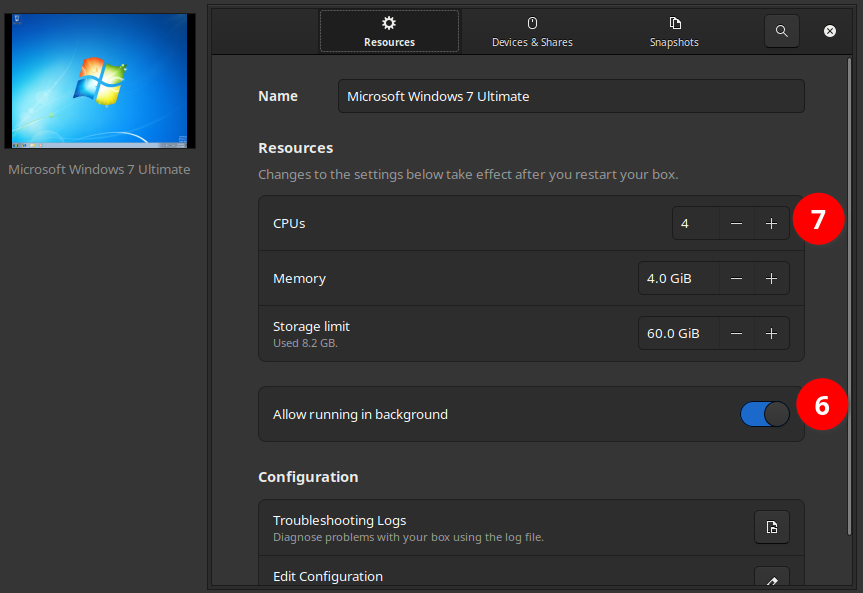
While gathering screenshots for this final draft, I had Windows crash while minimized in Boxes and Boxes out of focus. My mother’s VM fared a bit better through even Linux going to sleep from the lid closing – only having some audio distortions from the VM running at like double speed to catch up with the host system time, presumably. To prevent this from happening again, I’m enabling it to run in the background (6), but I’m also cutting its CPU core count to 4 (7).
SPICE
+1 for Express Install for including Windows SPICE Guest Tools. This section is rendered optional reading now.
Most guest operating systems aren’t designed to communicate with a host, so things like the clipboard (copy/paste) are separate. This makes it very challenging to move your own files on to and off of the VM. SPICE works as a two-part system with a server on the host and a client on the guest OS. Boxes comes with a SPICE server included, and to no one’s surprise, neither does Windows 7.
I got SPICE functionality on my express install. No copy-pasting files, but copy-pasting text in/out and drag and dropping files into the VM worked out of the box on an express install. Otherwise, I installed SPICE on my mother’s VM after finishing with Legacy Update and I had a browser able to download it from inside Windows.
Updating Windows
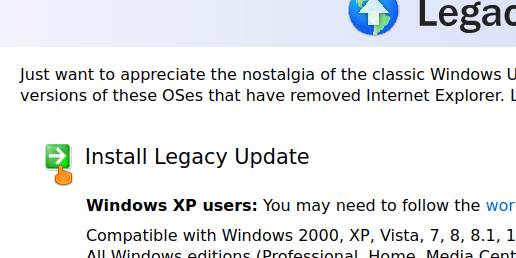
Microsoft no longer hosts the files for updating Windows, but Legacy Update is a community-run resource to restore various functionalities to old, sunset versions of Windows – most notably Windows Update[7]. My first time around, I installed that and spent a movie or two worth of time babysitting the VM. Download it from https://legacyupdate.net and put it on your Windows VM’s desktop. The download link looks like a header as pictured.
Run the installer. Legacy Update gives you a number of options. I’m keeping mine at default, but you can enable the Windows 7 Convenience Rollup Update if you don’t care about sending unnecessary telemetry being sent back to Microsoft in exchange for a faster install.
Legacy Update’s install wizard ends with a reboot. Open Legacy Update. You can now start the repetitive task of looking for updates, installing them, rebooting, and starting the cycle all over again until up to date. It should take two to four hours. That or you could open open Legacy Update and enable Automatic Updates. It points to the same setting from deep in Control Panel. From there, Windows should eventually take care of itself in the background if you leave it running for a week or few. My recommendation is to pop in a movie and babysit it – as I did with my mother’s VM. Just ignore the language packs you don’t need.
NTLite (Power Users)
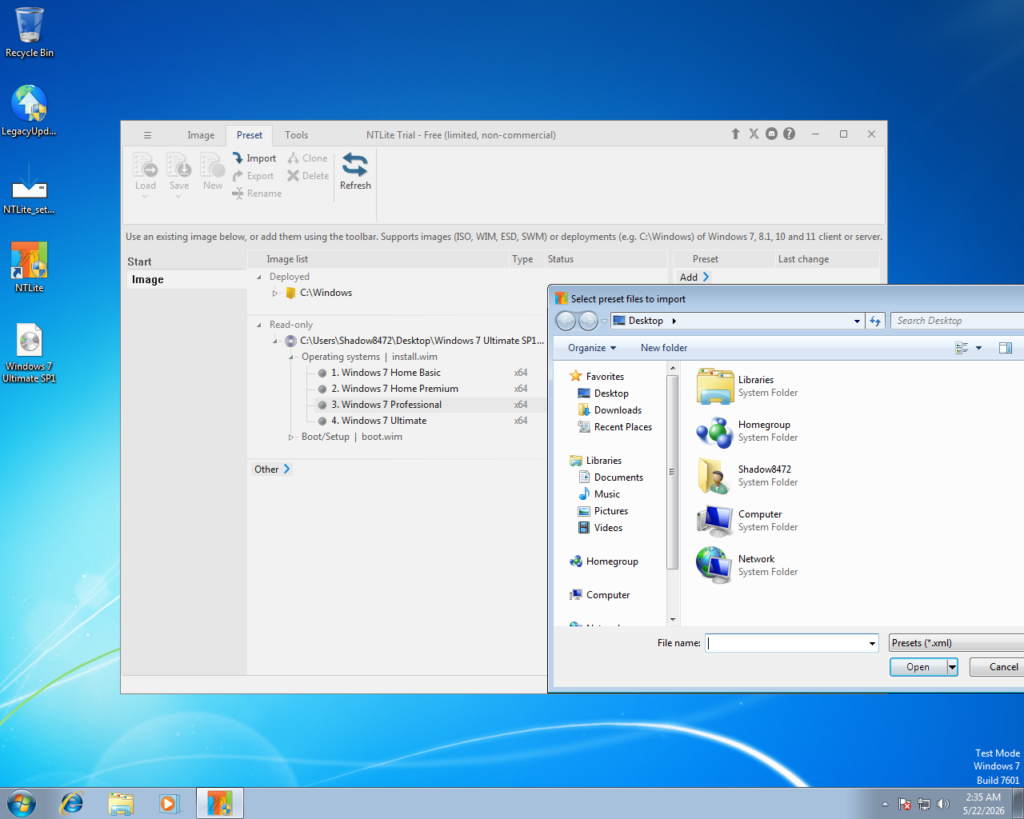
Power Users Only for this section, I’m afraid. Due to time constraints and the procedure looking a hair too technical if it does work, I’m presenting this incomplete branch starting immediately after installing Legacy Update and rebooting a first time (Otherwise, NTLite won’t run).
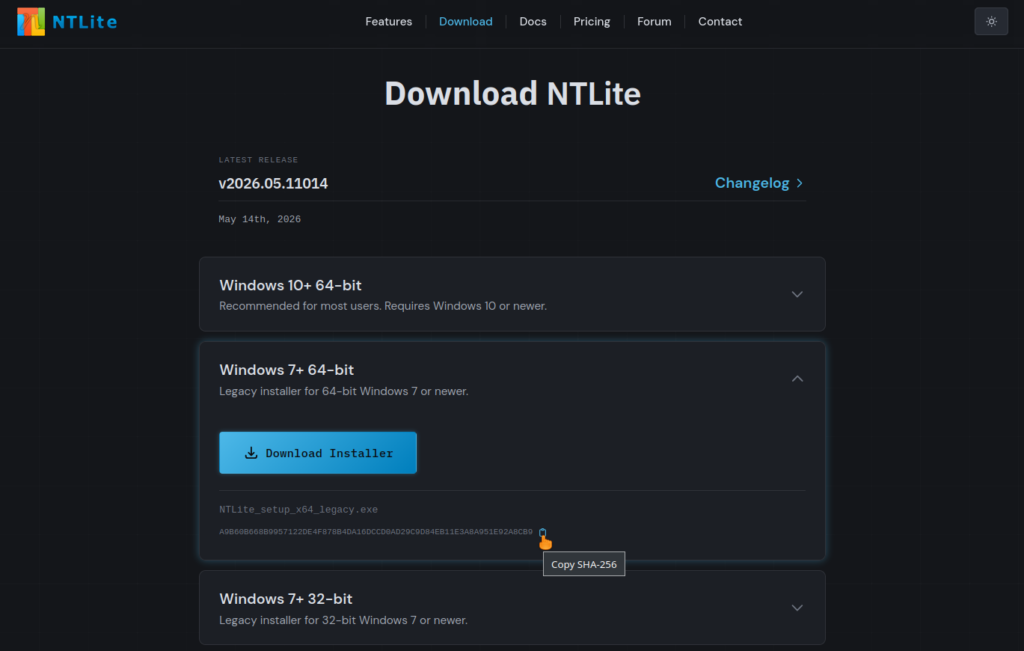
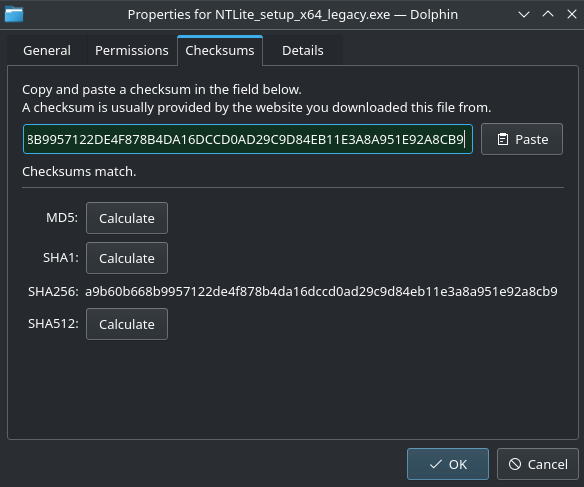
Sometime after finishing Round 1 I was reading up on improving privacy. I learned about NTLite, a powerful tool for modifying Windows [8]. Download it from https://ntlite.com/download/ and check the Shasum as you are able. (Pictured is a Shasum checker built into KDE’s Dolphin file manager.)
Here is where my research ran out of time. I was planning on having everyone use NTLite to inject all the updates into a custom Win7 disk image, then use that to “repair” Windows.
And so, dear power users, if you wish to explore this path further, be my guest.
Shared Folder
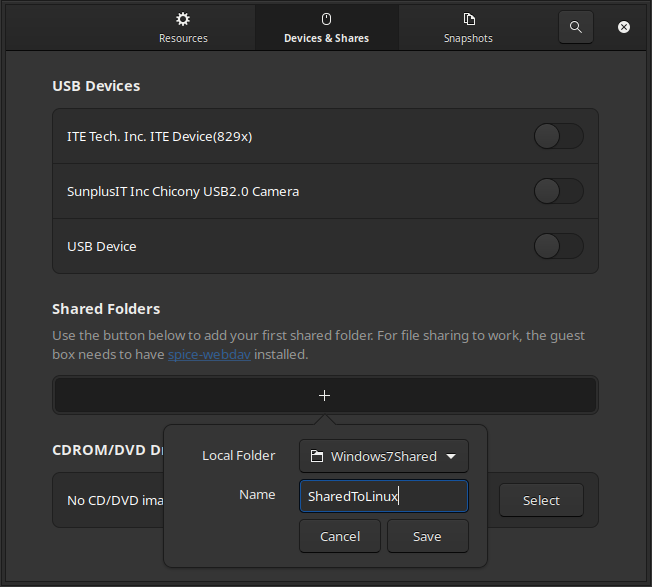
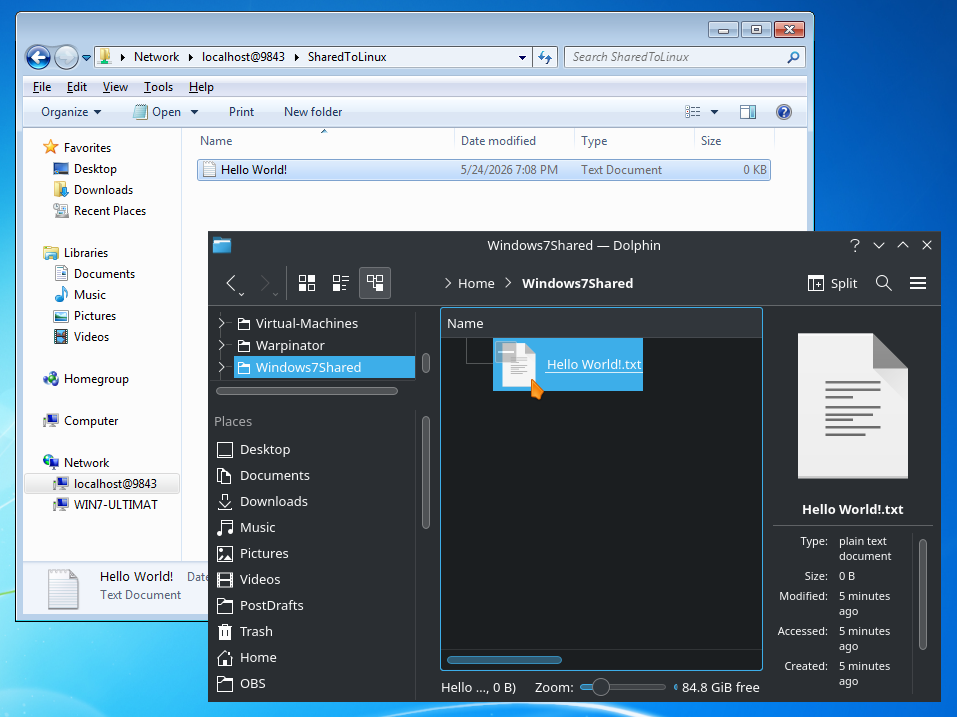
While Windows SPICE Guest Tools is included in Boxes’ Express Install, you additionally need spice-webdav –also written as “Spice WebDAV”– for easily moving files from the Windows VM back to the Linux host using shared directories/folders. If you’re following along with the manual install, go get SPICE tools now and install them.
In Boxes, bring up your VM’s preferences and select Devices & Shares. Click the + button under Shared Folders. For demonstration purposes, I made a file on my host home directory as seen in the screenshot.
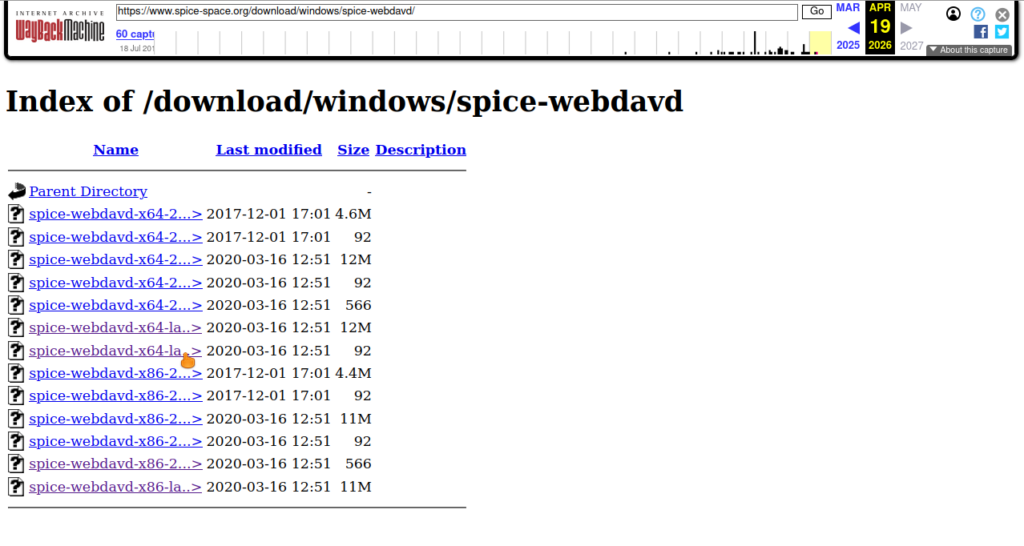
If you are viewing this shortly after publication, there may be a chance that the link from the screenshot (https://www.spice-space.org/download.html [9]) is still broken (isitdownrightnow.com reported a 4 day outage on Sunday, 5-24-2026 [10]). Fortunately, the WaybackMachine has the files. Note: site returned as I was doing citations [10].
Download the latest two links and use Shasum to verify your download against the number in the matching link, same as in the section “Verifying Your Download With Shasum” above. On the odd chance you are using a 32 bit copy of Windows 7, you may need to look up a guide on GPG (GNU Privacy Guard).
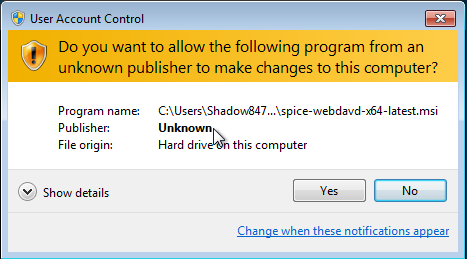
Move the installer to Windows 7’s desktop and run it. User Account Control will warn you of an unknown publisher, but we just took similar steps manually to the desired effect. In short: this software is not signed by Microsoft, but we’re trusting it anyway.
Once that runs, open File Explorer and navigate to Network, and your shared directory should show up automatically as a shared folder in Windows. Anything you put in there will show up in both places – a tunnel if you will between your host and guest OS’s.
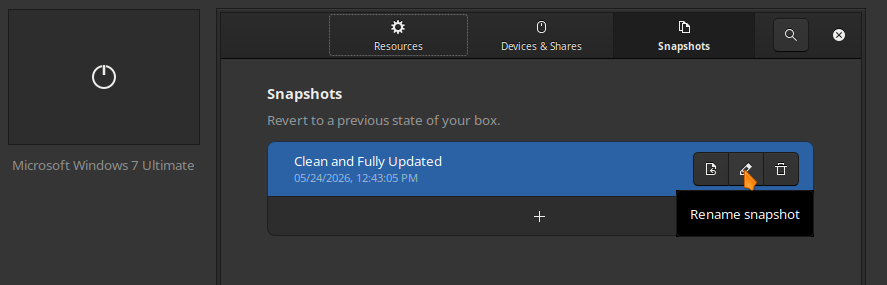
Create Snapshot
Once you are done setting up your Virtual Machine, open its preferences in Boxes, click on Snapshots at the top, and create a new snapshot.
Optional
This guide assumes most [former] Windows users know how to install a program, but now would be a good time to “move in.” Adjust the wallpaper, look up some guides to lose the “Test Mode” watermark if it bugs you. Delete your installer files off your desktop. Look up how to get Aero Glass working. All the fun things. But there is still a little more to consider doing.
Privacy
In 7’s later years, a certain number of 10’s telemetry features were “backported” to 7. Remember: most of your daily computing is done in Linux now; it can only report what it sees, but there exist guides and scripts to uninstall or block most known telemetry. One place to start looking is Blackbird [11], though the more you rip out or hobble, the greater chances you damage intended functionality. Remember to use snapshots as you tinker!
Virus Scanner
Conventional wisdom says to never run Windows without virus protection. After looking at available free options, I’d pick AVG because it still supports Windows 7 and hasn’t given an indication of stopping [12]. Feel free to make our own choices though.
On the other hand, by only running Windows for stubborn programs, you massively limit your attack surface. Worst case scenario, you load a snapshot from before you got infected. (You made another snapshot after installing everything, right?) Either way, remember to use common sense. A little goes a long way in terms of online safety. Don’t click on sketchy links.
Browser (For Manual Win7 Install)
After looking at my options for getting files from Linux into Windows on round 1, I settled on a de-Googled Chrome derivative called Supremium [13], though there are additional options if you look. It’s maintained for Windows 7 and still supports Manifest v2, where the modern Manifest v3 breaks several popular privacy/ad-block plugins.
Prayer
It may be a bit weird, but I’m trying to be a bit more proactive about inviting God into my work.
Father in Heaven,

Thank you for helping me get this out on time. Please watch over all my readers and grant clarity to the ones just learning about virtual machines. I know it’s confusing, but I’ve really tried to make it as beginner friendly as possible while still providing for the needs of more advanced students. Nurture their creativity, God.

In Jesus’ name I pray,
Amen.
Takeaway
I’ll give it to the UI (User Interface) artists, Windows 7 is beautiful, even without Aero Glass. Depending which critic you ask, Windows peaked at either XP, Vista (after it was fixed), or 7. My personal nostalgia lands with the twin peaks of XP and 7. XP took advantage of the rapidly increasing graphics capabilities, Vista reached too far, and 7 struck the balance a second time. Ever since then, the trend has been back toward flat colors. 7’s Aero theme was art – even the basic one I’ve been working with.
One more thing of note: I made an observation on my mother’s laptop that Windows seemed to quarter (or so) the expected battery life just by running.
Final Question
What would you have done differently in this guide? Do you have other favorite pieces of software you’d have used instead? Am I missing something important? Let me know in the comments below or reaching out to me on Discord (Invite to blog server).
[3]. Sreenath and Abhishek Prakash, “How to Verify Checksum on Linux,” It’s Foss, Aug. 12, 2023. [Online]. Available: https://itsfoss.com/checksum-tools-guide-linux/. [Accessed: May 24, 2026].
[5]. Jay, “GNOME Boxes Tutorial: Run Linux Vms the Easy Way,” YouTube.com, April 7, 2025. [Online]. Available: https://www.youtube.com/watch?v=tbhVLkVY-yE. [Accessed: May 24, 2026].
[11]. Blackbird, “Windows privacy, security and performance,” getblackbird.net, Dec. 7, 2022. [Online]. Available: https://www.getblackbird.net/. [Accessed: May 24, 2026].
[12]. AVG Antivirus, “Protect your Windows 7 PC with our free, acclaimed antivirus,” 2026. [Online]. Available: https://www.avg.com/en-us/windows-7-antivirus. [Accessed: May 24, 2026].
[13]. win32ss, “Supermium,” github.com, May 9, 2023 [Revised May 10, 2026]. [Online]. Available: https://github.com/win32ss/supermium. [Accessed: May 24, 2026].
Good Morning from my Robotics Lab! This is Shadow_8472, and today I am reviewing the important parts of my homelab, going over the servers and software, and improving the inner workings. Let’s get started!
Hardware
The Internet comes in and connects to my ISP’s box. It’s set up in some kind of bridge mode. I have an Opnsense hardware firewall named Cerberus serving as the network hardware firewall and router. Wi-Fi is handled by an older router with stock firmware.
I have a server closet with my old RedLaptop, a NAS (Network Attached Storage) called GoldenOakLibry, and a pair of Dell Optiplex towers named ButtonMash and Joystick.
Golden Oak Libry
When we first got a NAS, we went with Synology. Since then, I’ve learned and the Linux kernel has developed, and one day I heard from tech support that they won’t be supporting a mission critical feature given my software stack (more on that later). I’ve been taking it slowly, but I’m transitioning into a newer QNAP device and adjusting to its quirks.
The driving force behind this month’s efforts has been completing this migration. I’d previously moved all the data onto other drives and back while only missing a few small files – mainly thanks to a terminal program called rsync. I grabbed all the metadata along with it – including UID/GID (User ID/Group ID) of all the files. And since I’d set up the previous NAS to not care about users, it was all Synology’s default “everybody” identifiers.
My goal for this time around is to distinguish between users. How-hard-can-that-be? Very.
Researching for Network Login
NFS (Network File System), the protocol I’m using to talk with Golden Oak, by default just trusts the incoming UID of any clients connecting to it. That means that if I upload a file from DerpyChips with a UID of 1000 and I access the NAS from my new laptop with a UID of 1000, everything will just work. But nothing is keeping my father’s computer from reporting the same UID, as 1000 seems to be the default value for all initial users. Now, I have an account on my father’s computer, and since it was created after his, my UID on there isn’t 1000. Too much work, too fragile. Approach rejected.
A more robust approach to solving this problem is Kerberos. I have some recollection from my initial days setting up the Synology NAS. In short: a client talks to a trusted server to get at a service. I spent a while researching implementation –including using Buildah to make a container to run with Podman– but found it expects way more network infrastructure than I already have, so I pivoted toward learning about this technology I keep hearing about in relation to homelabs: LDAP.
LDAP (Lightweight Directory Access Protocol) is roughly equivalent to Active Directory in Microsoft Land. And in true Linux fashion, LDAP is a specification, not a single piece of software. Opinions differ as to which is best for a use case like mine, but LLDAP (Lightweight LDAP) seems to be right for me.
Joystick
Podman is the underlying technology I use for my homelab. It is often compared to Docker, but it works without root access in case of container breakout. I have a non-admin account on my server, Joystick, where I use Quadlet files for permanent Podman containers so they’re always running when I expect them to be.
But the heart of my homelab (software wise) is Caddy. Caddy is more or less a do-it-all networking suite. It’s a reverse proxy with built-in HTTPS – both real and by self-signed SSL certificates. And everything Caddy does is controlled by a Caddyfile written in as simple a format as possible. Once everything is in motion, the most annoying part is telling your computers and browsers to trust your self-signed certificate authorities.
Taking inventory, I found I didn’t have much in fully functional order. Vaultwarden (3rd party Bitwarden server written in Rust) and Crafty Controller (Minecraft server management software). Beyond that, I have an incomplete Nextcloud setup waiting on Golden Oak and dreams of many more projects – many of which also are waiting on Golden Oak Libry. The home directory was getting full, so I sorted them between Services that provide target functionality and Network that support the Services.
One of Caddy’s features is a static web server. After reviewing all my containers, I wrote a landing page for it to display. Debugging it ate a bunch of time, but I found I had goofed a mount configuration. From there, I linked my different services as a way to test them.
During this process, I discovered a poor Caddyfile entry for Crafty. Someone on GitLab had suggested essentially bypassing HTTPS security in a way that otherwise looked legit. This would have been fine for my setup, but out of concern for the community, I updated an earlier solution that relied on a deprecated Caddy term a different Caddy /path/to/certificate. In this way, I learned one way to “establish trust.”
Cerberus
Hardware Firewall. It’s basically a fancy router – a REALLY fancy router. If Caddy is the heart, Cerberus is the head. It handles the DNS blocklist using the OPNsense plugin Unbound. But Unbound also handles domain name resolution. I was several major versions out of date. Oops. Fixed.
Ironing out Unbound was another place that ate up diagnostic time like crazy. I eventually happened across a bug report where DNS server crashes if Unbound tries forwarding a wildcard subdomain (as in *.myDomain.lan) if the router thought itself on that same domain (under System>Settings>General>Domain). It wouldn’t stop completely, but it would get really slow. Switching to myDomain.arpa is a small price to pay for not having to manually forward each subdomain I configure for Caddy.
Takeaway
Life’s been hectic as of late, so I haven’t had the time or usable attention span to finish all my goals. Instead, I found several smaller goals and am in the process of whittling away toward the larger ones. My homelab was a bit of a mess after the techno-wizzarding I’ve been pulling off, and on this later pass, I’ve improved my understanding of what it was I was doing and how to engineer it better.
I have plenty of smaller goals I left out because I want this to be a log of what I’ve managed to finish – not a dream log of what I still have to do, but I still have one thing I wish to share.
One of the links on my homelab landing page is back to the router: https://cerberus.myDomain.lan. Firefox won’t load it. I looked up how to establish trust between Caddy and OPNsense, and my search results were flooded with a Caddy plugin for OPNsense. I’m sure it’s a fine project, but I don’t want to invest in that toy right now. Long story short, I pivoted approaches to use an ACME (Automatic Certificate Management Environment) client I found for OPNsense. I left an entry in my Caddyfile to hopefully expose the ACME server and did everything to make my first attempt. It failed, but at least I got to that attempt in the first place. I do however need to call it quits on the research.
Prayer
One YouTuber I occasionally pay attention to is Network Chuck (Shoutout if you’re reading this). I may disagree with his claim that “everything in IT requires coffee,” but I do like how he’s made a space in his videos for Jesus, and I’d like to do the same (the prayer, not the coffee).
Father in Heaven,

I thank you for the progress I’ve had this month, and I praise you for whomever is sticking around. Please bless him or her according to your will. May you inspire my readers in their personal projects, be it with Caddy, OPNsense, or more. Guide them towards whatever documentation or bug report they need, and help them avoid focusing on premature feature creep.

In Jesus’ name I pray, Amen.
And if you are curious about the Bible, God, or Jesus, I’d be more than happy to talk. These days, I primarily use Discord. There’s a link to my server in my Socials tab at the top of this page. So far, He’s been welcome there, but from now on, I’d say He’s properly invited.
Final Question
Do you have an opinion on which LDAP server reigns supreme for homelabs? I look forward to hearing about it in the comments below or in my Socials!
Good Morning from my Robotics Lab! This is Shadow_8472, and today I have a game I’ve started making with a side of working on my homelab. Let’s get started.
The Pitch
AstroRush
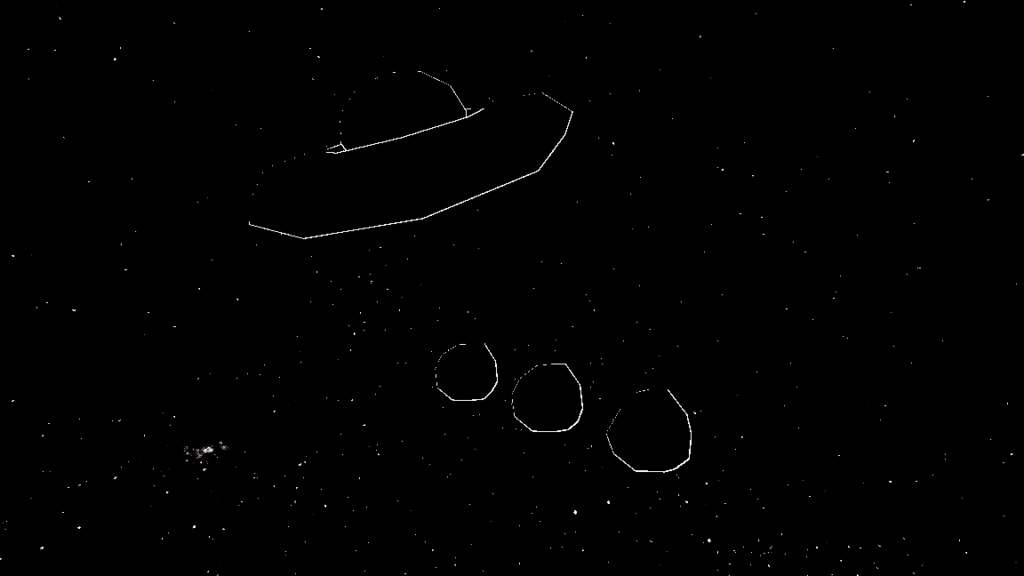
A re-imagining of the classic asteroid-blasting arcade staple, this simple 3D space shooter puts you in the cockpit of a nimble spacecraft pulverizing asteroids in search of their mineral wealth. But is humanity alone in its interest in the Alpha Centauri system?
Styled to resemble vector graphics of the inspirational Atari title, Asteroids, AstroRush is my first game in my lineup to build my skills toward expressing my Container Analogy in an interactive format.
Progress so far
First off, I’m building this game on Redot 26.1, a free and open source game engine forked from Godot to provide a more stable base. The project recently moved from a “soft fork” to a “hard fork” – meaning that backwards compatibility with Godot is no longer a concern. The word I heard is that Godot introduced breaking changes in a minor update, which generally is a big no-no.
Moving on to AstroRush. It’s a working title I came up with to replace “Asteroids 3D” for this post – a pun off of “asteroid” and “gold rush.” The story I have in the back of my mind is that humanity is building its first inter-stellar colony, and all precious minerals are required.
Development proper started by grabbing my free flight controller and a picture of the sky from NASA for my background. I got the composite of the starry sky to feel like it could be drawn by an arcade game by turning down the saturation and maxing out contrast in the environment node.
And then most of my time was spent on dead ends trying to get the look just right. This category is split into two sections: first is shaping the asteroids, the second is outlining models with all-black albedo. To shape the asteroids, I first made a vertex shader to nudge around the points of an Ico Sphere out of Blender. The naive approach of displacing each vertex gave me a “nacho explosion” where each triangle goes off on its own. The trick was using the values at a 3D noise texture as a seed. But I found I could only make one unique asteroid using this method.
My second approach was to build the same logic in code. It took a bit longer, but again found that the last mesh defined was being used for everything. This is particularly problematic, as I need meshes to scale for larger/smaller asteroids. I ran my code past the Redot community and learned the engine was working as intended; I had made erroneous assumptions from the documentation. At this point, I’m likely to just “bake” a series of meshes that can be assigned randomly as needed.
Extrapolating the visual style of Asteroids to 3D was probably where I wasted most of my time. After trying and failing to write an outline shader for myself, trying to work with the stencil buffer (turns out it’s listed as experimental, and subject to change), and searching for a pre-made outline, I circled around to one that worked sort of OK, but didn’t particularly like low-polygon games as I was working with.
I wanted to understand the structure of the shader I was working with, so I spent a day re-building it as a visual shader – translating each line of shader code into a form resembling a flow chart. For some reason, I was never able to get it to behave the same as the original, even when I rigged the relevant parts into an “expression” node made for handling code. Yeah… those appear a little buggy at the moment.
Around this time, I was playing with a widgit in the Redot interface when I noticed a pattern in the misbehavior with the outlining. All I had to do was vertex deform the outline mesh as well.
Working on the free flight controller, I found speed caps and drag for both rotation and lateral movement helped with the feeling of a responsive space ship. Without them, turns are a fight against velocity. Think: Kerbal Space Program. I’m also working on making the script more friendly towards using it in other games. That means extending it using a second file.
Takeaway
It will take time, and progress will be incremental as I learn the basics. I still don’t have a playable prototype. Is the game fun? I don’t know. I sure hope so. But as the code base grows, I’m going to want a local Git server in my homelab.
I am thankful for the Redot community being so chill because the Godot Discord has reportedly gone on a witch hunt – banning people over common opinions the moderation team considers hateful – be they expressed openly, in a profile you have to hunt for, or in a leaked DM. No mercy, no notification – just a ban, according to some Redot users I met. Assuming it’s all true, I have to say it’s sad. On the one hand, I believe they hurting themselves. On the other, Freedom of speech is not freedom of platform. They have every legal right to build an echo chamber, but I find it morality dubious at best to eject people for wrongthink when they are otherwise behaving.
Good Morning from my Robotics Lab! This is Shadow_8472 and this month, I participated in the 2026 Redot Winter Game Jam. I have a story out of it, but it didn’t go the best. Let’s get started!
Disclaimer
I do not wish to defame anyone – only warn about the importance of communication. I am therefore substituting the names of my teammates for Stardew Valley characters based loosely on roll in the project while ignoring other characteristics, such as age or gender.
People have bad days, and I am only one witness of a narrow window of time. So please: unless you are a moderator, leave idle curiosity here. Fellow participants, do not allow anything you read here to affect how you rate the entries.
Out the Door Studios
One of my longer-term goals has been to code a big idea I’ve had as a video game, but I need to build skills to that end first. I entered the Redot Winter Game Jam last year to do just that. Redot is a fork of Godot – itself a free and open source game engine. Godot made a comment I found unwelcoming on their socials, and Redot prioritizes making games over witch hunting wrongthinkers. Under that context, I built what became Out the Door Studios. Going into the Redot Winter 2026 jam, I have two jams worth of experience plus a little from personal projects.
A Group Founded in Poor Communication
The official theme for this jam is officially “Slippery when…”. For me, it is miscommunication – not all of it mine, not all of it bad. The first miscommunication involved meeting Sebastian, a programmer with a little 3D experience. He mistook our 2025 entry for 2026, but I invited him to Out the Door nonetheless. Nobody I’ve previously jammed with was both available and interested. Within a few minutes of my pre-jam pitch, he had delivered a visual matching my inspiration perfectly.
And then I spotted an ad by Lewis. He wanted a programmer and a 3D artist to round out his jam team for a more ambitious 3D project. I applied, offering Sebastian’s and my talents. It went back and forth between Sebastian, myself, and Lewis for quite a while, with me making Lewis out to be “middle-to-top of the little leagues.” Somewhere in there, I listed my years of experience with Linux intending that as an ability to solve problems.
Unbeknownst to me at the time, Lewis was more “bottom of the big leagues” and took my experience maintaining a homelab to mean I was programming the entire time. When I arrived in Lewis’ Discord, it had about 10x the members I expected. It is set up more like an office than an informal development environment. Impostor syndrome set in, but I pushed it aside. Their rules weren’t copy-pasted –usually a good sign– but the casual coarse language made me uncomfortable from the start.
Already on the team were people to whom I will refer as Leah, a concept artist I didn’t interact with much, and Maru, another programmer. Yellow flag out the gate: time zones – the five of us were spread roughly equally around the globe. Most pointedly: our programmers shared little in the way of sleep schedule, severely hampering collaboration.
The Jam Begins
Now, I never signed any NDA’s (Non-Disclosure Agreements), but as of publication, the jam is ongoing; I will avoid mentioning specifics unless they’re vague or important. We got a relatively good jam theme, “Slippery when…”, lending itself as easily to ice/slipping as stealth/evasion/pursuit. Four of us hopped in voice (Maru was asleep).
In that first meeting, I immediately got cussed at to turn my mic down (apparently, my mic settings were out of whack from fiddling last month). I proposed using Codeberg – having to explain the difference between GitHub (code-hosting website) and Git (version control software at GitHub’s heart), but Lewis about insisted on using GitHub, “let’s just stick with what’s familiar.” ‘But, GitHub is not familiar to me,’ I thought. His house, his rules.
Alone, that wouldn’t mean much, but every design decision followed suit. At one point, we were split 3:2 over what to call a gameplay element. Despite Lewis landing in the minority, it shifted from “we’ll just agree to know what we mean when either term comes up” to an unspoken, ‘just use Lewis’ term in-code.’ Yellow flag.
My main contribution to the game was locating a system important to the main gameplay gimmick. I found something on the in-engine asset store and had it half-way working, but after a day it proved buggy and inherently didn’t support browsers. I spent another day studying how similar effects were accomplished in familiar titles. One lonely video demonstrated everything we needed running in Godot (which Redot is compatible with), but without code or contact info.
The Tutorial
Then someone –Sebastian, I believe– located the tutorial. How to do <our gimmick> in Godot 4. Code was published, but lacked a visible license. I spent a day tracking one down. Let’s call the tutorial author Mr. G4 for Godot 4. His project built off someone’s Godot 3 code. Mr. G3 was following up on a fourth party’s Godot 2 demo. Between them, I only found an eMail for Mr. G3. Mr. G2’s digital footprints ended in 2021, one post after retweeting an incitement to violence against police in 2020, which I reported. Mr. G3 got back to me with an MIT License, and I was able to share my Container Analogy post.
Mr. G4 was tricky. I asked Lewis, citing enough context between the video and comments section to treat it as MIT, and he said his personal philosophy is that if there’s no license, just do whatever; it’s just a game jam. Yellow flag: one might get away with CC0 (public domain, even without public domain), but that’s not how copyright usually works.
I showed the tutorial to Muggyfox1, a colleague from my second jam, who figured it was fine. The code had been online for years, I made an effort to reach out, and the author clearly intended to be copy-pasted.
In either Mr. G4’s implementation or the asset library’s, the mechanic relies on a shader (GPU code usually used for graphics). Maru was wary of using shaders, but I figured it was within reach, given ready code and my success reading data back out of the graphics card.
Meeting
Sunday came around, and the jam team was invited to a meeting. Sebastian had a previous engagement, and I woke up early. Did I say the jam team? No, it was server-wide! I caught the tail end of a foul mouthed, pre-meeting goof off session. They deliberated content creator sponsorship programs to apply for as a server while alluding to male reproductive organs at the pair they eventually got.
I abstained from deliberation and voting, as I was planning to peace out after the jam at least until another jam – besides, none of the potential sponsors interested me anyway. When pressed for comment on something, I noted for the record that I considered myself as “on probation” for the time being.
Flashpoint and Aftermath
A week into the two-week jam, Lewis was feeling the time crunch. He was using all-caps in chat, demanding that someone start the 3D environment. We programmers were presumably all waiting on each other for things. Lacking a good 3D environment, I had been asking for help all day to add a slightly less important feature to the shader. Eventually, I entered a voice call with Lewis.
Lewis tried the demo I had on GitHub, but it was from a weird development point where something wasn’t working right. I offered to share directly from my screen, but Lewis wasn’t as impressed as I would have hoped. He was quite miffed to hear I was working on a shader and simultaneously told me to “SCRAP IT!!” and, “See it through!” If you’ve ever read about the development of Sonic X-treme, that’s what it felt like.
“Tell me ONE good reason I should not kick you out right now!” he said.
I had already committed to forgiving him after He apologized, otherwise it might have turned into a shouting match. I prayed to Jesus for the situation as I actively ignored any rash words of passion that lent themselves to being hurled back. “I’m the only one who knows how the <REDACTED> system works,” I said as calmly as I could.
I tried not to flake afterwords, but the damage had already been done when Lewis yelled at me. It came into focus the next day after two unproductive hours without positive directions and a reality check with my sister and mother. I was easily spending 10+ hours a day focused on this project, trying to keep things moving when Lewis was offline and people (mostly Sebastian) were at a loss as to what was currently needed. When I DM’ed Maru, she shared her doubts from the start and said, “learning while trying to deliver a complete game in 1 week [sic] is nuts.” (The jam is two weeks.) I had tried to be clear to Lewis, “I am here to learn and have fun with the goal of getting something out the door that is a bit more complex than my previous work.” Neither of those bolded conditions were true anymore.
Sebastian had been more optimistic the night before. I had taught him the system I’d assembled and documented it with plenty of screenshots. He commented on a couple missing features on the shader, and let no one truthfully say I didn’t give it my all to add them until I was burned out.
But when I did burn out, I tried to leave with as much class as possible while still saying things I felt needed to be said. I put my code in order, leaving a new comment or two, then organized the shader with frames around nodes meant to function together. When I told Sebastian about my plans to leave and Maru’s pessimism, he replied, “I might be the only [guy] who can stitch everything together.” Maru expressed disappointment upon hearing we wouldn’t get to work together on something more serious. In the end, I wrote a 500 word letter of resignation telling this story and dropped it in his server, CC’ing everyone in the jam’s section, including what looked like a server admin.
As a last order of business, I licensed my contributions under GPL to Lewis and his team, then ensured its admittance into the main branch (I don’t know that Lewis knows how to use ‘git checkout’ to cleanly remove my contributions). Since I’m not trying to sabotage the jam, I wrote in an exemption until the submission deadline. After that GPL applies, meaning if Lewis wants to continue development, he will have to either publish his entire project’s source as GPL or contact me through a 3rd party for negotiations, but only in the presence of a chaperon approved by me and who has authority to end the conversation at any time for any reason.
Takeaway
I am proud of the work I did complete, and I really hope the team can publish a fun game on time. But at no point did I ever sign any NDA (Non-Disclosure Agreements) nor did I sign away any rights to code I wrote/modified. I hope Lewis grows as an individual from losing me like this. When you work with volunteers, you’re working with volunteers.
I had fun with the mechanic I did get working, and I think I want to do something with it in the future.
Final Question
Have you ever had to walk out on a bad team situation?
Good Morning from my Robotics Lab! This is Shadow_8472, and today I have a few related projects I jumped between over the month. Let’s get started!
Kernel Regression
In the process of software development, it is generally impossible to continuously add features without ever introducing bugs. The heart of an operating system is no different. I never figured out exactly what happened, but my laptop started getting ridiculously long boot times after a Linux kernel update. Like: 10 minutes time spent not waiting on the user to enter decryption keys and login credentials – assuming it didn’t crash. However, by mashing F8 and F12 (only one of them is needed and I’m too lazy to figure out which one) during boot, I could access a menu to boot an old kernel without undue delay.
I honestly cannot recommend System76 enough. I’ve spent a while with different tech support agents, and my experience with System76 is consistently the best. I am very thankful they have native English-speaking agents who know their stuff. No one is paying me to say this.
After a few commands, I was told my hard drive was on the full side. That could explain some stuttering I was experiencing. So, I deleted a large game I don’t play anymore and installed a 2TB hard drive in my second of three M.2 slots. Opening the case to install it was as simple as unscrewing the bottom and pulling a little, following their guide. I installed PopOS 24.04 and it booted in a reasonable time. I want to eventually move over to it, but I so far haven’t figured out LVM management enough to mount my encrypted partition, and unfortunately that is outside the scope of System76 support.
Our conclusion was that either I had a weird configuration somewhere or the kernel had a regression. In either case, there’s been another new update, and my laptop boots normally again.
Headphones Jack Destroyed!!
Towards the end of the month, I had my laptop set up while out and about, and I got startled badly. Like really badly. Enough to rip my 3.5mm audio out from from the circuit board, ruining the audio wire while I was at it. First moral of the story: Never use a straight end on a sideways pointing headphones jack. An elbow in the wire makes the connection point a lot weaker as a lever, and might have saved an approximately $80 mistake after parts, shipping and tax. Again, thank you System76 for putting such exposed circuitry on an easily replaceable separate board (although the charge for shipping was painful).
As of publication, the board hasn’t arrived. In the meantime, I still need sound for my workstation. My first thought was to pass my audio through my Blue Yeti. By default, this microphone has a monitor function so you can hear yourself. I already disabled it, and it took just a little educated guesswork to route audio correctly. I don’t like the idea of keeping my good microphone set up all the time though when the same USB-C multi-adapter has a 3.5mm audio out.
However, educated guesswork wasn’t enough for round two. Seemingly no matter what I did while trying to play audio through the multi-adapter, sound would end up either not playing or finding its way over HDMI to my main monitor. On the odd case I got as much as a chirp out of my speakers, my video driver would blink to black, stabilize, then blink out a second time – before either to my monitor or eventually giving another split second of audio and doing the same loop all over again.
I got in touch with System76 again. The friendly agent had me run a couple commands to show what devices were connected, and I did what I could to provide any diagnostic information I could. Often, this would lead to an idea, which I would delay my reply e-mail until I could explore it. The biggest tip this session got me was to poke around with pavucontrol, a fancier audio mixer than the one built into KDE.
I found a mysterious LDC in my display configuration whenever 3.5mm audio is connected. I had a good independent exploration session memorable for my login screen being absorbed by this phantom screen, I looked it up and found the audio was being routed over HDMI, and duplicating my main screen to the LCD was my best move.
One night, I found myself playing a song on loop for an hour and I decided to time the malfunction. I ran a timer on the malfunctions and as luck would have it, when I set up the glitch loop and tried timing the split-second “chirp” it ran around 9.5 seconds before LCD disconnected and reconnected, completely busting whatever working theory I had at the time.
At some point, I muted my playback of my video in Firefox, and turned the volume up slowly. No glitch. I didn’t put it together until after I’d glitched it in another browser, website, and even a local game. The common factor was volume; my cheap not-quite-a-laptop-dock has some weak components, leading to signal blowout, resetting its HDMI phantom monitor when it the volume gets too loud. The solution was to turn the volume down and amplification up. A little prompting by a second agent at System76 led to me exploring the audio chirp into real monitor HDMI fail state, and I understand the Linux audio system better for it.
Takeaway
This laptop has been a very good learning opportunity for me. Running desktop Linux is almost the same, but switching between a workstation with two monitors and a speaker system and going on the go adds a new layer of complexity. I still have a while to go before I master PulseAudio. The day before posting, I had trouble accessing my internal microphone from where I disabled it somewhere deep in the OS. But overall, I’m learning a bit more with each fixed problem, even if it’s just to wait a bit while upstream fixes it.