A Summery of Goals

Good Morning from my Robotics Lab! This is Shadow_8472, and today, I am not doing anything too exciting. Just a quick touch up on last week’s topic and then I have some thoughts on building milestones for myself to reach. Let’s get started.

I ended up using the rest of the sample filament on a pair of unknown prints from the sample SD card. One turned out to be a sitting elephant and another was a scaled up version of the butterfly that came attached to the printbed when the printer shipped. Of note, the first layer of the raft was of a different thickness each time. Of course, I rechecked the printbed each print, and I got a little better pseudo-understanding of how the printer in at work is supposed to sound. I’d like to upload a video with a sample, but this week was a little too slow for my intended project.

Future plans. I still want to build and program a social robot, but I definitely need some intermediate steps before I get there. I wasn’t planning on the 3D printer at this point, but since I have it, I’d like to use it. My sister suggested I build a drone, and after rejecting the idea, rethinking it, and deciding it wasn’t a bad idea after all, I decided to research the best one for my purposes.

There is A LOT of information out there about 3D printing drones. Lots of it is up and above my level for now, and since drones aren’t my goal, I’m looking for a lower-cost drone I can print myself. It turns out a lot of the results for 3D printed drones are about getting drones that happen to have been 3D printed. So far, the only drone I have seriously considered is the Pixxy drone. It’s fairly small and cheap to build. Just what I need to learn some stuff from it and move on.

After I am done learning with the drone, I really need to check into learning about ROS. At that point, I should look into learning Gazebo alongside it. Learning some more about Linux, like remoting in to another machine should come in handy for when I build a more advanced bot running Linux with ROS on top.

But everything else aside, I have animals in the house. The 3D printer is a new thing. The dogs went to check it out and seem willing to leave a print job in place for now. My cat Orbit, though, can’t seem to go a day without gettin’ into trouble of one sort or another. The printer needs a case to keep him out. I’m hoping that will be next week’s project.

Final Question: Do you have any experience in 3D printing drones? If so, know any good, entry level ones?

3D Printer Setup and First Print

Good Morning from my Robotics Lab! This is Shadow_8472 and today, I am setting up my new 3D printer. Let’s get started.

Recap for last week’s topic: I put the latest LTS version of Ubuntu on the old Asus machine using my own SSD. The download for latest biannual full version was blocked out for security reasons. Guess what updated this last week! I’m leaving the old LTS version on it for now.

This week, I’m taking a break from sticking Linux on almost everything I touch. I received a 3D printer to further my escapades into robotics and I was instructed to use the printer before the warranty expires. I also received a Galaxy Tab A. I spent a while stress testing and had to exchange it before the return period elapsed. The first unit had a glitchy screen where, about every half hour to two hours, for only two or three screen refresh cycles, the screen would overlap with another version of itself that was shifted up and left when viewed in portrait mode (columns if in landscape). I think it wrapped around to the other corners as well, but it was never on long enough for me to tell. From what I could tell, nobody else complained about it, so it’s likely simply a bad unit. So far, I’m happy with the replacement. On to the printer!

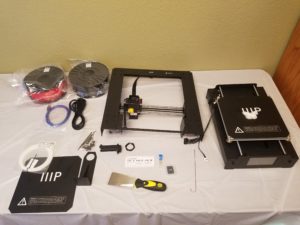
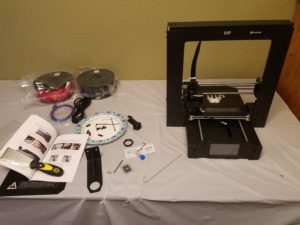
The model is a Monoprice Maker Select Plus 3D Printer. From the information I’ve been given, it should work well with at least Linux and Windows; both are OS’s I use. Included with the gift were a pair of filament spools for printing. The printer itself can do multiple colors, but not more than one at a time, but only if one swaps out the colored spools while printing. Multi-color heads tend to send the price up fairly quickly and most patterns are a single color anyway. I think I will invest time in painting models I want color on.
***

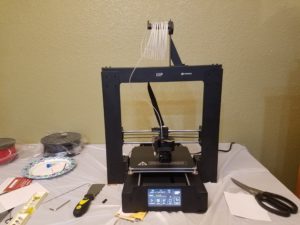
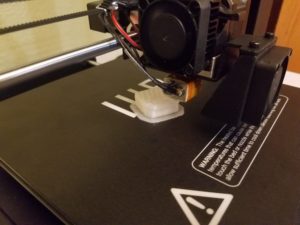
The printer is assembled, but I still haven’t turned it on. I scraped off the butterfly that it supposedly served to test everything out, in the factory I’d think. Disassembling it was fairly enlightening. While 3D printing is less wasteful than machining a similar product, printing is not without waste. A base layer called a raft is lain down first. This seems to serve as an anti-stick measure to the hotplate and a debug mechanism for when first starting a print. The raft peeled off the butterfly itself fairly nicely, almost too nicely; but I’m not complaining.
***

Calibration. Just calibration. That and confusing instructions. While I now have the printer going on its first assignment, the calibration took way longer than the claim of “printing within 10 minutes.” But I suppose I can blame the lab’s folding table uppon which I set it up. I had to re-level that table about three times because when I went back to checking the outer frame, the bubble level said that was out of alignment. The instructions even apologized for showing a wing nut when my model has knurled nuts (ridged like a coin). The picture in question had the latter.

After booting up, the instruction book led me down the wrong menu to bring the extruder to “home” so I could finish adjusting the print bed. That’s when I got to align the extruder so that I could take a regular piece of paper and adjust the table. “There should be some resistance to free movement, but moving the extruder should not cause the paper to be dragged with the extruder.” (User’s Manual p.20) Those two conditions made an infuriating combination. Yes, I understand the need for precision, but there seemed to be a range in which neither was met. Eventually I settled on a reasonable compromise where I held the paper down and moved the head.

Things complicated again when I used their SD card and chose a pattern for a first print job. Either the file names were corrupt and I got error names, or they were simply changed from when the book was written. I took a guess as to which of the four on the card was the 6 min. job, a gear, and came to write this section. It’s been more than 6 minutes, but it seems to either have gone with the second most likely job, an almost two hour vase. Either that or it’s a different pattern for a newer product.

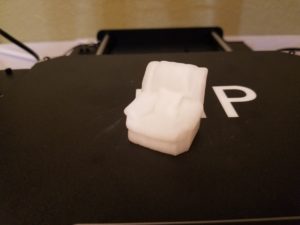
When the printing proscess started up, it sounded like something straight out of Forbidden Planet. The motors are a little hard on my ears, but then again, more than the average number of things are hard on my ears. It’s made some more progress, and it looks like some sort of arm chair so far. I’m using the sample filament that came with the unit, so I hope it lasts.
***

Success. It is a chair. I poked around in the menus a bit more and caused the printer to try tearing itself apart when it tried lifting its z axis too far while looking to unload the filament. It would have been helpful if the thing had told me about its auto-eject for the filament. I’ve also been getting this pretty strong notion that the thing was made in China for China. Any measurements outside the instruction manual are in Celsius or Centimeters, the English is worded terribly in places, and the language selection is a toggle between Chinese and English. And the icon has a character on the top. I’m not offended, just a bit wierded out.

Final Question: Have you ever been given an obvious translation expecting native authorship?

Linux Install: Ubuntu 16.04.3 LTS

Post intended for January 15 2018.

Good Morning from my Robotics Lab! This is Shadow_8472, and today, I am going ahead with installing the older, Long Term Support version of Ubuntu on the SSD I put in the ASUS machine. Let’s get started.

So far, this is an “update” post instead of a “report” post; I plan on posting any stray thoughts worth recording here. I already have the thumb drive with my target version, but I remember Linux complaining before about not having enough space, the install drive only just a little too small. I also remember it seeming to not see the SSD. I will start by looking up the problem.

***

OK, so about right away, I found conflicting forum posts from what to expect. I’m going to need to just try again and poke around.

***

I get to learn a little bit more about formatting. The current formats for consideration are: NTFS, FAT32, ext3, ext4. I know NTFS is a format Windows is happier on, and one source said ext3/ext4 is best for when the drive is going to be used with just Linux, so I think I will format it to FAT32. That is, after I find it.

***

I feel silly! The SSD was connected, but only to power and a loose SATA cable. I spent some time looking for it after bringing up the terminal and using the lsblk command. (LiSt BLocK devices) I connected the drive to one that works and I am working on installing now. I don’t think it will let me choose the format, though.

***

Interesting… the installer crashed. It seemed to want to default to ext4, and I tried to poke around a little for FAT32, but it isn’t worth it. I plan on replacing it with the new LTS version in a few months. Installation is now underway. Looking at the information scroll they have while it installs, they seem to have their own GUI program for getting software. I don’t know if that’s a feature propagated by Debian, Ubuntu, or just super-common to Linux in general, but I am guessing either of Debian or Ubuntu. The install is finished, so I’ll reboot.

***

Funny thing about setting up the BIOS to boot to USB first, you got to remove the USB to boot internally. The reminder to remove the boot medium before a full shutdown was a nice touch that isn’t present with the Ubuntu installer I used. Maybe it’s new and the installer is a bit older. This LTS version is about to be replaced from the most recent after all. I’d have to look it up, but I think LTS versions are given out every five years or so… Nope, every two years with five years support, it would seem.

OK, so I have set up a number of computers with differing versions of Linux, so I think it’s time to take next week off and re-orient myself in where I stand to take on ROS, dual booting with Windows, and server versions. Final Question: I get a bit disappointed when a project misses a long-term deadline. I’m sure if I were to make such deadlines for myself, I might disappoint someone reading. What do you think? Should I give deadlines months in advance, or just work on stuff as I come to it?

Ram Swaparound II

Good Morning from my Robotics Lab! This is Shadow_8472, and Today, I am bringing an underwhelming tale of setting up my “toy” computer. Let’s get started.

I re-scrambled the Ram between most/all of the computers under my care this week. The Linux Mint gift now has all the RAM it came with and the RAM that was originally from the Ubuntu MATE MineCraft Server. I pulled the alleged faulty RAM from the old Asus machine out of my main tower and reclaimed my own sticks. The original Asus RAM was split between itself and the Server after it was all given a BIOS level check.

Long story short, I am tired of doing about everything except shuffling sticks of RAM like a deck of cards. The amount of force required to install the things is a little disturbing when the components around the base are caving in a little more than expected. My RAM is staying where it is for now, and all the sticks appear to work.

I wanted to do just a little bit more, so I started going about installing straight Ubuntu on the old machine to turn it into my “toy” computer despite its random crashes. I have in mind practicing what I think to be dual booting with this machine, so I disconnected the old HDD and it’s RAID SSD “memory bubble.” (Please don’t ask me how that’s supposed to work. I know of about three RAID configurations, and none of them match this setup. I just know that RAID is when more than one storage device is operating in parallel to provide extra speed or redundancy, usually with matched, HDD drives.) I pulled the brand new SSD from my own tower and hooked it up instead of the old setup.

I grabbed my green USB stick with Mint on it and decided to use it for any OS install needs in the future. I put what I thought was the latest version of Ubuntu on it, restoring it to its full 8GB while doing so from when I first put Mint on it to repair the “corrupt” HDD. I connected the target computer to my secondary monitor. I booted it and… nothing. The screen wouldn’t even turn on to access its internal settings when I connected both VGA and DVI to it. It turns out the RAM in the Asus tower was in the wrong pair of slots; RAM slots are paired, and one pair is to be filled first, and I had filled in the 3rd and 4th slots by mistake.

I moved the sticks to the appropriate slots and tried again. I made it to the BIOS where I managed to convince it to boot to the Linux Install Stick. I tried to tell it to install, but it claimed there wasn’t enough space (8. something MB and there were only 8). That didn’t sound right. That’s the size of the USB stick… I ended up making my way to the live environment desktop and was confronted with Unity.

Unity? That desktop was canceled. What’s it doing on the latest… I didn’t have the latest version. What happened? The bootable USB program from the tutorial, Rufus, did request/demand I let it download a couple of extra files just because I was trying to set up a newer version of Linux than the one it seemed to come with… I poked around on the Ubuntu download site I got the ISO from, and found the latest version unavailable, and had instead gotten the latest LTS version. Long Term Support was a term I learned quickly. It turns out the actual latest version was blocked due to security concerns with the all three common CPU architectures affected. I decided to put the project off a week and see if a new build comes through.

In the meantime, my Final Question: If you use Linux, what desktop do you use?

Ram Swaparound I

Good Morning from my Robotics Lab! This is Shadow_8472, and today, I am going over the results of my gift as given last week. Let’s get started.

Meltdown! Within hours, my father’s new computer crashed, citing a problem with the RAM in slot 2. I may have touched some of the gold contacts when extracting/installing it, so I hope it’s still okay, if it was okay to begin with… I reopened the Asus computer’s case to see if it really was just the RAM all along.

I carefully pulled the four sticks from my tower (16 GB total), and installed them in the Asus machine, running Civ V in a debug, zero-player mode. The test ran for so long, I let it go all night, and came down in the morning all disappointed that it had still crashed in the same way. If anyone has any ideas, do make a comment here and let me know, please. The power supply and mother board are both candidates, but they each are a little more involved and/or expensive to swap out without knowing for sure what part is at fault.

Anyway, I pulled the Asus RAM from the new arrival and gave it back half, not including the suspected bad stick. The ‘bad’ half of the RAM, I have in my own tower and ran the Civ test. I didn’t get a full system crash this time; only the game froze and not the entire computer. Other than that test, the RAM itself hasn’t given me any problems.

I would like to test all 4 sticks together in my computer, and get the 4 total sticks (2 from Ubuntu MineCraft server + 2 from Father’s Mint machine) into the Mint machine and test that. Doing both of these at once would see me sending my RAM off to the server for uptime.

Time is a bit short around the holidays, so I think I will keep this post fairly brief. Final Question: From earlier, do you have any random ideas on what might be plaguing the Asus?

Linux for Christmas

Good Morning from my Robotics Lab. This is Shadow_8472, and today, I am going over how I set up a tower for my father as a Christmas gift. Let’s get started.

Seeing as I am scheduling this post for Christmas day, I can safely wright without spoilers. Remember that old PC I turned into a MineCraft server? Well I got another one and gave it the RAM from the now parted computer. To keep up appearances, I have the parted computer sitting where it has been for a while now, beside my main tower. The new machine is hiding behind a pile of clutter.

I installed the RAM before I even booted the new tower up, using my secondary monitor and a VGA cable. It detected the new RAM, and offered to do a hardware check. I figured, “Why not?” and went for it. The thing came back with a complaint of too much RAM. I tried booting to Windows, and it worked, so that’s a problem I figure I can address later.

I decided to try the Cinnamon desktop environment. I went to the stack of blank CD’s and grabbed one. The top had some stuff on it, but I didn’t think much of it; I was just testing a burn program. I burned the latest version of Linux Mint to it and washed the disk to get rid of the dirt on top… and on the bottom. The bottom of a burned CD is a little discolored when you look at it. The dirt on the bottom masked bubbles of unwritten portions of the disk, rendering it useless to me.

OK, so I try to use another disk… Linux Mint is 300 MB too big to fit on a normal CD: I had just ruined a burnable DVD… the only such DVD I had at my disposal, and it’s the first one I reached for. The LightScribe disks I have had sitting here are regular CD’s. I ended up redoing my Mint USB stick.

I charged in with enough confidence when installing the OS. I must have taken a detour when starting to install, because I ended up at a partition option screen. I backed out of there, and soon enough, I had a new Linux Mint machine. Sure, a bunch of the specific software looked different from Ubuntu MATE, but I used my skills to install Chrome, WINE (ironically named WINE Is Not an Emulator), and a few other goodies my father is likely to want, including a Glass Eye program that doesn’t natively support Linux. I had to get a .DLL file and stick it directly into the program file folder, since WINE was asking for it. Strange thing was that it was unwilling to just work when placed among other .DLL files for WINE.

On a whim, I tried installing SimCoaster, a game I enjoyed when I was younger, but only got 99% completion before my save corrupted (twice). It installed, but put up a front of ambivalence when I tried running it. The program made as if to start, but something didn’t work and it stopped without any error message or other explanation. I let it go for now before searching into the problem led to my plans being discovered. While I was setting the machine up, I grabbed my usual desktop and hid the icons and “start” bar. When I was done messing around with it, I assembled a custom wallpaper similar to the one I made for the Ubuntu machine.

This week, I decided I like to write my posts as I work. It might be a little more dramatic at times, but I should remember what is going on better. Final Question: Have you ever wrestled with WINE and won?

Goal Checklist

Good Morning from my Robotics Lab! This is Shadow_8472, and today, I am reviewing my goals leading up to development on a robot. Let’s get started.

So far, I have a Linux machine running. That’s about it. OK, I setup a pair of  MineCraft server programs on it, and all those activities built up my skills, but now, the path forward seems a bit less linear. I’ll try to explain each skill I think I’ll need and a possible project to accompany it.

The next project I want to do is set up another Linux MineCraft server, but this time, I want to remote in and use another computer to control it.

At some point, I think at some point, I will need to look into 3D Modeling. The skill to program a shape into a virtual environment is a valuable skill with many downstream applications, like animation, renders, and 3D Printing, among others. I have a minimal amount of experience with Blender, and I hear it’s fairly well supported across many platforms and for about any job. Plus, it’s free and open-source nature fit the secondary themes I’m trying to work with. The only thing I can think of to do in terms of learning it is to find a tutorial and follow it, pure and simple.

Gazebo and ROS are programs I will need. But before I can go there, I will want to get my main tower properly dual booted. Before I can feel comfortable doing that, I want to set up Linux a few more times AND a get a regular backup going for my computer. Once those are in place, I can start toying around with a virtual robot in Gazebo with ROS before moving up to physical robots.

Manufacturing the bot is something I’m looking forward to, but it’s going to feel like grunt work to me. I want to get on to programming it, but not so fast as to be completely oblivious as to how to do it when I get there. That said, I realized I will need to develop skills in following schematics when I spotted a post on the site for my intended model last week (LINK).

Even after I get a little proficiency in those skills, I can see myself having to go through a prototype or two before I work up to a social robot I’ll be satisfied with. I feel like I should practice setting up a dual boot system before converting my main system. Final Question: What kind of things would you want to see in a finished, open-source social robot?

Operation Intuos

Good Morning from my Robotics Lab, this is Shadow_8472, and today, I am trying to get my sister’s drawing pad to work in Gimp on Linux. Let’s get started.

I went into this project by looking for official support. None given, they only officially support Windows and Mac. But, I learned that Wacom, the company that made the Intuos is cooperative in facilitating community support.

Now, I have used the drawing tablet in Windows before using a somewhat older version of Photoshop. The basic operation, as I learned it is as follows: Draw with the tip and erase with the other end. The harder you draw, the darker the line. A variety of buttons on the side stand in for normal Shift, Alt, and Ctrl keys, as well as other functions. A touch scroll can control the brush size, zoom settings, or anything you would normally use the mouse wheel for. And it’s complete with a control panel with enough settings to discourage anyone who doesn’t want to set aside a day or two setting the thing up exactly how they want it. The term is called, “decision fatigue:” you get to a place where you have so many options that anything feels better than continuing to look.

Armed with the hypothesis I was likely to find a solution fairly quickly, I simply plugged the device in and opened Gimp. That first, glorious success when it actually drew when I put pen to pad was beautiful… until I put the eraser to the pad and that drew too. The buttons on the side of the pen seemed to register as inputs as well, but the pressure feature was a no-show. I just tested the scroll wheel and other buttons, and they don’t seem do do anything useful. The scroll pad just seems to center the picture vertically and the function change button seems to just blink the mouse pointer.

Looking into the correct drivers is proving a challenge. I still don’t fully understand the situation, and I have found old support forums seem to go stale after more than a few years as software is maintained. One old forum directed me to a particular package to download, but apt-get stopped me as there were dependencies that couldn’t be resolved.

I did a little more research, and it looks like support for my version of Linux isn’t as easy as I would have hoped. A two year old Ubuntu MATE forum post broke the discouraging news. I will need to look into finding what distribution is going to be the easiest to work with this… less than standard input device if I want to avoid a year or two of learning how to write my own driver for it.

***

A new hope spot: My entire situation has more than just the OS in between user and brushstrokes.  Maybe the tablet is already fully supported but not properly configured. If so, Gimp just needs to be told what to do.

***

I found a command to run in the terminal to list the “devices” associated with the tablet, but it could be the “devices” supported by a particular driver for it. Either way, my current thoughts are that the tablet is supported, just incorrectly configured.

***

http://lifeofageekadmin.com/configuring-wacom-tablet-for-use-on-gimp-2-8/

I found this tutorial on how to get Gimp and the Intuos to play nice, and it happens to be on a distro of Linux, Fedora in this case. I won’t say the tablet is 100% functional, but I’d say it’s well on its way. I was able to draw in Gimp using the varying pressure, erase with the eraser, and I think the scroll wheel switched tools. I’ve heard of additional software to make it work fully, but I’m happy with it for now.

This week, I got a lesson in looking for problems in the right places. If I had considered that Gimp wasn’t Photoshop and focused on the easier solutions first, I wouldn’t have gone around trying to install redundant/already held drivers. Final Question: When was a time you tried to fix a problem with the wrong approach?

Ubuntu Based MineCraft

Good Morning from my Robotics Lab! This is Shadow_8472, and today, I am setting up a MineCraft server on Linux. Let’s get started.

First off, WOW! I never would have expected it. I had heard Android was a version of Linux before, but, WOW! So, Ubuntu MATE is designed to be beginner friendly and easy for Windows users to find their way around, but there are still some “cultural differences.” The first of these cultural differences I is the file system. Where Windows has their C drive, Linux might have /dev/sda/ or something else. I don’t have it figured out yet, but it apparently can let someone know what partition of what drive they are looking in. The other major difference I noticed is the Software Boutique. It looks just like a miniature version of Android’s Play Store would if it were meant for a desktop. Only now when I look it up do I find that it’s a relatively new feature.

The aforementioned Software Boutique is where you get your programs. Windows users are in the habit of going out and downloading programs from online, hopefully from a trustworthy source. If you end up with something less than honest, your virus scanner will hopefully catch it before it can do any damage.

Good Linux users are in the habit of using package managers. All I know about them so far is that they are databases of trusted software that can also keep your software up to date with spontaneous security patches and things. That brings up the other comparison, security. Windows is the big target when making viruses. Linux was designed with security in mind, and it isn’t the go to OS for most desktop users. Both factors make it less tempting to aim at Linux when building a virus. Long story short, if you maintain good habits when playing with Linux, you don’t need to run a virus scanner.

Another thing I noticed, performance. When Windows 7 was running on there, It was chugging along as if burdened by old age. Now, I’d say it’s running like a middle-aged system. It has its slowdowns, sure, but that was running two clients of MineCraft off internal graphics. I think this computer will do nicely for my purposes.

This brings me over to setting up a MineCraft server. The client was happy with OpenJDK, the free and open source version of Java. When looking through the Software Boutique, I spotted the server and grabbed that. Too bad it wasn’t as care-free as it’s resource happy counterpart, Client. So far, I have learned that I will need to assemble a .bat file to put the server files where I want them. If only I knew how to do it, I could be done in 30 seconds…. The thing about obsolete tutorials, though, I’m going to need to assemble my own instruction set.

***

OK… It looks like I am learning about bash files and the command line before I get too far.

***

I have seen things I rightfully shouldn’t know until about a year from now. Too much to rightly cover. All I wanted to do was automatically start and stop the server after startup and before shutdown respectively.

Backing up a little, I got onto a help session with another Linux user. I don’t remember his screen name, but he advised me that not all software need be downloaded from a software repository. Big enough names, like MineCraft, should be safe enough to download directly

On that note, I used Firefox to download Discord as well, and was given a package file to deal with. It was either that or a tar.gz file I wasn’t sure what to do with, even after looking up the format.

Looking up server automation techniques, I came across powerful features that, after thinking about it, might have ruined my system if I played around with them too much. I kind of felt like I was staring into an active reactor, knowing I could stick my hand in to either disrupt everything, or find out nothing happened after all. For the curious, Linux has a different Runlevel for various functions, such as boot up, shutdown, restart, single-user, etc. At this point in my exploration, I had to gather most of my information from bits and pieces from scattered around forums and the like, so I don’t have any links to share. I did come across a few terms, many of which are obviously important, yet none of which I have fully sorted out/differentiated. I’ll just be happy to get my Spigot MineCraft server running and updating, then I think I’ll call it a week; scripting can wait, I have a more hands on project for next week.

***

The Spigot server is up. It turns out it had nothing to do with packages. When I first went through the process of getting the tools to compile the server, I accidentally disregarded the file I was in. All the mess ended up on my desktop. I sent the offending files to the trash and redownloaded and recompiled in a special folder for building such files: a ‘factory’ so to speak.

***

There is still much to explore with just this one distro. After I get a little more comfortable looking at the foreign grammar that is that which is used in the Linux terminal, I’m planning on reevaluating the lazy computer. I see two likely paths for it. After redoing its thermal paste, I’m planning on moving it over to Ubuntu and leaving it running for a few days, possibly under stress test conditions. If it holds up, I will move it in as my toy desktop and my current toy desktop gets moved to a server version to run the family’s MineCraft worlds. On the other hand, If the stress test fails, I can see the computer being parted. I know its BlueRay reader is superior to my current DVD reader. The Ubuntu machine has already inherited its old screen and speakers, which were surround sound, if there was a discrete sound card. I ended up pulling the rear speakers from the setup because they were buzzing otherwise.

I learned a lot this week, and I will say: it pays to know what it is you are supposedly doing. A series of instructions may be just someone’s preference or the way things must be done. If you ever find yourself maintaining anything, go ahead and learn a little bit more about it. You might pick up a few new tricks. Final Questions: Do you play MineCraft? If so, what was the version you started playing? And do you run a server?