

A New Tower to Play With

Good Morning from my Robotics Lab. This is Shadow_8472 and today, I’m inspecting a new to the lab, quality used computer. Let’s get started.

This is going to be another progress update post. If nobody objects, I think these will end up being the defacto standard post type. Anyway, the first thing I noticed about it was the Dell name brand. From what I have read, they tend to make good Linux machines.

My plan at this moment:

  1. Boot the machine as it is.
  2. Burn a CD or DVD with an image of its hard drive.
  3. Install Ubuntu MATE.
  4. Get the system stable.
  5. MineCraft server

I expect to finish through item 3 this week. Eventually, I’d like to learn the command line and how to remote in. After I get an idea of the command line, I can see about turning it into a server version and/or find a more appropriate distro for running a MineCraft server.

***

Well, I was not expecting this…. The computer boots just fine, if I had a VGA cable (I think). My current setup is the box, a monitor running off a DVI adapted from a DisplayPort. The wireless keyboard and mouse are working fine, and sounds are coming from an on-board speaker.

The computer is booting to Win7, but it loses the monitor signal after the Windows logo disappears. Even so, I am not letting a little problem like that keep me from shutting it down correctly. There is no account password, so I hit Enter, then Alt+F4 to bring up the shutdown menu, then Enter again to confirm shutdown.

While diagnosing the problem, I had the computer booted to both Linux Mint and Safe Mode. Safe Mode was particularly annoying because I had to mash F8 to get there, while F12 brought up it’s boot menu by simply holding it. In either case, the DisplayPort worked correctly, and I’m inclined to just proceed to installing Ubuntu MATE. I don’t know yet. Maybe I will go ahead and image the drive onto a disk.

***

I really don’t think I will ever be putting Windows back on this machine. Honestly, I doubt it. The only thing I might consider saving is Access, but I’m not sure if the license follows the computer with it, or the person or organization who originally bought it. Also of note, for the past two days, every word I type in here has been underlined by the spell checker (unless it happens to have a number in it, like F8 or F12). It’s kind of annoying. I think I’m going to go straight to 3 now. The computer is booted to Ubuntu’s install drive now, and I’m eager to get started… but it’s just I get the feeling I’m crossing a one-way bridge with no return, and I don’t like that feeling. I just want someone else to be responsible for it, but that would undermine the whole point of doing it mostly on my own… I don’t know what I’d need to make a backup and I doubt I would use it anyway, so I guess It should work now.

Now that is weird… no more underlines under most new words. I don’t know what is wrong with my spell check. Nonsense words are also being cleared in clear sections. Before, I thought Firefox was punting spellcheck off to a glitchy database, but now, I’m not sure… I can only hope I can arrange for things to work out. Undo and redo seem to reevaluate the underlines. (I am so off topic…). Anyway, I’m going to just go for it.

***

This is it, I’m at the moment of decision and I just can’t cross. Maybe I can talk myself into it… I just need some support to do a clean install. Dual booting is harder to maintain, and I don’t see any reason to keep that copy of Windows around except to have the option open… I think I will wait a few hours and continue my work then.

***

I backed out. The VGA cable arrived and Windows 7 did a full boot. I told it to do whatever updates it’s going to do, then I’m making that CD and I’m giving that drive a full startover.

***

It’s done. My father did talk me into making a system image and repair disk, though. Protip: make sure your power cord is firmly connected when you try updating and someone is likely to bump the tower with a broken arm chair. I did not learn this lesson the first time, so it happened again. But the important thing is that Ubuntu MATE is now installed and running as the exclusive OS on the new server.

I think that’s enough for this week. I’d like to poke around and learn some more about setting up a proper Linux desktop. Eventually, I will be wanting to dual boot my personal system, but that can wait until later. Final Question: I did a lot of back and forth in this one. Would you rather read an end of week report, or a progress log?

P.S. Restarting Firefox took care of the spellcheck problem. I wonder how it started though…
The Lost Post (Hard Drive Rescue Saga Continued)

Good Morning from my Robotics Lab! This is Shadow_8472, and today, I’m continuing my work on the failed computer system from last week. Let’s get started.

Lesson #1 for me today: SAVE YOUR WORK WHEN YOU STAND UP! I had a 3/4 finished post waiting to be finished. I must have gotten up for something, and I later had to reboot for something covered later on. WordPress does not auto save. With that out of the way, I’ll try to recreate something resembling my lost post.

So, last week, I covered how I used Linux Mint to do a memory dump of a failing HDD (Hard Disk Drive). This week, I plugged it into my tower and checked it for errors. My copy of Windows gave it a clean bill of health. “Only 4KB of data in bad sectors,” was the worst report I got from it. 4KB is tiny, but if it includes the boot sector, I’m out of luck when trying to boot to it. My PEBKaC (just look it up, it’s funny) moment happened as I went to shut down and boot into the suspected drive.

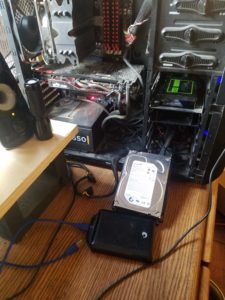
At this point, I went into various fuzzily related details to create suspense, such as how I couldn’t find my other SATA cable or how I didn’t have the correct mounting for my case for this HDD. I yanked the unformatted SSD and connected the HDD and let it rest just outside the case. (The picture is from just now, not then.) Anyway, at one point, the drive was putting its weight on the power cable, so I started turning it over. My father cringed as I slowly rotated the box to avoid too strong of a gyroscopic effect on the spinning disks. He told me that Hard drives used to be sensitive to the orientation they were in when they were first formatted: they must not have had as good motor control for the read heads. While this is an aging HDD, it isn’t 90’s technology, the latest example cited as not being up to being turned on end.
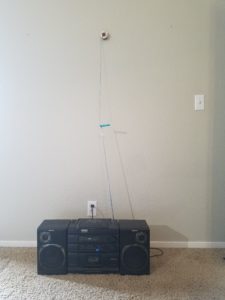
Also of note, I stuck Ubuntu MATE on another USB thumb drive. I actually had emptied a few others as well, but I only went through with the one.

At this point, I rebooted and lost my earlier post. Now for the results.

I first tried to get into the boot order to adjust it. That didn’t help too much, but I did find the boot menu. I selected the 2TB drive available and “Windows is getting used to its new hardware,” or something to that effect. It took a while. I ended up not being there when it rebooted itself, and I had to get back into the BIOS and back and forth… I eventually pulled my main hard drive, the green one in the picture, and let the HDD at it. With nothing else in the way, it booted. To black. It’s like the login screen was stuck loading after giving me the mouse pointer. Startup repair didn’t do much for me.

At present, (the time a depicted by the picture) I have three hard drives connected to my computer. I managed to find the lost SATA cable in a drawer I’d forgotten it was stashed. The configuration of the power cables is maxed out. Sure, I might be able to use a little trickery and rerouting to fit a few more things, but the geometric shape and lack of cable elasticity is making things difficult.

***

P.S. Edit: Guess what I found after writing the final two paragraphs. Yes, the lost post in question. I need to pick a single browser for composing my posts. The only reason I even recognized it as the lost post was because it lacked the picture. I like this a little better, so I’m still using it instead of going back. At the same this post missed some stuff. Instead of merging them though, I’m just going to post it as a page and link it HERE.

P.P.S. It was a page all along.

***

The final results are in: the little Chkdsk stunt with repair stunt worked. I was able to boot the drive successfully two consecutive times. I won’t vouch for its speed or the fact that that copy of Windows somehow missed my bigger monitor, and had the audacity to call it older than the one it actually found. Jokes aside, it did say some older monitors might not automatically connect. Detect monitors didn’t find it either. I don’t really care. The problem I set out to solve is fixed, and the drive is now pulled from my system.

Final Question: I know I said I would like to do a monthly video, but at this time, I don’t know if I can keep up on the ideas. Until I get a bigger project, I will probably just make a video when I am doing something new and hardware related. What would would you like to see in such a video?

Desktop Data Rescue

Good Morning from my Robotics Lab, this is Shadow_8472, and today, I am going over my first trot into actually using Linux for something. Let’s get started.

So, my family’s main computer is an aging system. This week, it decided to just not work anymore. Taking an opportunity to exercise my skills, I went ahead and emptied a USB thumb drive and started learning. And by learning, I mean failing and researching why things kept going wrong.

I started by considering the problem. I had heard Linux Mint is supposed to be stable. I used Chrome to surf over to linuxmint.com and went to downloads. I was confronted with four desktop environments. I went with MATE, as I had heard nothing to do with with Cinnamon, Xfce, or KDE. The next page gave way too many options in terms of mirrors to download from. I tried out two different links; the first mirror estimated almost an hour, and the second one, just five minutes. Another five minutes were spent moving the ISO file I had just downloaded over to the drive I had waiting (I still do not fully ISO yet, just that it is some sort of disk image).

After looking up a tutorial on setting up the bootable hard drive, I moved the ISO back to the downloads folder and formatted the drive. I followed the instructions and, soon enough, had a stick that was supposed to work. I prayed a silent thank-you prayer after the boot order was overridden in the BIOS and I saw Mint working for the first time.

Next step in the plan: get into the failed hard drive and dump everything to a new drive. Oops. Newer versions of Windows like to hibernate themselves instead of actually shutting down. Linux gave me a super long error message informing me about something like this happening. The proper fix would be to get into Windows and disable it from merely hibernating – not an option here. Another look at that error message hinted to trying to mount the drive as read only. I went to the command line and had no idea where to start. It was getting late, so I messaged a friend; he linked me to a forum post for my exact problem.

The fix worked beautifully. I connected an external drive and compared the used space on the bad drive to the empty space on the backup drive. I was pleasantly surprised to find enough space. I set the system to doing a dump and left it overnight.

Somehow, the system held up long enough to finish the dump. I was thrilled when the last of the data was saved. My father told me I had helped diagnose the cause of the crashes; he was thinking it was a blunder with the thermal paste for the CPU and cooling system. Of course, it went and crashed again shortly after.

The old system has been replaced. I’m waiting to do a checkdisk on the failed drive using my tower, and I think I can safely say my next post will be on tinkering with the old system.

Final Question: Up until now, I have only been studying up on Linux, taking it slowly, getting ready to do something while waiting for a computer I can brush off and start over on if I ruin things completely. Now that I have an available workspace, I find myself reaching for results using tutorials. Do you learn better by first doing, then learning what you are supposedly doing; or learn what you should do first, then do it?

At the Gates of Linux

Good Morning from my Robotics Lab. This is Shadow_8472, and today, I am giving my first thoughts on peering into the “Linux World.” Let’s get started.

This week, I’m giving my post sort of in parts. As for when I start this post, I don’t know how far I will make it. That said, I will probably be commenting on things I learn from, mostly videos I don’t choke on.

…

Getting started, I found an older video uploaded by Eli the Computer Guy. His Introduction to Linux went over the basics of Linux, covering many topics. Give it a watch if you want into Linux. Just know, it is not a quick guide. It is more like a “Here’s what you ought to know before starting” type of video. A big thing I learned about was my misconception about licensing for open source software. Long story short, “open source” does not imply “100% free.” I want my robot personality project to use software that is free. Open source is just a good positive, but not big enough for me to worry over.

My big takeaway from the lesson: there are many distributions of Linux for a reason; each one is optimized for its own application; interested parties must know exactly what they want their system to do before they reach for the prettiest one and dig in

According to my prior research, Ubuntu seems to be my best shot, but I am not sure yet. Back to research.

…

I found another New-to-Linux video. Uploaded by Joe Collins, his video, Top 5 Mistakes New Linux Users Make, is aimed at brand new Linux users, like me. He says he has tons of experience with getting people into Linux. Based on his recommendation, I think I want to check out Ubuntu MATE (Ma-Té) and hope it works with Gazebo and ROS. He also gave a warning about “borking” a computer. Read: user induced software meltdown. My system is pretty stable as it is. He recommends getting a separate system to play around on. I think I may take that route.

In any case, I doubt I will be installing Linux THIS week. If it weren’t for this blog, I probably would be losing focus at this point. I’m already invested a little, and I don’t want to stop here. Besides, I think setting up a separate Linux computer for my private MineCraft server will be a good stepping stone project. I may even spend some time learning how to remote in from my Windows 10 machine.

In the meantime, I think I’m just going to try and take consistent steps on my overall project, even if some of those steps are finding out I had severely underestimated the next planned step.

…

In closing: No Linux today, expect another slow update next week. Maybe I will look into the way you are supposed to get software. I hear it isn’t by just Googling for it and downloading. Final Question: Do you use Linux? If so, how common is it to really mess something up when you are changing an innocent enough looking setting?

PC Upgrade Time

Video Link

Good Morning from my robotics lab. This is Shadow_8472, and today, I’m covering the installation of my new SSD (Solid State Drive). Let’s get started.

If you are watching the video version, you can see a time lapse of the upgrade in the background.

So, for the upgrade, I’m adding a 250 GB drive. To mount it, I have a plastic bracket and a SATA cable. After bringing the computer over, I fetch a bowl for holding screws. I unpackage my supplies and open up the case. I use a little canned air to clear some of the dust buildup. It takes me a moment to puzzle out the final orientation for the bracket, but when I get it, I start installing the SSD with the big screws from the bracket set. The drive does not accept them. I use the smaller ones instead.

I feed the SATA cable through the case and attach it to the motherboard. After taking the faceplate off to get a better look the first drive’s mounting, I remember the quick release system.  I start attaching the remaining screws so I can slide the assembly into place. At least, that was the plan. The screws refuse to go in straight. There are three sets of holes to mount the bracket and all are too small for the bigger screws.

I spend a while battling the holes and drop the first screw in the case. I fish it out the first time, but the second time, I have to pick up the case and dump it. After trying one last time, I abandon the venture and locate a smaller set of tools.

Fortunately, I find some acceptable screws in the small screwdrivers’ case. One catch: of the six screws I find with the small screwdriver set, only three fit. I try out a few other possible screws from the garage, but none of them fit. I stop the camera for a few hours and go shopping for a fourth screw, but I don’t find any.

While I shop, I open myself to the possibility of mounting with only three screws. After all, three is all you need to hold it still if you aren’t planning on shaking the thing around on a regular basis. But as a last ditch effort, my father comes in and lets me modify a long screw that would otherwise have fit. I try marking the length, lopping it, and filing it down. The shortened screw’s new tip is too big. Resigning to my three screw plan, I stick the assembly in and close everything up.

After reconnecting my peripherals, I turn the system on and have a circus of a time trying to figure out if the operation was a success or not. Windows didn’t see the new drive, and I even reopened the case and adjusted the connections. Eventually, my father was indeed able to confirm that the system did see the drive, but Windows wasn’t acknowledging it for lack of  formatting. I opted to leave it unformatted until next week when I do my research on installing Linux.

In closing: This was the first computer upgrade by myself for the most part. I was clumsy with my organization despite my attempts to make everything go smoothly, but it was a success anyway.

Final Question: What was the first computer upgrade you did without supervision?


First Project Complete

Good Morning from my robotics lab. This is Shadow_8472 and today, I am explaining why I am not upgrading my computer this week. Let’s get started.

Long story short, California was set ablaze last week.  Our neighborhood saw a glow from the fire burning the next city over. We packed all our most important possessions, like a 100+ year old trunk of photos and my desktop computer.

The Internet dropped out for a day or two and our gas got nixed so it wouldn’t make a flamethrower if the neighborhood burned down. We still had power, and our stove and new drier are electric, so we only really missed our hot water. We tuned in to the local radio station for live coverage.

The station itself was in a badly burned section of town, almost having been burned down themselves. They were ultimately spared, but they did say something about an exploding tree shooting an ember the size of a large fist into their back parking lot.

The stereo we were listening on is almost as old as audio CDs. Fun fact about radio technology: when you are barely getting a station, it gets fuzzy with static. Repositioning the antenna is a minor mitigation, but it doesn’t help when your position in the room can interfere with incoming radio waves, even if you are just sitting up.

I eventually got tired of the static and tried to fix it. The sliders on the front helped, but not enough. Touching the antenna seemed stabilized the signal almost perfectly, but no one seemed interested in standing there with an arm on the thing.
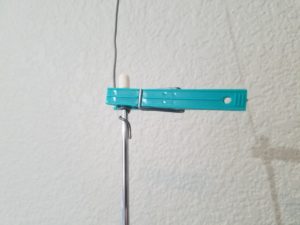
Eventuality, in true MacGyver style, I raided the tool chest and grabbed the first metalic spool of wire I saw, in this case, some sodder for stained glass.

I ended up using a plastic clothes pin to affix the makeshift antenna extension. I later improved my design by curling the sodder around the tip of the antenna to prevent the connection from slipping down. Since then, the radio only complained when adjusting the spool, which was hung up on the wall.

In closing, the fires are still burning, but the firefighters are getting them under control; it looks like my neighborhood was spared. I haven’t seen any national coverage, but locally, the news has been positive in the face of the disaster. Sure there were some looters going through evacuation zones, and people are still trying not to breathe the airborne remnants of other’s houses, but the impression I got is that people as a whole are getting together to help each other.

In the future, I am sure there will be times I am at a lack of overall progress due to one delay or another. What do you think about unplanned mini-side projects?

Early Progress

Good Morning from my robotics lab! This is Shadow_8472, and today, I’m going over my progress so far. Let’s get started.

Now that I’ve written about getting the site up and a few vague goals, I want to explore some relevant research I did before I went off to start blogging about said research.

ROS. That is about the first, term you should hear when first looking into hobby level robotics. ROS (Robot Operating System) is, surprisingly, not quite a OS (Operating System) for robots. My understanding is that it’s more like a program that manages robot parts. It’s free, open source, and used at all levels of robotics, including some commercial products. Just don’t use it for something that absolutely must not get hacked or someone could die. Security, I hear, was more of an after thought.

Linux is the more familiar name for the do-it-yourself type of computer OS. Personally, I’ve used Windows since I first taught myself Chess on Windows95. Guess which OS ROS runs on. Answer: Linux. Guess what my second major goal for this project is going to be. (Tip: the first goal was my first post.) Answer: Install Linux and learn more about it. Now, I’ve had some minimal exposure to Linux at both my high school and university (both used Windows primarily). I’m not a “What’s Linux?” type of guy, but I’m no alien to it either.

Gazebo is another program I read about related to ROS. It’s some sort of robot simulator. I don’t know much about it, except It primarily runs on Linux, and that you better know what you are doing if you dare set it up on any other OS *Windows*. I think it prefers to run in Ubuntu, but I’ll check that out later.

Anyway, since Linux keeps popping up everywhere I look during my preliminary investigations, I figured I’m not going to have a good time if I try to get anywhere without it. I set out to install Linux on my desktop; my SSD was full, even after relocating a sizable file and picture archive. Somewhere on Gazebo’s site, they recommended against just running Linux off a flash drive, which would have been my next investigated solution. I finally caved and bought a new SSD to install so I can dual boot my machine. It was about that time I decided to start this little blog sidequest. Besides, the more I learn, the more ambition this project goal seems, and I can use all the help I can get.

That pretty much brings you up to date with my research so far. As of this posting, I have not installed the drive. That’s in next week’s topic. I plan on uploading a video where I perform the upgrade.

Final question: While my ultimate goal is to assemble the software side of things for free, paid stuff still might be beneficial to look at. (Think, “They did it, now can I?”) What software should I look into?

Project Goals and Dreams

Good Morning from my robotics lab! This is Shadow_8472, and today, I’m going over my long term goals for this blog. Let’s get started.

Starting off with my core goal: I want to build a social robot with a customizable personality using open source hardware and software. My hope is that anyone reading can follow along with their own robots, learning from my research and hopefully contribute back as the projects develops.

Social robotics is a field within robotics where robots are made to interact with people. I expect building the robot will be the easy part. Programming it will be the real challenge. As far as the physical robot itself, I have been considering using Proto2, a platform developed by the team at sweetiebot.net. According to their FAQ page, they intend to release Proto2 to be open source before the end of the year.

In addition to making the personality customizable, I would just love it if the software was capable of operating offline. From my research so far, my first impression is that this is a stretch goal; any potential personality software I found requires an Internet connection at all times. This may be because it is just easier to program, or if it is even reasonable with today’s technology.

This leads into my first dream level goal. Maybe, just maybe, some of the work done here will end up in a larger robot serving as someone’s service dog. I doubt a bot on that scale would be cheap without having a major reduction in price. I hear nylon muscles are under development. I may have to check back on those in a few years.

In closing, my strategy is to aim high and hope I can find the right people to work with along the way. For my ending question: What personality traits would you give a robot?

Hello World!

My site is now active. As I enter these first few words, I’d like my audience to know, setting up a blog is not easy. Sure, I could have gone an easier path, but for me, this isn’t just a robotics blog. I have a class in web languages that I will need to retake some time, and I wanted to view my site’s code and edit it.

I started with the idea about a month ago. I made my first, permanent progress almost to the hour and minute. All along, I was figuring I’d be posting by “next week,” until I completed the task at hand and the next part of the problem presented itself. Even now, I still have a lot to do in terms of web design.

Never underestimate the value of a good tech support team. I rejected at least a few services with live chat who barely passed the Turing Test solely by running out of prewritten messages and displaying a lack of English skills. One place even had a chime announcing an answer to your question. The previous two features combined provide an experience I would imagine a low end fortune machine would provide. While the same chat client with an annoying chime was used for HostGator, my host, the help was consistently productive and the chime was something to look forward to. The tech support for NameSilo, my DNS, was awesome and helped me learn the difference between a nameserver and DNS records. NEVER underestimate the value of a good tech support team.

I intend to make weekly text posts, and hope to make monthly video posts. Each week, I want to end with a question. As the site is still under construction and I don’t know how to set up a comments section yet, I ask anyone who is viewing this: What is the date you first came across this site?

Edit: Comments are open now.