A Series of Limitations

Good Morning from my Robotics Lab! This is Shadow_8472, and today, I am laying a project to rest. Let’s get started.

The past couple weeks, I’ve been working to make a video call from my Raspberry Pi using the PiCamera taped into the case. Only this week did I learn it was too ambitious when I stopped by the workshop and actually started testing what worked. I managed to get a inbound stream, and presumably good audio (there weren’t any speakers connected at the time), but the video stream coming from the Discord webapp in Chromium came through way too slowly to be of any use but for a good laugh.

My time on this project was not wasted, though. I learned a lot about both how the PiCamera works and what it can do and what the Pi itself cannot do. It turns out the Raspberry Pi has all its graphics on the CPU, meaning no specialized circuitry for videos to begin with. That isn’t to say it cannot handle ANY streaming. It did manage to pull off viewing the live broadcast of my church’s services for the last couple Sabbaths with only a few problems. It’s likely something to do with the resolution and frame rate it’s trying to work through. That or trying to send non-existent audio while streaming video is a little much for the little computer.

This project was fun, but I simply don’t have the skills to pull it off at this time. If I ever do get it working, I expect it to be on a tiny, 64 bit OS for the Pi written just for video chat and nothing else.

On an unrelated note, I plan on separating the Pi itself from the cat deterrent(s). It will hopefully solve the power problems if I set up a little, offline network connected by radio or WiFi. Maybe I’ll take apart an old wireless mouse and see if I can use that.

Final Question: If you want to stretch your abilities, you should pick goals just outside of your abilities. What was the last project you tried, but found was just a little bit too far out of your reach?

A Series of Reluctant Leads

Good Morning from my Robotics Lab! This is Shadow_8472, and today, I am bringing you another fragment on my journey to get my PiCamera working in a video call. Let’s get Started.

This week had a lot of progress, but no workable results. I did a lot of research on the problem, refining my understanding of the situation, but the solution always feels an hour or two away.

To recap, work last week finished with the Discord webapp playing nicely with my Blue Yeti microphone, but it wouldn’t even acknowledge my PiCamera, even when getting into the sound and video test page.

This week, one of my early findings was a driver, Video 4 Linux 2 (v4l2). I spent half a day believing something wrong with it, because v4l2 looked a lot like v412 because of the numbers before and after a lower case L. Long story short, after running a command:

sudo modprobe bcm2835-v4l2

The camera still didn’t work, but at least Discord tried to load an image from “Default” instead of insisting there wasn’t anything resembling a camera it could use

Fortunately, while researching why the camera still isn’t working, I noticed a forum where someone pointed out the command needed to be run after each reboot for the V4l2 driver to work. Other background information I picked up was that the problem might be something requesting a 0x0 feed to display.

I also noticed for the first time that the “raspistill” program’s output covered parts of the black boarder Raspbian leaves. It’s as if it’s on a separate layer in front of the OS’s video output. One of the options included making the camera output transparent, so I used that freedom of vision to try and share screens, but any screen sharing was from the desktop layer only.

I had a bunch of redundant/unfruitful research for a couple days, and I eventually ended up in the workshop again. I want to say I had about half my progress this week right there. It took a little while to review my progress so far, but after everyone understood things, we started playing around with narrowing the source of the problem farther. Many of my hunches about where the problem wasn’t were confirmed, though I did learn a bit about the Chromium hardware permission system and how some software repositories are left in a power saving state while not actively being used.

We managed to confirm the driver was working after arguing with a python prompt. It still requires adjustment, as in it threw up what looked like a blotchy, pixel for pixel view of the camera, and it was zoomed in. It covered up the black boarder entirely, so I’m hoping this isn’t just an educational dead end.

Final Question: most of my unfruitful research is quite unmemorable. This was just one of those weeks where my early work was mentally lumped in with last week’s work until I reviewed the actual blog post I made not covering it. When was the last time you forgot how recent your recent progress was?

A Series of Dead Ends

Good Morning from my Robotics Lab! This is Shadow_8472, and today, I don’t have much, but I’ll try to put something down. Let’s get started!

I went to the workshop again this week with a list of things I wanted to figure out how to do, starting with getting TightVNC to switch users. Nope. TightVNC servers are tied to a single log-in session. Without good communication, that piece of information took between thirty and sixty minutes to figure out. We did get a copy of the heater program working the Pi at 100%. Before I re-run the temperature experiment and risk damaging the case, I have another side project I want to try figuring out.

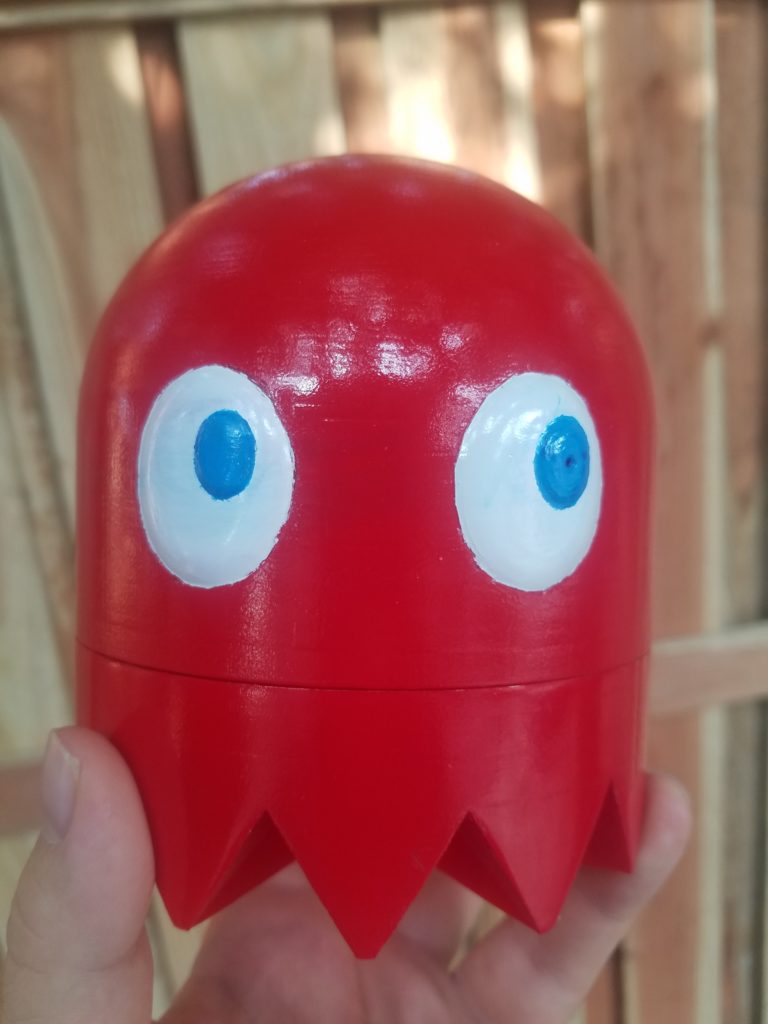
I have a friend I haven’t seen in a while and he lives in another State. I want to show off my ghost case (Now pictured), but I want to call on the Pi and hold up a mirror so he can see it with its own ‘eye.’

My first thought was to just download Discord and call it good. Oops. The Raspberry Pi may be 64 bits, and Discord want to run on 64 bits, but Raspbian doesn’t exist on 64 bits. I found a decent-looking forum post [LINK] that discusses 64 bit computation on the Pi 3 series. Long story short: 32 bit Pi computing has inertia. They don’t make 64 bit Raspbian because it would cost more utility than the few who seek it out would gain from it; it simply isn’t worth it for an official, 64 bit Raspbian to exist.

Jumping back in time to before I found the article, and I had just given up in the short term, I looked around to find that there are operating systems that can run on the Pi that use all 64 bits, but several comments seem to describe the wanting nature of either the setup process or trying to squeeze any additional performance. My thought is that such operating systems are often not optimized specifically for the Pi and take up what benefit they otherwise would have had with additional overhead. The extra bits are there if you need them and know how to use them.

At this point, a Discord client is looking like a no-go, but I did try to get a call set up in the browser. I haven’t gotten it to work yet, as I need to figure out how to get my Pi Camera and Blue Yeti to play nicely with the Discord site in the Chromium browser. It’s just something with the permissions, I hope. I remember seeing something about the Yeti not giving Linux a single thought in its advertising, but I think I remember seeing it show up in the Discord web page.

Final Question: Does anyone actually know if the Raspberry Pi will melt through a PLA case?

Review and planning session

Good Morning from my Robotics Lab! This is Shadow_8472, and today, I am laying out my plans for the near future. Let’s get started!

I’m still figuring out the new setup with Derpy. The VNC client I set up on my main desktop isn’t sending keyboard shortcuts when remoting into Derpy, but my laptop does and I cannot find the setting to change it. It also seemed to prefer opening up programs for a local login (if present) if the remote server requested anything be open. I upgraded it to Ubuntu 18.04.1 LTS after trying to get some tech support over Discord.

In my last post, I believe I said I was now using GNOME 3. That was wrong. I’m on the Xfce desktop environment and I couldn’t tell the difference, especially while trying to elicit help. I’m willing to work with this desktop environment, as I hear it is supposed to be pretty stable, and it’s the only one I have to work with at the moment. Yes, I don’t have a way to switch desktop environments remotely. I tried logging out remotely, and the VNC session became unusable with that complex black and white “gray” pattern, replacing the desktop picture as I dragged lingering windows around. A reboot fixed the symptoms, but I still want to see about getting the root cause addressed sometime.

I have a few things I want to finish before going on with programming the Pi to detect and deter cats. Mostly the more intermediate Linux literacy skills, like getting WINE to run things reliably, or forcing a piece of hardware to work when it shouldn’t.

During my miscellaneous research this week, I found Rasbian is only a 32 bit operating system and the Raspberry Pi 3 family is all 64 bit based. I would like to explore benefits and drawbacks to finding a lightweight version of Linux to run on the Pi and running that for my cat program instead of just programming it for the board’s default OS.

Final Question: It’s hard to know what version of an otherwise identical product to go with, especially if you’ve never needed it before, especially software. I find a good word from someone I know goes a long way. How do you decide what version to use?


Remote Access 1

Good Morning from my Robotics Lab! This is Shadow_8472, and today, I have a lot of progress to report on remote accessing my computers from each other. Let’s get started!

I spent most of my time for the blog this week in that workshop I joined a few months ago. A lot happened, but I am not the main mind who put everything together, and I don’t fully understand everything that’s going on.

This week, I gained the ability to log into Derpy, my secondary Minecraft server/Linux testing platform, from another computer using TightVNC (Virtual Network Computer). TightVNC is one of many desktop viewing applications; most others cost while I’m working with a free version.

The first step was to set up a server on Derpy and get another computer to try and connect. We eventually ended up with a “gray” error screen with a black x pointer if we had everything working as best as was possible (it was actually a complex pattern of black and white pixels).

Part of the wonkeyness of remoting in involves screen parameters, like size and this one I know nothing much about called color depth. Something along the way likes a color depth of 24.

While we tried a few possible fixes, multiple places said to put GNOME on for the graphical interface. While I find the Cinnamon nice and convenient, I am more than willing to explore something new to find something that works… GNOME surprised me with that pesky zoom in thing I abandon Unity over.

I did a bit of research, and the popular Unity environment is built on GNOME. I hypothesized that Unity had changed something Cinnamon couldn’t care less about. None of the normal zoom in fixes worked, and the text had their smooth, vector based look, even though they were huge, so we knew the picture was at the correct resolution.

Over an hour of pointless guesswork later, I had outsourced the problem to a Linux support Discord server. After no response and someone else’s problem getting solved, I reuploaded along with a photo of the screen this time. Over the next three minutes or so, a couple users by the names of MotherM and ~> yay -s Superuser went back and forth trying to figure it out until a user by the name of PlasmaPower offered a command to restore the correct interface scale factor to 1 where Superuser had identified it as at a factor of 2.

gsettings set org.gnome.desktop.interface scaling-factor 1

With GNOME functioning properly, I was able to make a connection and even managed to open the Minecraft server remotely. However, any new graphical programs, including terminals, opened up in the host machine. It turns out, using TightVNC server hosts an extra login session, at least the way it was set up. Before I left the workshop, we got a script set up to automatically start the VNC server whenever the computer restarts.

Later, I figured out that if I logged out from the host machine, newly opened programs work as expected. I also eliminated one of my dual hypotheses. New programs prefer to open locally before yielding to remote sessions when dealing with multiple logins from the same username, not the first session started.

As it stands, the connection is stable. Future improvements may include sizing the resolution to fit my secondary monitor and getting a version of GNOME installed I can relate to a little better. I should also be able to set it up for CLI mode only for the host terminal.

Final Question: Linux is apparently the hardest OS to get set up for remoting into. When was the last time you reached the finish line, only to find out you were doing it the hard way, even if the easy way wouldn’t have worked for you anyway?

How I Prefer to Deal with Griefers

Good Morning from my Robotics Lab! This is Shadow_8472, and today, I am using some kind of new WordPress backend interface to tell you a story this week about something that happened on a creative Minecraft server I run. Let’s get Started.

A while back, I did a project where I revitalized an old, boat race minigame from a previous season of the Minecraft server I play on. I set up a private server to test this operation. Later, my family started projects on that server for others to come in visit before they were built for real. Part of the boat race required people to have OP privileges to work, and not everyone knew about the work on the race. Those that knew ended up being those with OP privileges.

Last week, I heard a report of confused member wondering where the warp points to the different projects went. I logged in and found tell tale signs of explosions around spawn. The pad with all the warps was gone, its command blocks smashed.

I found a name and what looked like a method of destruction. This person had gotten an advancement related to spawning the Wither Boss, a very destructive enemy in the game, and thought it didn’t quite look like a Wither Boss’s direction of destruction, it was close enough to get me to pursue that line of investigation. 

My mother was my primary ally this time. Over the course of a day, we questioned the suspect and assembled a story out of they told us. Apparently, a younger sibling had logged in from school with her account, having mysteriously gotten the IP from somewhere, spawned the wither, [smashed the command blocks], and left. Later, they logged back in and quickly left, fearing they were being framed.

The story didn’t seem quite in line with what the command line was saying, but with only a mouse on Derpy Chips, the computer the creative server is hosted on, things were going a bit painfully slow. I found the IP the griefer was using, and an IP associated with a legitimate access where they had a conversation in chat. The IP’s matched. I know a little about how IP addresses work, but I’m no guru with them. What it looked like to me was that I was getting the IPv4 of the ISP (Internet Service Provider) for the city they were in, and that that was a dead end for investigation for the time.

No matter the story, I was already thinking of how to fix the mess. I knew I had several, old backups and I could just use some of the files from good files instead of the griefed ones. I set Derpy up for work, but found it impossible to easily move the needed files from the latest backup to a copy of the current world.

I thought it would be a good time to try working on my next blog post (today’s), where I wanted to set something up so I didn’t need to ever switch screens and controls around again. Long story short, I tried to plug a different keyboard in from another computer, and it worked. I moved the appropriate files to the copy and had someone look at spawn… and it was the old, bland spawn. I didn’t have a copy of the nice spawn that got ruined. Oh well.

Meanwhile, my mother was still suspicious of the prime user of the grief the account that did the deed. I went chatting with them late at night, getting their story out of them in text before eventually pointing out that it didn’t match up with what I remembered of the logs. I went to sleep, and in the morning, I found a full confession. It was TNT, the wither skull was just meant to look cool, and the self-given command block I had originally assumed had been used to kill the non-existent Wither Boss was a red-herring. They were the guilty party, and they were truly sorry.

In that moment, I felt sort of like how a villain might describe the rush they get when they have their foe begging them for mercy but are still going in for the kill, but my only I thought was to forgive the party who had wronged us. It took me a while to word my response, and my mother had actually gotten back to them before I could respond, but we all were leaning toward forgiving them. OP privileges were revoked, of course, but while flying over the destruction, I was thinking to myself, ‘That would make a really nice lake if it were properly decorated.’ We asked them to repair the damage as a friend.

I was most surprised at their reaction to being offered forgiveness. They were expecting us to get mad, toss around bad names, badmouth them, ban them, and hate them forever “to put it nicely.” I honestly cannot relate.

We asked for a chance to share God on this server, and we can hope that they go and do likewise.

“‘If your brother or sister sins against you, rebuke them; and if they repent, forgive them.'” (Luke 17:3 NIV)

Final Question: Have you ever been forgiven of something, or been a position to forgive someone seeking forgiveness?


Stress Testing PLA as a Raspberry Pi Case Material

Good Morning from my Robotics Lab! This is Shadow_8472, and today, I am running a looping Hello World program on my Raspberry Pi for a while to see if my work for the last few weeks needs to be redone in ABS plastic. Let’s get Started!

I’m going with the hypothesis that while the Pi may run a bit warm for PLA plastic, with the heat syncs, and ventilation, I should be okay.

My procedure will involve using an infrared temperature sensor I borrowed from the workshop I joined a couple months ago. After messing with it for a while, I figured out how to use the temperature probe that came with it. I’ve taped the probe in the space I’m most concerned about overheating as I don’t have a line of sight view of the place.

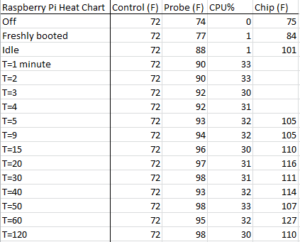
Each data point I take will track the ambient temperature of a consistent point nearby, the temperature of the probe, the CPU speed, and some points will take the temperature of a chip on the inverted Pi’s exposed underside, but only when data points are coming in after 5 minutes or more.

***

I’ve started collecting data. The probe wire is notoriously difficult to keep in place. I took data points while it was off and freshly booted. Nothing much changed temperature wise except the chip getting a little warmer. I’ll include a screenshot of my results later.

***

It’s part way through data collection. I may have skewed the results of collecting the data on the chip on the top side by measuring at a different angle. Ambient temperatures are fairly steady but the probe location below the heat syncs is slowly climbing. I just took another measurement, and the possibly skewed one doesn’t seem like I’ll need to throw it out after all. I was hoping it was my readings and not a temperature spike. I’m also concerned that the probe may be slipping, especially if it’s getting closer to the heatsink.

***

The probe was slipping! Its readout was growing steadily as the tape holding it in place gave way. My data at T=40 minutes and on will have it correctly positioned.

***

***

Estimates of the low end for PLA softening are around 60 degrees C or 140 F. In conclusion: While I believe my data has a large margin of error, I do not believe it is so great as to void my conclusion that it is safe for my case to operate my Pi under these conditions.

The Pi only ever reached 33% CPU usage, I believe it was throttled by the task of writing to a command line. If it were to run hotter, the plastic might still be in danger. I will need to redo this test when I’m running image analysis on it.

Final Question: How else can I improve my tests?


A New Tool Part 13

Good Morning from my Robotics Lab! This is Shadow_8472, and today, I’ve finally completed the construction of my New Tool!

I believe it’s only appropriate that I write this post on the computer in question, a little Pac-Man themed Raspberry Pi system I’ve named Blinky Pie.

The work this week was actually fairly simple. I stopped by a local hardware store with the Pi and the case to pick up two screws, and the guy who helped me was very knowledgeable. He helped me choose screws that were big enough to hold the board, but not so big as to crack the printed plastic.

Before I did my final assembly, I did a dry run where I taped the camera in place across the top of the dome and down the other side, and it worked pretty well, so well, I only had to add a final piece to keep the camera secured.

I took the camera out to finally install the two heat sinks that came with my Raspberry Pi starter kit, a task my father was happy to help with. After that, I installed its ribbon cable around the back of the board where I could install it with the screws I picked up earlier after making sure the camera was installed correctly. Of note, I have been having a lower rate of failure when installing that thing lately.

While celebrating the final completion of the base hardware for my tool, I ended up exploring some settings on the GUI, specifically the task bar, or as Windows would call it, the Start bar. I found a setting to customise the color, and about a setting for about everything you could think of and double it. The term is called “decision fatigue.” There are so many settings, you can spend, and have to spend an hour or two to get everything looking OCD compliant. One glitch preventing using the “icons only” setting from save space has a workaround of moving the task bar to a side and back again, but that throws a bunch of other settings into chaos, mainly the height of the task bar, and guess who doesn’t have a “restore to defaults” button!

I’ve run multiple tests with the Pi idling in the case before its final installation. I’m pretty confident the case won’t melt. It’s well ventilated by the heat-sinkable chips. I even ran the dry assembly for a few hours, and the plastic around the stock board with out heat sinks was only warm.

Final Question: Besides feline repellent, what other applications can you think of for a Raspberry Pi with a camera?

A New Tool Part 12

Good morning from my Robotics Lab! This is Shadow_8472, and today, I am finally done with the paint job. Let’s get started!

I had to give in. Spray paints are just too broad of strokes for the delicate eyes. I ended up recruiting my sister to do them with acrylics. On the plus side, they are a slightly closer shade of blue to the original sprites, which I was going for, anyway. I booted up the Pi after the final bits of paint were dry, and confirmed a clear image from the camera. I snagged My father to clean the whole thing with rubbing alcohol and the two of us applied a clear coat.

As of this writing, I have spent an hour or two working at removing that Elmer’s glue mask. I waited too long, and the mask is too thin. If I ever need to mask off another waffle cone like that again, I’ll spend less time using masking tape beforehand than peeling the glue afterword. The Elmer’s glue trick is only for small details!

The paint job is not as perfect as I’d hoped. The white iris has a little bit of blue in it and there’s a little chip in the paint on the back. A bubble or three have grown in a few places about the surface, and the final irises have brush strokes. Even with all these small flaws, it still looks better finished than it did while stuck in development limbo. Overall, I’d say it’s almost what I wanted.

As it stands now, I have most of the glue off, but the rest is either splitting on me or stubbornly sticking to the printed plastic. Fortunately, the holes I taped off remained taped off through the whole ordeal so I didn’t have to go through and find a hook to get blobs of glue out of all the deep crevices.

Looking forward, I hope I don’t need to use an Internet connection to recognize a cat. I honestly don’t know how long it will take to finish with the software side of things, but I will need to first make a “Hello World” program to debug my coding setup. Come to think of it, I likely only have one more “A New Tool” post, as it’s just going to be attaching the board and any little details that pop up.

Final Question: have you ever had a long project finally approach its completion date after crawling along for way too long?

A New Tool Part 11

Good Morning from my Robotics Lab! This is Shadow_8472, and today, I’m reporting the trickle of progress on the Pac Man Ghost Pi case. Let’s get started!

When last I left off, the paint needed a little sanding to get rid of brush strokes. I used 1000 grit sandpaper on it, but I ended up smearing the blue touch up paint onto the white iris. Additional sanding to get the smudges and strokes off the white rubbed straight down to the red plastic.

I ended up having to repaint the whole thing. Dealing with paint on this project has been a two-person affair, and my father has been quite busy any time I’ve been thinking on the project, and time to dry just compounds the problem.

The first layer to be redone was the biggest, red body of the ghost. As a pro-tip, my father showed me how he peeled back the masking on the eyes a little to get that bit more of coverage. From a diagram I saw some months ago, I believe that will help avoid a hard line in the final product after all the tape comes up and everything.

The second layer was the whites of the eyes. Nothing much special happened here, except the eye holes were covered with tape this time. To my dismay, my father explained the correct tool for the job if I wanted to spray the eyes on. It turns out an Air Brush is a lot more handy than a full spray can, but he did figure out why it didn’t work so well the first round of touch ups.

The solvents in spray paint evaporate quickly, so he maximized the amount of solvent by spraying upside down to get some extra propellant, as well as use some mineral spirits to help combat premature paint clumping.

As it stands now, there was a little bit of an accident with the blue spilling into white territory. Without an Air Brush, it looks like I will just have to endure a few brush strokes on an imperfect surface. At least the clear coat will still protect the looks it does get in the end. The whole thing is already looking awesome, but my dream of it looking absolutely perfect is something that will need to wait for a bit more experience.

Final Question: Have you ever wondered why you couldn’t do something, only to realize you don’t have the best tool for the task?