3D Printer Online Again

Good Morning from my Robotics Lab! This is Shadow_8472, and today, I am bringing a good report about my 3D printer. Let’s get started!

The problem so far: My 3D printer has had some issues with filament running through the extruder tip when it shouldn’t. The plastic semi-remembers its curl from the spool, so it curls around and touches another hot spot on the extruder tip. In addition: This would drag along the initial couple inches of extrusion, keeping the printer from laying the important first outline when making the raft. I even observed stuff peeling off the printbed a couple times.

While I was at investigating printer problems, I got some cleaning filament and played around with using it for something other than a print; some had come with the printer, and I took it for normal material. I followed a tutorial to clean the printer, and got most of the stuff in the printhead out.

I was never able to get the printer to start extruding right away, but by raising the print bed, the troubled corner stuck without the outline. I still had a print I wanted where I would have a hollow cube, but the support structure would account for more than half the weight. The solution: print one side and two edges twice and glue the halves to each other. I think it took on the order of eight hours, and within four hours of coming off the print bed, one of the prongs had easily snapped. I don’t plan on fixing it, nor do I plan on replacing it at this time. The design was flawed; it was only half a centimeter thick, and I think it needs a full centimeter.

Either way, with this distraction out of the way, the printer is a bit cleaner and working correctly again. I can now return to my bigger project. The next step is with Blender.

Final Question: Unrelated: I started a Spigot Minecraft server this week for family and a few friends. What are some plugins you have had fun with in the past that would work for multiplayer cooperative on a small server?

3D Printer Diagnostics

Good Morning from my Robotics Lab! This is Shadow_8472, and today, I am going seemingly nowhere with my printer. Let’s get started.

I got some cleaning filament today. It looks just like the “sample” that came with the printer. It doesn’t have a spool. It is a translucent white when solid. However, it’s much longer and came with two twist ties to hold it together. It actually extrudes clear and goes milky when it cools.

I spent a while messing with the cleaning filament. I shoved a bunch through the extruder tip and it still ooze a little, then curl around to touch another spot on the extruder tip and form a loop instead of a thread. I developed a hypothesis that the natural curl of the filament was influencing the curl of the extruded material, so I tested it by flipping the roll on the holder. The curl eventually went the other way, supporting my hypothesis. The printer does not appear to be clogged.

I still have a bit of gunk I want to get out so it doesn’t show up in random spots on my important, white print. I found a guide [LINK], but I seemed to regress in my abilities as I went along. The first try was okay, the second one seemed a bit broken, and the rest didn’t even come close. At one point, I even had the filament coming out a completely wrong part of the print head. I ended up turning the printer off until I can research it a bit more, but the guide I linked did say something about maintaining pressure for a couple minutes. I did manage to get a bunch of stuff out, but I have my doubts as to if I even got close to all of it.

Final Question: The curl seems to be a works as intended, but my main problem still exists. Any ideas why my filament is trickling a little when it’s otherwise warm but not extruding?

Planning a Semi-Sealed Night Light Part 5

Good Morning from my Robotics Lab! This is Shadow_8472, and today, I am going over no tangible progress. I ran out of time debating the future of another project with someone, and not even that is resolved. Let’s get started!

I haven’t been able to print anything all week. Whenever I do, the extruder tip is a little runny when it should be stopped. It ends up curling around, then sticking to the side of the tip. I cleaned it off multiple times before I realized what was going on, and I haven’t been able to figure out the correct keywords to search for the problem. I think the problem may be because the printing temperature is too hot for this particular spool of filament. The tip may also have a little clog frustrating things.

I also figured out what was with some miscolored specks in different prints I’ve done recently. The first time I spotted them, I thought they were just dust that had gotten into the print job that really didn’t want to come out. Now, I know it’s residue from previous spools. While this may just look ugly when using a single kind of plastic, if I start switching between PLA and ABS regularly, I will want a cleaning filament. I’ll want it sooner if my problem above involves a plugged tip.

In other news, my friend, who I still want to print this night-light up for, has had a situation change on her. I just found a lamp base I could use, but I may need to make the whole thing battery operated instead.

Final Question: What could cause the printer tip to leak, almost as if slowly extruding normally?

Planning a Semi-Sealed Night Light Part 4

Good Morning from my Robotics Lab! This is Shadow_8472, and today, I am printing a thin box frame the maximum size of my 3d Printer. Let’s get started.

Workflow wise, things were fairly straight forward, though in reality, things were overlapping, as usual. The workflow started with planning. I want a physical model of how big I am able to print. I toyed along the production line between Blender, Cura (the slicer), and the printer before settling for a squished “cube” that will scale to have 5mm edges and corners. A power outage during the night caused me to lose my model, but I was able to load my hollowed out cube again from a .stl file. Interestingly, it was converted to have triangular faces, so I had to turn it all back into quads before I could continue.

Meanwhile, my early cube prototypes’ rafts wouldn’t start out correctly. The extruder tip would start moving without the plastic sticking until a few inches down the line. This problem looks like the exact same one as when I printed 36 coins at once for the meetup with Tango a year ago. That time, I could just discard the malformed tokens, but this time, it’s a whole print depending on this line.

I’ve investigated the matter by learning enough G code to read the instructions the printer was following, and I get the idea it’s following them correctly. Link to a Wiki. I learned a bunch, but I literally don’t have anything to show for it this week. No cube, not even one on the printer. I’ve tested a number of theories, including retracted filament to goopy nosel. I’m out of time, but the first thing for next week is checking out the print bed, a factor I dismissed earlier on because of its resemblance to the coin problem earlier. I will say though, that I do have the bed a little lower than I have had it before, so that may be the case.

Another unsolved problem: Whenever the printer boots and I try printing the hollow cube, I’m finding the printer ratcheting when it tries going beyond its print range. I’ve had this happen a couple times, but it stabilizes after a couple false starts without me seemingly doing anything.

Final Question: Two: What’s with my delayed extrusion start? What’s with the printer glitching and self-correcting?

Planning a Semi-Sealed Night Light Part 3

Good Morning from my Robotics Lab! This is Shadow_8472, and today, I am prototyping the shape for this large night light project. Let’s get Started!

I made a lot of progress this week. We ordered a roll of white PLA plastic for this project, and since it worked out well with a free shipping deal, we also got an ABS spool for when I print up another Pi case sometime in the future when I have a setup that can safely handle the toxic fumes.

While the spools were shipping, I got into Blender, and fiddled around with merging two half-cylinders on top of a box. The shape is supposed to look kind of like a house with four windows. Modeling that up took the majority of my time, but that was review. Good thing I remembered enough to recognize or look up the names and shortcuts for each tool I used.

I printed up my first prototype, and it turned out about exactly as I imagined it, only the color was solid white instead of clearish white like the demo filament that came with the printer in the first place. I modeled up an interior, and it turned out exactly how I imagined the first one. When I saw the printer wasn’t doing it correctly, I applied my mirror modifier and tried connecting the inside layer and outside layer, but the same problem must have happened again, because when I opened up the slicer with the allegedly third design, it was the second, sealed design. Good to note it doesn’t just draw the outer most layer.

While the third one was printing, I decided to slip in a few “spare parts” that were otherwise rattling around in my laptop before replacing the power port. I paused the print and noted how I would need access to the back of the printer when I install the electronics for the final light. Another minor mystery I’ve been dealing with was specks of other colors showing up in prints. While shopping for the filament, we actually spotted a spool for cleaning the printer. I don’t know how it works, but I could see the demand for such a product if someone wants to make sure if there isn’t contamination between colors or types of plastic.

I’ve used what I’ve learned to refine my understanding of this project:

Prototype shape
Hollow Prototype (present)
Model up relief pictures on “windows”
Deduce Final size
Electronics to fit final size
Refine model to hold electronics
Final product

In the interest of keeping specks of black or red out of my final print, I think I want to make a print to demonstrate the full print range of the printer. I’m thinking of doing a simple cube with just the edges. It will produce a lot of infill, but I think it will be neat to just have a cube around.

Final Question: What fun shapes would you like to see available for print for tiny computers?

Planning a Semi-Sealed Night Light Part 2

Good Morning from my Robotics Lab! This is Shadow_8472, and today, I am covering the repair of my laptop with what I believed (until just minutes ago) was the only full sized SD card reader in the house. Let’s get started.

My overall project will rely on the 3D printer, but the only installation of my printer’s slicer is on my laptop. I’ve had this machine for almost a decade. Even though it’s an old machine, it can still barely keep up with my relatively relaxed demands from it. The slicer is still well within its capabilities relative to my patience.

A few weeks ago, I want to say a month or so, I was setting my laptop up for streaming our church’s service, but it didn’t like its power chord all of a sudden, so I set Blinky Pie (My Raspberry Pi computer) on the case. Meanwhile, after testing and replacing the old power chord, we compared the power port to known good ones, and a central post was missing.

My father and I ordered the part from an official source, and finally got around to changing it out. Note for future operations: When the part you’re replacing is at the bottom of a tightly packed pile of electronics, check the fit with any external connectors before installation. We were okay this time.

The repair took a while. My father did most of the work while I navigated the service manual and kept most of the parts straight as they came off. While it was open, we took the opportunity to extract this impressively rectangular dust bunny from the fan as well as a few rattling pieces, mostly broken bits of plastic, but there was a mysterious screw. During reassembly, I found that three of the screw guides/spacers were broken off from the case. I removed the speaker assemblies from around their spots, and found patterns on the sides to tell which was which. We super glued them in place and finished reassembling. I think at least one of the super glue jobs didn’t hold

We plugged it back in, and… got the same error that started the mess. The brand new power chord isn’t recognized. Some research online suggested it may be the motherboard going bad. That one hurts. I’ve had this machine for a large chunk of my life now, and I still had more plans for it. There may still be a little hope. The internal chord for the replacement power port was a bit longer than the original, so we might have ended up with an imitation or one meant for a different model. Otherwise, it might be a BIOS problem. Time may yet tell.

Final Question: What was the most intense repair you’ve taken part in?

Planning a Semi-Sealed Night Light Part 1

Good Morning from my Robotics Lab! This is Shadow_8472, and today, I’m starting a new project where I install some electronics while a project is still printing. Let’s get started!

This will be a much larger print than I’ve ever done before. I know that already. I’ll be laying out the pieces of the project and ordering them as I write, just to play with the writing style.

Different parts include: Blender modeling, Laptop repair, White filament, and Assembling a circuit. If I think of more, I’ll insert them where appropriate.

Project Concept: the final product will be a gift for a friend I’ve known for a long time. It will be roughly cube shaped light printed from white PLA with relief pictures of either Angels or Cats on the sides. For extra style and practicality, I want the top sculpted to look sort of like a curved roof. A long lasting light bulb will illuminate the whole thing from the inside from atop a custom circuit board, but anything inside won’t be accessible after the print is finished.

Laptop Repair: the other week, my laptop refused to accept my power chord. It looked like a bent power pin, but it was a large piece of plastic from the port missing. That will easily take up a post when the part comes in and I cover its repair.

White Filament: I have two colors of plastic right now, black and red, neither of which would look good for a light. The plastic needs to let light through, but also go with pretty much anything.

Assembling a Circuit: this is a topic that could easily take two or three weeks and will challenge and grow my abilities the most. Simply put, I have no idea what I’m doing here, except that I need it to move power from the power chord to the light bulb, and maybe some colored LED’s around the outside. I’ll want to thoroughly test it before final installation.

Blender Modeling: this one will happen in tandem with the previous one. I’ll need to establish a maximum size for the circuit board based on how big I can make the case with the printer. But I’ll need the final measurements of the final board before I start the final print. Unless I want to toy around with an induction based power chord, I’ll need a place to plug in a power chord. It might also help if I was able to screw down the board itself.

So far, I have a fairly good idea for the overall shape modeled in Blender; I don’t think I have a good mesh yet, the boolean operator didn’t exactly like two half-cylinders intersecting like I had them doing.

Final Question: How have you aimed for something out of reach, but not so far as to (hopefully) be unobtainable?

Ice Boat Challenge Port Revamp Part 2

Good Morning from my Robotics Lab! This is Shadow_8472, and today, I am covering the finer details of my port of one of my favorite minigames in Minecraft. Let’s get started.

Many times over this project, I’ve tun into bugs. There is no way I’d remember them all, but I did pick up a few tips along the way, mostly from Grifter. If things are going wrong with relative coordinates, try aligning yourself with the source block and teleporting to the relative coordinates. Another approach is to set a particle in a repeat command block or a chain command block downstream of one. More often than not, one of these will literally get you where you want to go. I recommend the barrier particle for its lack of movement and occupation of a full block space.

Another bug I had to deal with a lot early on was invalid functions. If you try loading a datapack with an invalid function, Minecraft just throws a compilation-time-like error in the console then ignores it. Fortunately, the error report, once I read it under Grifter’s instruction, told me where the function, line, and column of each error was. It also didn’t help that Minecraft functions can’t have a comment start part way through a line.

The most recent bug I had to deal with was one that royally goofed it during some stress testing my parents, Annie_8472 and Leo_8472, kindly provided. Sometimes, a level wouldn’t load if you didn’t make it onto the pressure plates far enough. I tried fixing that by using align xyz command segments, but I only made it worse. I never did figure it out because I reverted the change and extended the search range to include a bit more of the alcove. For those keeping score, the bug was with the IBC game and not the MGC core.

At present, the project is almost done; I don’t think I’ll have enough for a whole new post next week, but I still need to debug the Lost & Found. Jamcdonald, the one who showed me the super hoppers last time, did a quick test for me and made note of the bug. He also pointed me in the direction of a place to get signs to do some fancy stuff the original credits signs do.

Final Question: I’m open to further development after things launch. What kind of levels do you want to see in this datapack?

Ice Boat Challenge Port Re-revamp

Good Morning from my Robotics Lab! This is Shadow_8472, and today, I am going over the “boat race” I ported to Minecraft 1.13 vanilla. Let’s get started.

At the beginning of the week, GrifterMage, an admin on the Minecraft server I play on, showed interest in getting the boat race up and running again sometime soon. I had already changed its host server over to a “Paper” server, like the server the project is being built for. Everything worked for a little while, but one day, the datapacks I tried sending weren’t working. I restarted my server, and my “original” copy was broken.

I decided to rebuild the backbone of the project from the ground up. While Grifter recommended I reuse as much as possible, I knew there was a certain amount of spaghetti logic at the end. I figured it would take less time to take the lessons I learned last time and make a version 2.1.

Grifter said he was okay with work-in-progress “untested” datapacks, so I made provisions as I set up my workspace. With Derpy set up as a VNC machine, I experimented with different arrangements of windows on both Derpy and my home Windows machine until I ended up with something that works.

My creative server with the secret boat race development laboratory in an Ice Spikes biome served to manufacture the structure files. From there, I would switch over to Derpy, where I would copy them into the “original” datapack along with the “originals” of the functions to run the whole setup. The datapack was stored in a special file on the desktop beside another file called Nightly Backups. This file did not live up to its name. I saved between two to four zip files per day there; whenever I felt I needed to make a progress report to Grifter I would open a terminal and run a command to zip the datapack for both storage and transmission.

The greatest flaw I perceived in my design last time was my inability to be sure someone else could set the game up on another server, so I created a “Clean Paper Server” to test my datapacks myself where I wouldn’t need to worry about anything accidentally relying on some scoreboard objective I forgot to make sure was created. Once I was done, all I had to do was delete the old server, copy the Clean Paper Server beside itself on Derpy’s desktop, copy the datapack into Clean Paper Server (copy 1), launch the server, hop in with my client on Windows, load both halves of the arena, and install the Ice Boat Challenge game. If this were something I was planning on needing to do over the course of a month or more, I would have looked into writing a script to automate what I could on Derpy.

The design objectives of this version remain almost the same as my first attempt at porting the boat race. I want to minimize the load on the server, while making it as easy as possible to develop other games for the system. I ended up coming up with a number of standards, like a “home” block for most command blocks in the Level Slots (floors a level can be loaded into) to run their commands from, forming a sort of two-way vector between the homes of each Alcove and Level Slot.

One improvement I noted in my notes for future development was to set up something similar for navigating the alcove. When Grifter introduced the /data merge command to me so I could use the same structure block for basically anything I wanted, he hinted that Minecraft 1.14 might actually let commands pipe information stored in such structures as input to other commands. I made sure to note that in many places within the comments of my functions. /data merge also opens up the possibility of multiplayer games that hijack functionality from the alcoves, so I made provisions for that functionality in the future.

This time around, the game starts when a player steps in an alcove. The Game Center operating system checks the player’s score for what game they want to play, and loads that game’s loader into the Level Slot for that alcove using a structure block in the home coordinates. The loader checks what slot it’s in, then checks what level to load for the player in the Level Slot’s alcove. It tries to load in the first half of the level, but if it fails for any reason, it has a carefully staged self-destruct to reset the Level Slot while making sure the redstone bits don’t accidentally pop off while multiple blocks are being changed (I’m pretty sure Minecraft likes to work from low y values on up based on an experiment I did with End Gateways, and my observations here back up this hypothesis).

After the loader, a series of command blocks embedded into each level takes over. These blocks handle spawning in the boat, teleporting the player, animating the boat so it does its cool spin, and checking for if the player has won or left their boat. It is here that I fixed a bug where the last version would smash players’ faces every once in a while. I used some redstone to space out commands. One of the last major bugs I faced before I got the main show working was dealing with how I hooked up the win detector. I had two blocks on repeat calling the same function and feeding into the same conditional chain command block. I ended up moving the win condition and giving it its own, dedicated command block.

A very big thanks to Grifter for all the help he’s given me this week. He got me started and helped me build inertia until I understood things well enough to continue mostly on my own. He also provided a friendly Discord avatar for me to explain the problem to in the hopes he would have time to help fix my current bug, only for me to keep working on it and often find it on my own.

A final word: documentation. Documentation is the link between you programming now and whoever is working on your project in the future. I have a whole folder in the root directory of the datapack with what the logic behind the Game Center and the Boat Challenge game is supposed to be. It also has a list of known bugs, a list of naming conventions I found helpful, credits, and even some general notes for what to do for if someone ever rewrites the project again

Final Question: Have you ever gone back to redo a project, only to find you’ve sped up by a fairly large margin


An Experiment Rerun

Good Morning from my Robotics Lab! This is Shadow_8472, and today, I am rerunning the experiment from a few months ago to see if my Raspberry Pi is likely to melt through its PLA casing. Let’s get started!

Last time, my apparatus failed miserably. The painter’s tape holding the thermal probe in place slipped just enough to let the probe get away from the point it was supposed to be measuring. This time, I used Scotch tape, and it held. Another improvement was a custom program that ran all the CPU’s cores at 100%, compliments of the workshop I’ve been going to. I recorded temperatures to the nearest tenth of a degree instead of rounding to the nearest whole.

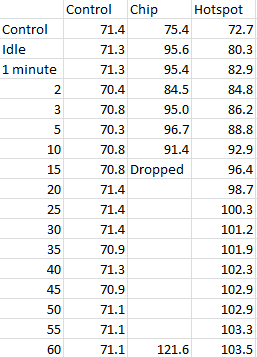
Results for today’s experiment. All measurements are in Fahrenheit.

I ran the experiment for an hour, taking measurements on a white envelope on my desk, a chip on the upward facing bottom of the Pi, and the probe measuring the target spot on the case. Measurements were taken while it was off, after the Pi had been running long enough to level off the critical spot’s temperature, and every five minutes after the test started, with extra data points at 1, 2, and 3 minutes.

I changed procedure at the 15 minute measurement, as the temperature from the chip was highly unstable, likely due to temporarily improved ventilation by removing the case’s head. After dropping this measurement, I noticed the probe temperature climb from slightly faster before stabilizing to within a degree of 102 F for the second half hour of the test, well below the glassing temperature of PLA.

Conclusion: While this case should be fine with whatever load I put on it, PLA is not the material to be making computer cases out of.

Final Question: Have you ever changed an experiment mid-procedure because you suspected your measurements were affecting your results?