Linux 101 with Leo_8472: Part 2: Browser

Good Morning from my Robotics Lab! This is Shadow_8472, and today I am hardening Firefox with my father on his new Debian installation. Once again, I am hands off the actual machine. Let’s get started!

The popular Chrome browser by Google is literally made by a company that makes money by studying you to feed you ads you’re vulnerable to (ie: more likely to click on) or want you to see for some other reason (a political agenda they approve of). While this is shady and dishonorable, respectively, there’s little to keep them from aiding a government they wish to appease from targeting people on a basis for any sort of “wrong” thinking.

Consider: if logging in to a site online is like showing your face, the browser you use to visit that site is your car. Just as people can learn to recognize you by your car, websites can recognize you by your browser –even if you don’t log in– by all the individually nondescript details your browser shares by default.

Firefox markets itself as a privacy-respecting browser, and while they’re a less-offensive choice than the alternative, they’ve made some choices that chase cash and not all their defaults respect Grandpa Joe’s technical ignorance. Their default search engine is Google. They have a “privacy respecting” news headline service that tracks you locally on your machine (as I understand it) but ultimately will record your clicks and is subject to its own political bias.

Project Progress Review

Before diving into the main payload, I did guide my father through installing Debian again over his first install – this time using the LXDE desktop environment. It’s small, and we are planning on installing a different one anyway that isn’t included in the default lineup found in the installer.

When starting a software project is often best to check for updates. sudo apt-get update and my father’s account wasn’t in the sudoers group. I quickly found a command to fix that and talked him through logging in as root to take care of that. Once updated, we began working over Firefox using a guide by Chris Xiao [1].

Firefox Hardening

Firefox presents its user with an overwhelming number of options. Xiao’s guide [1] does a good job of maneuvering you through a number of options you may want to set if present, but in the end, it’s up to you to make the final call on each setting exposed to you. We neither followed all the steps suggested nor limited ourselves to it.

The guide starts off with the settings menu one might find by fiddling with the menu, where it was simple enough to read the guide and switch settings as we spotted them. It then followed in to the spooky scary deeper settings you only change when you’re okay with potential software breaks. My father compared it to the registry in Windows.

Closing thought:

I made a mistake. In a coming week, I plan on moving my father over to the “testing” branch of Debian. I don’t have the exact numbers in front of me, but his Firefox version is about 15 to 20 versions behind what I’m using on Manjaro (Firefox 92.0.1).

I will need to revisit this list.

Takeaway

Online privacy is largely a fleeting fantasy these days, but I believe it’s still worth working for.

Final Question

Where do you draw the line between privacy, functionality, and security?

Work Cited

[1] C. Xiao, “Yet Another Firefox Hardening Guide,” May 5, 2021 [Online]. Available: https://chrisx.xyz/blog/yet-another-firefox-hardening-guide/ [Accessed Sept. 26, 2021]

Linux 101 with Leo_8472: Part 1

Good morning from my Robotics Blog! This is Shadow_8472, and today I am talking my father through his first Linux install. Let’s get started!

Installing Linux isn’t as difficult as people think it is. If you ask me, the hardest part is the research. You need at least a little experience to know what your priorities in an operating system are or even could be, but you won’t get that experience without exploring the possibility space.

For this project, I’ll be helping my father install Linux. However, he will be the one at the controls and I’ll be “over the phone” from the same room, telling him what hardware to use, what software to download, and what commands to enter.

Step 1: Hardware

Linux doesn’t run in thin air, but it can run on otherwise low-spec hardware. For today’s project, we’ll be installing over my first Linux install — from before I really knew what I was doing — the hard disk drive originally from ButtonMash, my server/phototrunk workstation. For the rest of the system, we will be using his existing computer, ButtonMash’s hardware sister. I’ve selected one of my thumb drives to host our install media.

Very important: back up your data. THE LINUX INSTALLATION PROCESS DESTROYS ANY DATA IT TOUCHES. The USB we’re using is just outdated installation media for a previous system. I started talking my father through the backup process, going through a number of commands, but when I remembered an existing backup, I went and laid eyes on it before giving the final clearance to overwrite it.

This section went well, but I did have to fetch an extra SATA cable to install the drive with.

Step 2: Installation Media

Linux is often installed from some sort of installation media, usually a USB stick. Normally, I’d use the dd command and a setup where I won’t nuke a different drive by accident. I’d rather not risk an accident, though, so I spent a while searching for some sort of Linux USB flasher.

Turns out installing Linux from Windows is a well-documented rite of passage, and dd is what you’re expected to use when jumping from Linux to another Linux. I eventually dropped a question in the Engineer Man Discord and user localhost recommended Belena etcher, so we’ll be trying that. I chose Debian to install because I’ve had some success with it in the past, but to keep things fresh, I’ll be moving him to the testing branch.

Belena etcher came without any sort of checksum, but Debian does. When given, always make sure to look for a checksum — especially for core applications like operating systems.

This section went smoothly aside from an overstuffed Downloads directory providing us with plenty of distractions and command line practice. Belena Etcher came in a .zip file, so we created a decompression chamber my father dubbed his Bombshelter. Once we were ready, Belena Etcher made it clear which drives were which as advertised. The only thing remotely worth complaining about was their self-promotion for premium and other products. Of note: they are multiplatform; if you’re looking to switch from Windows, they are a viable choice.

Step 3: Installation

Now for the main event and my father’s first important choice. Dual booting. When multiple bootable drives are present, the BIOS select which drive to boot and the bootloader on that drive can provide a list of operating systems to boot into. When I wanted to set up one of my computers for multiboot, I wasn’t able to configure it manually after physically disconnecting all drives I care about.

Debian 11 booted straight into an installer, where the graphical installation process mostly cared for itself. Overall, though, this step was a little harder. Names are hard, even for a computer. I know about Logical Volume Management (LVM), but not enough to recommend it for this particular project. When we tried it, it was looking to mess with the existing disk.

We had the option in terms of desktop environment to install, but as I plan on taking him to a place where he can further customize it, it doesn’t matter so much. I nudged him in the direction of trying KDE in the name of exposing him to something new, even though it’s typically a little heavier.

We had a some trouble getting the computer to boot into Debian proper. I suspected it was the GRUB list only outputing to VGA until we pulled up a BIOS level boot list and forced it to boot to the new Debian drive and the GRUB menu offered access to Debian or Mint.

As I feared, KDE was a bit slow.

Takeaway

Congratulations to my father on his first Linux install. I had more planned, but we simply ran out of time. I expect a part 2 to follow shortly where we’ll focus on getting from a point-and-click environment to something he can feel more comfortable in.

Final Question

Have you ever tried to pass on a skill to another person?

A Minecraft Server Sent Me Source Diving

Good Morning from my Robotics Lab! This is Shadow_8472, and today, I am building a private Minecraft server for plugin testing. Let’s get started!

Minecraft Paper Server

Any sufficiently popular computer game will eventually attract someone with the ability and drive to modify it. Others will come along and make tools to lower the barrier of entry so even more people can customize their experiences. Barring legal action from parent companies or a drop in popularity, the cycle continues to the point someone with basic computer literacy can find the resources he needs to join the modding community as I did almost ten years ago after my friend introduced me to Minecraft Bukkit servers. Shortly afterwards, I had myself a Last Airbender inspired Minecraft server.

In the year I was gone from Minecraft, my mother and sister have been helping on the moderation team for DS9Fireblade on PhoenixCraft. DS9 has selected a number of plugins to manage the chaos that often accompanies publicly available servers, but it’s hard to master all the commands when you have to worry about not breaking stuff.

Server Building

Little has changed about the fundimentals of Minecraft server construction. A modded server provides a stable platform imitating the vanilla game while providing plugin or mod makers a space to hook into without interfering with other plugins.

DS9’s server is running Paper, a version of Spiggot from the Bukkit modded server family. Ideally, I would take the time to track down the exact version for 100% compatibility, but I was having trouble finding the download. I made the executive decision to just use the newest version of each piece of software and adjust things if needed.

I loaded the server onto ButtonMash even though it’s still technically on Photo Trunk duty until that project is done, idle as it is. I remembered a series of topics I covered a while ago on how Minecraft doesn’t do well with the default settings and that G1GC (Generation 1 Garbage Collection) makes things go more smoothly in terms of long-term problems. I wasn’t fond of doing all that research again, so I reviewed this sight [1] which I do not look forward to citing, but offers a a list of Java flags to use and what each one does.

Months of idling were not kind to Button’s RAM, as it was about maxed out with Xorg (graphical server), even when I closed everything. I rebooted. It defaulted to its internal Minecraft server drive I have slated for a future Linux install some day. Around ten minutes of digital technical taps to the BIOS and removing a bent thumb drive later, I got it back into Debian.

The server still refused to start. Java was up to date with the repositories at Java 11 but it wanted Java 16. I just so happen to have solved the exact same issue with a Minecraft client earlier week. I downloaded an appropriate version of GraalVM [2]. Since I don’t plan on this server going anywhere, I saved it within the server’s main directory and edited my serverstart command accordingly.

The server was a bit more cooperative after that. I signed the EULA and modified a comment about tacos supposedly being the best food (why is that even in there?). Once I confirmed the server was running I started adding plugins, starting with the modern bending plugin and following it up with tools from PhoenixCraft.

mv Goof

My workflow settled into a pattern of looking up a plugin from the list, going to the download page, copying the actual download link, then using wget to download it onto ButtonMash as I’m working over SSH. I wasn’t impressed when I had to rename each file as it came in, but I figured it wasn’t worth my time to immediately puzzle it out, but I made a Downloads directory to isolate incoming files so they didn’t get lost.

Things were going well until I found one that didn’t want to be downloaded via command line. I waited a few minutes, but it still said it was temporaily unavalible. I was able to download in Firefox though, so I saved it to GoldenOakLibry, my family’s network storage. Soon I was copying its containing directory over into plugins.

Oops.

The containing directory was gigabytes of information at the least. I at least knew my Unsteam games project was in there, but I also found an old backup from my laptop. The connections are all hard wire, but I didn’t feel like waiting an unknown amount of time for the half way point, so I canceled the command with CTRL+C to assess damages.

It had only really started: two visible files at the very least. They appeared to still be in their original spot, but I wanted to be sure. I looked up the mv command’s inner workings, but my search results were filled with helpful information for someone learning normal terminal operations, not an unusual situation like my own.

With few places left to turn, I went source code diving. The hardest part was finding the code, but dpkg -S is the tool for that job. I zeroed in on the mv source and found the exact file [3] on the Debian website, a file written in C. My mission at this point was to answer this basic question: does mv do anything to directory trees its moving between physical disks as it goes or does it copy everything and clean up at the end?

I found what appeared to be a loop structure at line 364 in main(), but it didn’t appear to be trying to traverse any sort of file system structure. Further study led me to line 173, in do_move() where it copies the file in question before flagging the whole thing for deletion on line 224. And with that, I had answered my own question: cleanup is done after everything is safely moved.

Takeaway

This post was entertaining to make. It was supposed to be a boring, but quick and easy job I didn’t need to research much for after a week of stalling for topics. It was also the first time I went looking into the Linux source code, and while it makes poor skimming material, it was insightful. Find In Page was my best friend.

Cleaning up in post makes sense though. Everything in Linux is a file, even directories that contain other files.

Final Question

Have you ever studied the laid out inner workings of anything?

Works Cited

[1] lechowski (I think… Author is unclear), <March 5 OR May 3> 2021. [Online]. Available: https://lechowski.info/gry/minecraft/modded-mc-and-memory-usage-history-crappy-graph [Accessed Sept. 12, 2021]

[2] GraalVM, 2018-2021. [Online]. Available: https://www.graalvm.org/ [Accessed Sept. 12, 2021]

[3] M. Parker, D. MacKenzie, and J. Meyering, “mv.c” 1986-2018. [Source code]. Available: https://sources.debian.org/src/coreutils/8.30-3/src/mv.c/ [Accessed Sept. 12, 2021]

By Continuing To Stay I Agree To What?!

Good Morning from my Robotics Lab! This is Shadow_8472, and today, I’ve been thinking long and hard about my policies towards current practices of data collection and how I’m going to balance privacy and functionality. Let’s get started!

Wakeup Reactions

My first reaction when thinking about data collection is that it’s all bad – overreaching companies look at where you’re going and what you’re doing and use that data to feed you ads and filter your social media feeds so you start thinking “correctly” according to some big boss at the top. I’m scared. Some people just give up trying because they feel it’s too late to stop the cyberpunk dystopia we’re quickly sinking into so it’s not worth it to even try. Others will go overdrive the other direction and redesign their whole lifestyle around having little to no online interaction.

I’d describe myself as somewhere in the middle. I’ve tried to take a reasonable stance; I only replace digital services with less invasive alternatives when they’re otherwise up for replacement. This strict of a policy has led me to go a year without a phone and to boycott Minecraft ever since they announced mandatory Microsoft accounts. Overall, I feel a little safer for my efforts, but I’d feel better if I could convince the rest of my family to take similar steps as they are able. At the same time, I feel a little more isolated than I should be.

Data Collection: the Good and the Bad

The truth about online data collection is that there are functions that logically won’t work if it doesn’t happen at all. Posting to a comments section implies permission to display said comment publicly. It may also subject it to moderation, and inclusion in site backups (it may show up again if site is rolled back to before user-end deletion). Sharing a photo may additionally require giving the service permission to “digitally manipulate” it to make a low resolution thumbnail. Ordering up a video from a streaming service requires it to know what you’re watching. All these things are fine, even though you are technically forgoing elements of privacy to allow things to work.

The bulk of applications of data collection exist in a huge gray zone between acceptable and unacceptable. That video streaming service can make more appealing suggestions by building up a profile on you, observe that all your peers are into MoneyBuck’s Capitalist Island Adventure let’s plays (not a real game so far as I can tell), and guess that you might be too! The same technology and permissions can be used to track your interest in candidates for the Yellow-flag political party and with the way things are set up, it only takes a few lines of fine print you will never see, unless you actively look for them and they can sell their profile on you to some other company who prefers you vote Orange-flag and –with another line or two of fine text you won’t likely ever see or understand– will slowly change what it shows you to make you more sympathetic to the Orange-flag party while it hides pro-Yellow-flag stuff from people already in the Orange-flag camp.

In extreme, real-life cases, they’re essentially digitally harvesting your organs to profile you for profit in a not-illegal black market. Their model of you is perfectly legal because you technically give consent to the fine print of a web page they’ll only serve up when asked specialy.

Struggles of the Privacy Resistance Movement

Privacy tools exist. Many people give up hope anyway presumably because their go-to information sites often have built their business models around the user data market – places with a vested interest in hiding tools designed to assist in undermining abusive data collection policies.

Some jurisdictions have passed laws requiring opt-out options. It’s a start, but in my experience, there’s still a lot of room for sites and services to avoid unintentionally informing users of their rights and/or make it annoying or inconvenient for users wishing to exercise them. More than once, I’ve seen an opt-out popup revert on page refresh. For user accounts, expect instructions on how to find the opt-out controls to be buried behind at least a few layers of “Please see our X for more information” worth of of tiny type.

Minecraft and Microsoft Accounts

I don’t think of Microsoft in a positive light anymore. Their announcement trailer for account migration was honestly more than a little offensive because it left me with the message that my concerns in particular could be bribed away with a cape. They can burn my cape for all I care. It wouldn’t look good with my player skin anyway. I’ve been vocal about rejecting the terms of service for a Microsoft account.

However, I’d be lying if I said I didn’t miss playing Minecraft. If I want to keep playing, there will come a time when I’ll need to migrate. I’m still not happy about getting an account, but how much of a privacy backslide is it really? What steps can I take to tell them, “I said, ‘No!’” in a way they will understand?

I reached out to the folks at tos;dr [Terms of Service; Didn’t Read]. Their whole thing is annotating terms of service documents and highlighting potentially objectionable or commendable phrases they find embedded in the legalese. But they only have so many resources. In the end, they’re good to sound the alarm and not so good for pressing forward. I wasn’t able to get anything conclusive straight from them.

As migration propaganda was pushed through my family’s Minecraft launchers, I managed to talk my family into slogging through the tiny type. A lot of it sounded pretty good. Sugary even. Alarmingly calm. One document led to another led to three more and the web went on. It was not a fun read. Only as we were coming to the end of a document chain did we find that this Privacy Dashboard they mentioned several times [1] was effectively a partial red herring; I’ll need to talk to a human being somewhere in their system to exercise my full rights. {Writer’s note: I really wanted a direct quote, but it’s late, and “Learn more” is the enemy of “Find on Page.” Consequently, I don’t know if I’m on the right page.} With all the tricks I’ve seen so far, I half-expect their staffed privacy department to be severely understaffed to the point where it barely exists, legally speaking.

I may not agree with everything I’ve seen, but there’s nothing stopping me from minimizing my contact with them. I’ll only make an account once it’s absolutely necessary. I’ll only ever use Linux when playing because it doesn’t have all the mysterious collection nodes requiring additional policies on data collection from Windows, Mac, and some other names I don’t recognize or remember. The official launcher with its ads for their other games will only be my last-resort option after days of trying to get a chosen 3rd party launcher working. Finally, I’ll lock down my account once it’s made with their Privacy Dashboard for what that’s worth while I at least try to go the final step and clamp it down hard through a live agent. If I am going to accept their terms of service, it will be on MY terms.

Takeaway

Too few people care about data collection practices and the people who do are burdened with the alarmingly rational feeling of Big Tech watching them, even if they make a hobby or career out of researching how to be as nondescript online as they might be while walking a dog. Privacy should not be something Grandpa Joe needs to worry about after little Jimmy the computer nerd tips him off. On the other hand, it’s easy to get overenthusiastic about reclaiming privacy and cut yourself off socially instead. Each person has his or her own balance point, but it’s all too often privacy by intervention instead of by default.

Final Question

Have you ever boycotted anything to seemingly no avail?

Work Cited

[1] Microsoft, “Microsoft Privacy Statement” Microsoft, July 2021.[Online]. Available: https://privacy.microsoft.com/en-us/privacystatement [Accessed Sept. 6, 2021]

Bad Ram, or Is It?

Good Morning from my Robotics Lab! This is Shadow_8472, and today I’m solving Derpy’s derp once and for all (I hope)! Let’s get started!

Background

There’s seemingly always been something off about Derpy, even before I dubbed it DerpyChips. First it was a cheap hard drive shorting out. Every so often, the system would throw a power kernel error. I fixed it inadvertently while switching to a solid state drive when I installed Linux.

More recently, we got some new RAM to replace the sticks I borrowed for another computer, but then the system developed occasional twitching fits. It took a while, but I identified one of its four 4gb RAM modules as having a number of bad sectors. The others passed the testing tool. The twitching improved, but not entirely.

Long-Haul Diagnostics

I started using Derpy a little more heavily a bit under a month ago, and the twitching went from Discord twitching by randomly restarting to Kerbal Space Program crashing at least once every couple hours, though only during loading screens and conveniently always shortly after a save or autosave.

Sometimes my game would catch and I could properly close out before it quit with a note about core dumped. If I was unlucky, the even the mouse would freeze for minutes on end. Rebooting didn’t help.

With problem frequency rising into the barely diagnosable range, I decided to run Derpy’s RAM through a less formal test. I temporarily moved the suspect sticks to my Manjaro workstation, isolating them from an unknown number of possible causes. Both computers were pretty dusty, so I took them outside and hit them with the canned air. To keep things fair, I only installed three out of four known good RAM sticks into Derpy and stored the fourth in a drawer.

A Test in Question

Both systems were usably stable right away. Derpy’s fan especially wasn’t panting nearly so hard without a giant dust mat blocking the heat sink. But what if that was the problem all along? Dust in the computer is the perfect unstory. It was early enough in the week I would have sought out another topic.

I spent an afternoon of perfect stability on Derpy, then focused my efforts on passively testing the RAM with my main computer. 99% stability. I had a few audio glitches, but for all I knew, they were always there and I was just noticing them because I was expecting trouble.

Over the course of the week, more problems started showing up. Not many, not often, but KSP did eventually lag hard a couple times, and Discord restarted, switching screens while it was at it. I even had the whole system go unresponsive, even when trying to switch to the “real” terminals outside the graphical environment. One time in a week of testing, I was forced to reboot.

Takeaway

I wasn’t as intense with the RAM as I would have liked, but all things considered, I’m around 95-98% sure Derpy’s replacement RAM is no good. I’ll be interested in seeing about switching it out under warranty this coming week.

To get an idea of how irreproducible this error is on command, after a couple big crashes, I finally had the idea to keep the terminal I’ve been running KSP from up on my second monitor. The plain loading screen is a buzz of activity as the terminal dutifully posts entries in the log file. I was hoping to see its activity during a bad crash, but it wasn’t to be.

Final Question

I’ve narrowed down the problem to the part and prescribed a solution, but I still don’t understand the why. My best guess is that it’s degraded somehow since the test or else it’s weaker under extra heat. Why does my RAM glitch out the way it does?

Setting Up WordPress… 4 Years Late

Good Morning from my Robotics Lab! This is Shadow_8472, and today I am going into the long-overdue topic of managing my site. Let’s get started.

The Silent Years

For years now, I’ve used this site as a place where I write about anything vaguely computer related I’ve been doing. I aim for 300-2000 words depending on how rambely I get. It keeps me thinking. Occasionally I need to teach myself a new skill. If a week is too slow, I’ll add filler I hope will be informative and/or jabber about plans for whatever the next phase entails.

But before today, my audience has been silent through a fault of my own. I can’t receive feedback unless the person offering it knows me on another platform. That’s a problem. I should have fixed it long ago, but even getting one-way posting online was draining, to say the least, and I got busy with other topics.

Registration

I started work this week by viewing the site’s back end while logged out. Nowhere did I see a way to make an account. Back in the admin panel, I found the first important click: Settings -> General -> Membership has a checkbox called “Anyone can register.” I enabled it.

Immediately, the login page had a new option to make an account, and I tried to do so with an e-mail I have for making alt accounts. Something in the site suspected me of being a bot.

Several hours of pushing myself to investigate later, I disabled a bunch of plugins and made my account. With the help of my good friend, Commander Stryker, I narrowed the problematic plugin down to MOJO Marketplace when it was the only candidate disabled.

Spam Protection Without Captcha

While solving the “suspected bot” problem, this week, I found an option in a forums plugin to use a Captcha service to protect against bad bots spamming my site. Captcha tests are often used to present bots with a difficult challenge humans can pass without much trouble.

Unfortunately, these tests are obnoxious to solve at best and needlessly discriminate against the disabled at worst. As computer science advances, this approach necessarily gets more difficult to keep ahead of automatic solving. These days, Google has a near monopoly on this technology, but with their track record of grossly abusing privacy, I’d rather limit their active role in this blog to directing traffic here as I am able.

The other option is a similar, but service called hCaptcha. All I have to say right now is that recognized their logo from when I recently solved one of their challenges. They are a topic worthy of a future post, though not an immediate priority.

More interesting to me is the idea of a honeypot. Instead of inconveniencing humans and bots alike in a prove-you-are-human style test, honeypots lay traps invisible to [well behaved] humans [who aren’t poking around in the HTML] while most bots will happily give themselves away by interacting with them. Again, this is a late development, so if I learn more, it will need to be covered in another post.

Takeaway

There’s a lot more to running a WordPress Blog well than I’ve been doing. I’m far from over.

Final Question

At long last, you should finally be able to respond: Do you even try to answer Final Questions?

Unsteam Games

Good Morning from my Robotics Lab! This is Shadow_8472, and today I am doing a brief followup to my work on moving Kerbal Space Program (KSP) between computers. Let’s get started!

Author’s Note

My experience is with Linux. I make no claims about how Steam handles games in Windows. Furthermore: this post is for educational purposes only. Don’t take advantage of DRM-free games by pirating them. Make an effort your money goes to the legitimate owners of a game when playing.

Steam

Like many computer gamers since 2003, I have a Steam account and I have a number of games through the platform. It’s a nice way to make sure you don’t lose physical copies, and it adds a number of achievements for completionists to strive for.

But that doesn’t mean I have to like getting ads stuffed up my face every time I already know what I want to play, nor do I need to like the feeling of being watched as I play. I like the feeling of achievements, but for some games they’re unironically tacked on decades after release (I’m looking at you, Sonic CD). Finally, there’s that overhead from the client itself. Other than achievements or tracking how much of my life I’ve spent in what games, there are very few obvious reasons anyone might want Steam running in the background if it isn’t strictly necessary.

Home Cloud Saving

Admittedly, Steam does provide a few reasonable features you can’t easily get while cutting them out (assuming the game can even be started). User created content can be added through the Steam workshop. Some games’ multiplayer modes were made specifically to go through Steam’s servers. Saves can be automatically synchronized from one computer to another.

That last one is a feature I’ve managed to replicate, or otherwise have well underway. For single player games I can run without Steam, I’ve been able to use rsync to quickly copy progress from one computer to another. Last time I talked about it, I discovered it’s safest to always include as much of the respective file paths for the directories being synced.

By default, Steam will put games in ~/.steam/steam/steamapps/common/, but any game that doesn’t care if Steam is running should be happy running out of anywhere in the file system – just keep in mind Steam won’t update what it can’t see. This time, however, I’ve upped it a little. I moved my copy of KSP to a directory I called ~/Games/UnsteamGames/ and added two more titles from my collection I wish to synchronize together: Starbound and Stardew Valley. I had to reflect the changes in GoldenOakLibry, the network storage, but I also wrote simple scripts with the synchronization commands embedded.

I also addressed Steam updates. I have my preferred daily driver where I’m installing all my games from. On that machine, I used a symbolic link for each game I’m relocating.

Rsync is a powerful tool. Perhaps my next improvement will involve a hidden file my script ignores.

Takeaway

Rsync wasn’t the kindest to Starbound. The process kept hanging, and I have no idea why – I just know it wasn’t because of large file sizes as my research suggested as it was having issues when all I told it to copy was a directory with MIDI-like files or low-resolution sprites stored as PNG’s.

Final Question

What other games might I isolate and re-home for ease of synchronization?

My First (High Pressure) Pneumatic Artificial Muscle

Good Morning from my Robotics Lab! This is Shadow_8472 and today, I am assembling and testing my first prototype artificial muscle. Note that this is not a tutorial, but a work in progress; I’ll be making more elaborate updates when I finish each phase of prototyping. Let’s get started!

Initial Construction

In case you missed my last post on McKibben artificial muscles, I’m using some surgical tubing with a in a braided ASA plastic sleeve as the main body of my muscle. Starting out, I’m using a bicycle pump for my air supply and some old, mostly cotton string for holding the ends together. We cannibalized some old garden drip line for structure in the inflation end, and a screw on the other end.

Assembly started with cutting around 12 inches each of tubing and sleeve. The sleeve unravels like crazy when being stretched, so I melted one end with a candle lighter. The mouth was nice and tight, but it was stuck contracted. I fed tubing in the other end melted that end open. I inserted the two inch length of drip line and screw into their respective ends and tied them off.

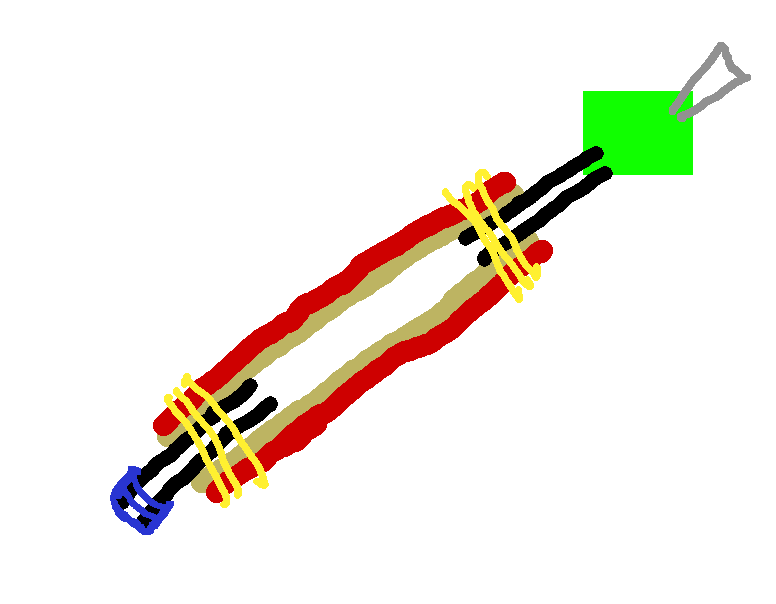
I drew this picture in GIMP for my father’s benefit before construction, but it highlights a “green part” between the actual muscle and the bicycle pump (gray triangle). Note this was drawn before I added the screw on the solid end and the blue parts are painter’s tape that lasted about as long as it took to try taping the muscle to a ball inflation tip for the pump.

First Actuations

There was no way my chosen string was holding at pressures required to inflate the muscle, so we moved to zip ties. We also redesigned the adapter to use rubber tubing wrapped in duct tape to resist inflation. It happened anyway when the rubber expanded lengthwise as well as radially. After extending the tape just a little farther, I started pumping as the hiss of gas escaping the system made it difficult to focus on the pump’s pressure gauge.

We ran a number of tests, and over about 10 inches of workable muscle, the whole thing contracted to about 8.5 inches and expanded from 3/8 inch to 1/2 inch diameter – about as thick as the casing would go according to tests later on.

Development continued after the pictured state. We had some irreconcilable leaks with the zip ties and switched to more expensive pipe clamps while we dreamed of ordering some rubber tubing with a thinner wall. The Green Part was replaced again with more plastic tubing probably intended for water, and accordingly leaky at its adapter. Only the very tip is still rubber tubing, and that’s only to create a seal someone has to hold closed while the system is under pressure.

Speaking of pressure, every improvement raised the maximum possible pressure before something failed or was otherwise too loud to tolerate. We made several milestones, but eventually maxed out the pump at 150 PSI, though after I sealed the leaky connector with some proper sealant tape, air stopped escaping until 80 PSI, but when it started, it was painfully high in pitch.

Takeaway

My finger pads HURT after assembling that thing. It could be working with the braided plastic or messing with the pipe clamps, but I don’t see many of my materials being final picks. The contraction ratio is lacking, the tube is high pressure, and if I’m going to be using a lower pressure anyway, I might as well go back to zip ties.

Final Question

During testing, I kept going to higher pressures because I was operating under the hypothesis that there was more contraction to be had. The calipers said otherwise; manually squishing the casing off the spool it came on gave about the same diameter. I identified my false impression as coming from the fact that the woven casing came flattened out, and my mind wasn’t translating diameter and half circumference properly. What hypotheses have you discarded while working with something?

A Self-Guided Rsync Lesson

Good Morning from my Robotics Lab! This is Shadow_8472, and today I am following up on last week’s topic and actually bouncing the game Kerbal Space Program (KSP) back and forth across a couple computers. Let’s get started!

Project Introduction

KSP is a rocket simulator. Rsync is an advanced copy tool. I don’t understand rsync well enough to use it to its full potential, but this week I’m answering three questions in order: 1. Is the project possible? 2. Is the project feasible? 3. Is the project optimizable?

The goal is a smooth transition from one computer to another. When I need to move, I just save/quit my game, move to the other computer, and start/continue playing. To do this, I’m copying them to a network share they both have mounted, as a third workstation would make for a messy network trying to move it around ad-hawk.

Project Possibility

The main goal here is to get my game running on a different computer, regardless of how ugly the process looks or how long it takes, and ugly it looked and long it took! It’s understandable though. First time moving everything will be from scratch, but after that some noticeable speed up should take place because it should only need to copy the changes between files.

Besides taking longer than I’d consider feasible, my game also crashed, locking up Derpy, a workstation I want to play on. The window dressing appeared, but I coldn’t move my mouse or bring up a TTY terminal with CTRL+ALT+<Function keys 1-6>. I had an existing SSH (Secure Shell) connection, and the top command told me KSP was trying to run, even though I kept trying to shut it down with kill, even with sudo. I wasn’t even given an error. I stumbled across using a -9 flag for kill -9. That worked, but I have yet to understand why. Presumably it’s a little more strongly worded way to stop a program.

My exploration an hour or so later was interrupted by an unexpected success. My game launched, I took a rocket to orbit, confirmed it had enough dv to complete its mission, and I saved and quit.

Is the project possible? YES!

Project Feasibility

The next step was to go back and forth a few times. In my previous step, I had difficulty finding my game ended up inside my existing game directory instead of syncing to it. I did the same thing again my first attempt trying to retrieve it from Derpy, and it took just as long as the first time.

My second attempt started with a successful synchronization from Derpy to the network share with the inclusion of the –delete flag in case a file is ever removed. I errered on the side of caution and made a copy of my KSP directory inside another directory I called KSPLand. Good thing I did. The way I set up rsync, the second phase of copying wiped out my backup and stuffed the game directly into KSPLand instead of KSPLand/Kerbal\ Space\ Program/. I’m attributing this to oversight to trailing slashes at the end of file paths. I would have said I just had a lack of caution, but at least I didn’t wipe out my other games!

Attempt 2.1 went much more smoothly. I compared the exact commands and eliminated the offending slash. I briefly got confused looking through my real game directory and saw one of those recursive copies. This back and forth is mentally exhausting, but it eventually went through.

Rsync Sandbox

At this point, I backed out and made a directory where I can practice rsync without it taking half an hour to reset. In it, I made two directories representing my two workstations. In each of those, I made a notKSP directory with files named after the numbers 1-10 as well as an “innocent” game directory I didn’t want messed with.I lined up a dozen possible variations controlling for my file path ending in path/notKSP is followed by nothing, a /, or /* as well as my destination’s path, path/, path/notKSP, and path/notKSP/. I made a chart by using the –dry run flag. About half of them appeared to work, but to my surprise, the actual runs didn’t match up.

All my source path/notKSP/* got the data over, but nothing was ever deleted. Also, trailing /’s on the destination directory didn’t affect my results. The frustrating part is that I had four commands (two if I ignore destination trailing /’s) give me exactly what I want, and they’re each a single / each away from an unsatisfactory command: rsync -avh –delete source/notKSP/ destination/ will add notKSP to destination and make sure it’s the same while rsync -avh –delete source/notKSP destination/ will make sure the final directory in destination/ contains notKSP and nothing else.

In my opinion, the safest form of using rsync is rsync -avh –delete source/notKSP/ destination/notKSP/ because if I mess it up and forget the trailing /, I end up with Russian nesting directories and have to fish a freshly created copy out of the directory it was supposed to update. Furthermore, tab to complete prefers to add those trailing / characters [unless an extended directory name is present] and I can specify an alternate directory name for the destination should I choose as I discovered while conducting another test in my rsync sandbox.

Project Feasibility Cont.

For how useful the –delete flag is for rsync, it oddly doesn’t have a single-character shortcut. Otherwise, I would have written about implementing it here. There exists a –del alias, but I’ll pass for now.

With a properly calibrated rsync command, I ran a dry-run to the network share from my tower to the network share. Where I previously had a wall of text detailing all game files being compared, I now only had a few files –many of which were deleting a test game I had purposely planted for later deletion– totaling to a mere 1.69 megabytes as opposed to the 3 gigabytes of the full game. Even over Wi-Fi, I was done in seconds.

Is the project feasible? YES!

Project Optimizeability

As long as the possibility remains that a single character can blow a hand-entered command, I won’t be comfortable. The plan from here is to curate a set of four commands and plant them in scripts so I don’t have to retype them each time. One thing is for sure: I’ll be keeping the container directories until I have my scripts working.

I’ll probably set each one up in a script and use the appropriate one when I need it. A more complex script might automatically pull any changes from the NAS when I start and push them when I’m done. Once feature creep sets in, I might as well add checks for if the share is down, or if I even need to sync at all. It might even be useful to add a hidden file next to the directory in the share to track who has the game open and error out if I try to open it twice. But then again, those are all dreams. I’d only go to that extent if/when I give the same treatment to my other entries in my offline/LAN compatible Steam library.

Is the project optimizable? The sky’s the limit, and I don’t have a rocket.

Takeaway

As I worked, I learned a bit more about the command line. For example, I discovered how much easier it is working with multiple terminals in the same window. I also learned that ls will let you peer into multiple directories at once. When a directory is deleted and a backup restored, the normally useless command cd . will update your terminal from trying to look at the deleted directory to the new one. I was able to work on my rsync commands in one terminal, view results in another, and use a third one to reset between trials. With a little working, I got my two accessory terminals down to a single line each with a little help from the && operator to run multiple commands at once.

Final Question

While working on the verification step, I was running out of time to post and declared victory a little prematurely. I had trouble with my rsync NAS to Derpy dry run looking like a full loadout. Something I did goofed the metadata. Have you ever declared victory early?


Package Loop

Good Morning from my Robotics Lab! This is Shadow_8472, and today, I am aiming to rig Kerbal Space Program (KSP) to run across two Linux computers. Let’s get Started!

Intended Target

KSP is one of those games I find myself coming back to every so often. In case you’ve survived the past decade without hearing about KSP, it’s a game where you design rockets using an assortment of parts and fly your kerbals on them to explore their solar system. There are no goals except the ones you set for yourself. With the final major update now released, I’m going to give it another go at an interplanetary game.

But it would sure be nice if I weren’t tied to a single computer while playing. Steam offers a cloud save option, but I’d rather not be needlessly broadcasting my play time for a single-player or Local Area Network (LAN) experience. I picked up a little shell scripting for auto clicking in another game, so I figured I’d stretch the skill a little farther. For this project, I will be using Derpy Chips and my daily driver without a fancy name.

KSP updated nicely on my tower, but when I went to install the game on Derpy, Steam was nowhere to be found aside from a broken icon and a couple other Steam games I might try pulling this trick with in the future. My system was bugging me to update, so I went sudo aptitude update and sudo aptitude upgrade. It didn’t update correctly.

Running in Circles

I spent around three days trying different combinations I knew. Both Aptitude and Apt-get were stumped. The errors recommended I try running some more aggressive commands to fix installs, but I kept ending back at the same broken state.

Taking a closer look at the errors themselves, it appeared a whole host of locale packages were to be replaced with one inclusive one. Each and every one of them, as well as others appeared to reference some variant of libc6.

Not good.

Libc6 is a C language library. C is important as one of the first programming languages with a little abstraction for easier human readability while still being close enough to the hardware for amazing optimizations. You take out LibC, things start breaking fast.

I tried putting the upgrade off some more, but my package manager wasn’t having any of it. It insisted I fix the problem before installing or removing anything.

All this time, I was reaching out to the Engineer Man Discord. I got a few links on stuff to do, like a number of commands to do in sequence in case a particular log was getting in the way, but it always came back to my Libc6 version being wrong.

Progress and Repair

I of course was looking stuff up on my own, and I managed to find Libc6 was “half-installed.” My best guess is that a month or two ago, I had a partial upgrade. I didn’t think much of it at the time because I wasn’t relegated to an Xorg forsaken command line like all my other major system meltdowns normally worthy of a repair shop visit.

I made some progress when I used dpkg to uninstall a package I was otherwise interested in removing from the system anyway. According to localhost, the Discord user who solved my snafu (special thanks), I was caught in a dependency loop. Basically, when apt-get is either installing or trying to fix an install of package A , it wants to see package B or something like it before adding it to the list of satisfied packages, but if package B wants to see A or similar before it’s happy, there’s trouble. My trouble was that in order to fix the AB circle with apt-get or aptitude, I needed to first fix the AB cycle preventing me from solving it. Dpkg is too dumb to care about package dependencies, so it will happily ignore any logic bombs you’re setting (or defusing) for yourself.

Takeaway

I don’t understand the fix, sadly. I am still thankful Derpy is running again. I went ahead and installed KSP there, but the game file structure is so complicated, I’m just going to be copying the whole thing over to GoldenOakLibry, the network storage, using rsync. After going back and forth a few times to make sure everything is working as expected, I will write a set of scripts for further automation.

I will follow up if anything interesting happens on the implementation proper.

Final Question

Have you ever fudged a personal cloud?