Good Morning from my Robotics Lab! This is Shadow_8472 and today I am exploring the notably hostile environment of recycling old Windows keys. Let’s get started!
Among my long-term projects box is a retro gaming VM running one or more old versions of Windows. How hard can it be to move an installation legally?
VM: Virtual Machine
Very.
What is a Computer?
I grew up on Windows. Our tech stockpile has no shortage of outdated machines or extracted hard drives with valid installations of the operating system. Surely, there should be nothing wrong with playing Musical Chairs with components until I have something that meets my needs. Microsoft’s licensing doesn’t work that way.
I feel like Moses proclaiming, “Let my people go!” to Pharoh with the way nostalgia of boyhood intermingles with a starkly contrasting mission. The worst I’ve had Linux complain about hardware is when I duplicated a Debian drive and GRUB got upset over a UUID mismatch (it remains unaddressed to this day). To illustrate: I’ve had three Windows XP installations sitting around for years – one on the Old Church Computer I’ve been featuring lately and a couple pulled from other machines. I tried booting one of the pulled drives with the Old Church Computer, and the obtuse operating system asked for its installation disk before it would consent to my game of Musical Chairs. For all intents and purposes, Windows figures your computer is your motherboard because that’s most involved part of the system.
UUID: Unique Universal IDentifier – a [hopefully] unique number for identifying hard drives
Product ID’s and Keys
Major versions of Windows are were sold through different channels under different licensing terms. The important variations today are between Retail, OEM, and Volume. A Retail/“full version” (usually bought off a store shelf) follows the owner, entitling him to a single Windows workstation. OEM licenses offer some marginal savings in return for the license following the hardware; factory OEM’s will flash a system’s key into the motherboard’s BIOS. Volume licenses are sold with bulk in mind; one key can activate as many installations as its organization paid for, but if individual computers are ever sold off, the license stays with the organization. Each of these classifications have multiple channels each as identified by a triplet of digits in the Product ID [1].
The main event this week is a software tool called NirSoft [2] that scans Windows’ registry (or a mounted installation of Windows) and extracts product ID’s and activation keys for both Windows and a small selection of other software. From the three readily available installations of XP, I recovered two OEM type keys and one 011 type (upgrade to XP Home Edition) [1]. Luckily, a matching upgrade CD recently turned up.
Takeaway
I counted four different ways I could pirate Windows XP with the tools I have. I may frown on Microsoft’s data-gobbling and competition crushing policies, but I respect them enough to keep it to name calling in unprofessional venues. Even if I did steal and post about it, I doubt it would be worth their time coming after me. I’m doing this 100% legit to the best of my ability, and I’d encourage anyone looking to make a similar VM to practice integrity as well.
Final Question
Unless I can also scrounge a retail Windows 95 or 98 disk + key, I can’t install XP fresh. My tentative plan therefore is to move the existing retail installation over to a VM and situate it with the matching CD I found. My one concern at the moment is weather the XP upgrade license overrides or augments whatever underlying license, which may be an unmovable OEM license. I don’t know if I can even tell. Am I safe to proceed?
Good Morning from my Robotics Lab! This is Shadow_8472 with another installment of How I would Relearn Linux, a series where I drop tips about the lessons I’ve learned writing about Linux. Let’s get started!
Document Your Work
This blog has been invaluable to my self-studies of Linux. The weekly push has been vital to keeping my various projects alive. If I were relearning Linux, I would highly recommend blogging as one thing I got right early on.
At the same time, another medium might be right for you. The Linux community self-propagates through everything else from videos and books to forums and chat rooms. A private journal would not be inappropriate – as a matter of fact, if I were relearning Linux, I would write for a few months directly into a word processor and buffer it on a hard drive while I research a host, domain name, and blogging software. Whatever you medium or two are suitable to your talents will provide you a resource to look back on later.
Audience and Frequency
Let’s take a closer look at my own blog as an example, Let’s Build Robotics With Shadow_8472. My content is online for the world to see, but my primary audience is myself as I write. I’m of course excited to talk about my projects, but if I cared about having a constant stream of fans jabbering away about me, I would have either paid closer attention to audience building or given up long ago. My main purpose is to give myself a regular push to learn.
The one piece of advice I’ve followed closely is consistency. I’ve posted Mondays at noon (Pacific) with few accidental exceptions since learning to schedule posts. Not every post is my proudest work, but that’s OK. Progress is slow with projects outside familiar parts of my niche. When projects turn out to be much bigger than I judged, I can talk about what’s not working, call it “Part 1,” and hope someone has a solution. If all else fails, I’ve afforded myself the flexibility to switch to a smaller topic when I burn out. It will be there in a month when I return.
Takeaway
This blog remains one of the most important pillars of my continuing to develop my Linux skills. I would totally recommend something similar for anyone looking to learn a technology skill.
Final Question
How do you record your long-term progress?
I look forward hearing your answers in the comments below or on my Socials.
Good Morning from my Robotics Lab! This is Shadow_8472 and today with a continuation of my project involving the open source game Space Nerds in Space. Let’s get started!
Previously
Two weeks ago, I found Bodhi Linux, a low-weight Linux distribution based off Ubuntu. I used it to compile and run [poorly] a game called Space Nerds in Space (SNIS) on an aged system from a church office.
My Own Space Nerds Distro
I had it all figured out until I had a brilliant idea just minutes before I was sitting down to pen last week’s post. I’d carefully researched and ordered a set of thumb drives to host enough Bodhi installations for a full SNIS bridge on a keyring. I’d have spent a paragraph comparing and contrasting the merits of uniquely colored sticks vs. sticks with both A and C connectors vs. low profile sticks, and a sentence or two about not getting so low a capacity that the case and connector are the major contributing factors to the price (low profile/64 GB, by the way). My project was done except for one small idea: use Ventoy.
Sooner or later, I will update my SNIS bridge, and I’d just as soon maintain a master copy and propagate changes over to the other chips –slim operating system and all– as a bootable .iso disk image. SNIS does not need persistence, so it should be more than happy running out of a live image.
The catch point from last week was in remastering Bodhi. Its official tool doesn’t work in the current version, and so was omitted. I was learning Linux Live Kit and working with its dependencies, but I ran out of time. The afternoon after posting, I coaxed Linux Live Kit into producing an unoptimized image, but I ran out of space on the stick I was working with.
I want to squeeze as much performance out of as little computer for this project as possible. From tests last time, my weak link was memory on the graphics card. Well, how nice would it be if this hypothetical Linux distro didn’t waste system resources on such things as a full desktop environment? I’m comfortable enough on the command line. Assuming I can bully the game into running from the command line, it shouldn’t be difficult to boot straight into the game. If I’m clever, I can have the live distro self-assign a static IP based on a text file sitting beside its .ISO so a router isn’t even strictly needed to play.
Debian/Cage
But I’m dreaming months in advance, and I know it. I made an attempt to slim down Bodhi before switching to Debian 11, the latest version of Debian without a desktop environment (installing over the same small 8GB USB stick from last time). Upon request of various error messages while recompiling SNIS, I had to add packages for git, make, and wget, tools that commonly come with more fleshed out Linux installations.
In the spirit of forward compatibility, I explored Wayland compositors and found one called Cage. Cage will display a single window in full screen and close when no longer needed. It’s perfect for my application… It isn’t in the repository for Debian 11. Debian 12: yes. I went through the effort to try compiling it, made some decent progress while learning about other compilation tools (through downloading/compiling them, naturally), but slammed into a wall of dependencies trying to arrange for a library dependency of something. I got farther with Debian 12, but SNIS wasn’t happy running in Wayland. Furthermore, testing with SuperTuxKart told me I was having issues with keyboard/mouse inputs making it through to programs running in Cage. I eventually scrapped Debian for the short term and went back to Bodhi.
Why just SNIS?
I’ve spent a lot of effort focused on SNIS, but I’ll expand my potential audience if I include a number of open source games. SuperTuxKart (STK) is also ton of fun and has a lower burrier to entry. While it would be nice to compile the latest version of everything each maintenance cycle, some version of STK is in most every major Linux repository.
I spent some time researching other FOSS multiplayer LAN games for Linux without persistence. I found that I had underestimated the trope of “aim gun, shoot enemies.” I’m not opposed to the first or second person shooter genre on principle, but I did narrow my search to exclude graphic violence and the couple horror offerings I also found. I also came across an instance of a game where the engine was open source, but the art, level layouts, characters, and other assets were of mixed licensing that don’t fit with my vision for this project.
Takeaway
I went in another full circle this week. I’ve had some great ideas, but if I expect to have something to show on this project before I lose motivation, I’ll have to arrange my inspirations on a roadmap. For now, I need to focus on learning at least one Linux remastering tool, and game selection/kiosk mode can wait for later.
Final Question
Digging through a freeware list, I found another couple games I’ve played and had a good time with and a few more I’d be willing to try out. What free and open source games would you play at a party?
Good Morning from my Robotics Lab! This is Shadow_8472, and today I am starting a new series where I drop a beginner-level tip whenever I have a project change direction last minute. Let’s get started!
Multiboot USB
The biggest barrier to entry for installing Linux is creating your first installation media and booting to it. These days, it looks like downloading a program like either Rufus or Balena Etcher and burning a USB thumb drive with a 1 to 4 GB .ISO file, almost always turning the rest of your 8 to 64 GB USB drive into dead weight. If you intend to continue exploring Linux, it’s easy to get in the habit, and soon you will have a collection of spent USB drives mucking up your search for the one drive you saved to transfer text files or pictures.
The solution is to get a large USB and multiboot it using a utility like Ventoy or YUMI. My experience was with installing Ventoy from Linux, and it was as simple as creating any other USB-based bootable media. Since then, whenever I am instructed to “burn” a .ISO file to disk, I just copy it to Ventoy and it shows up.
What’s more is while I was researching for this post, I learned that it even comes with a Windows installer. As usual, be sure to offload any files you wish to keep as they will be lost while setting up Ventoy.
Takeaway
I consider my Ventoy USB to be the most useful tool in my possession. I highly recommend it for anyone learning Linux.
Final Question
With the entire array of Linux distributions to try out, which ones do you keep around on your master USB drive?
I look forward hearing your answers in the comments below or on my Socials.
Good Morning from my Robotics Lab! This is Shadow_8472 and today I am working on one of my smaller dream projects: a bridge simulator. Let’s get started!
Space Nerds In Space (SNIS) is a LAN game for Linux available as source code hosted on GitHub [1,2]. In it, you and several friends take on the roles of a starship bridge crew manning your stations and going on sci-fi adventures in deep space.
LAN: Local Area Network
I have access to an old church office computer with Windows XP installed. I’m gonna try running it on there. The main site [1] recommends against trying anything less powerful than a Raspberry Pi 4B, but I want an idea of how low the game can go. I’ve set my expectation to “This computer has absolutely no business running this game.”
In old or low-end machines, the weight of an operating system often becomes a significant contribution to resource consumption. At the same time, both low-overhead distros I’ve worked with before (Tiny/Micro Core and Puppy) have specialized package managers, and I’m not up to a self-guided crash course on repositories this week.
My first thought was that I’d prefer access to AUR for an “one-click install,” like how I cheesed it into working on Manjaro. I located an 8GB thumb drive, but the old church computer didn’t appear to be a fan of booting Manjaro. Instead, I researched low-overhead distros which could cleanly install packages from apt. I came across DebianDog Linux which sounded perfect until I learned development had stopped and shelved the idea as a backup plan. Puppy –as I learned– already has the means to use .deb files, so I stashed that as another backup plan in my recent experiences with Puppy, it has to be told to connect each boot.
AUR: Arch User Repository
Bodhi Linux
Further research found me Bodhi Linux, an Ubuntu derivative with downloads as light as 747MB and RAM requirements well under a gigabyte. Its native apt support means access to a large selection of standard packages, which will come in handy when compiling software.
I found my way onto the Bodhi Linux Discord server, where I reported the Arch logo of all things showing up in the installer. After I provided a screenshot from a staged second installation, we figured it was a bug with the installer Bodhi borrows from Ubuntu.
My installation was a success. I found the Moksha desktop maintained in-house [4] to be surprisingly polished, but a bit too flashy for my needs. Were I moving into it as a daily driver, I’d be disabling the animated taskbar icons. The terminal visual bell would also have to go, as I about hear sirens whenever I trip it – and I trip it frequently with my liberal use of tab to complete. I did –however– get around to removing Chromium.
Installing Space Nerds
This was neither my first attempt compiling SNIS nor my first time getting a product out the end, but it was my first time successfully doing so manually. I installed git and cloned the SNIS repository. I passed up my previous attempt by using util/install_dependencies as opposed to finding/installing dependencies manually. My first attempt at opening the compiled program I was… met with a solid green window and the computer crashing hard. I never figured out why, but on attempts where that didn’t happen, I had to wait through a 5 minute, 30-40 second loading screen where I realized later how lucky my second attempt was to have not ended in a massive flicker between black and the desktop – and this second attempt ended in a display of erroneously rendered polygons after a few minutes of play.
I inquired as to SNIS’ minimum system requirements on GitHub [2] and smcameron, the game’s creator, kindly helped me get it “working.” You can read the full discussion here: https://github.com/smcameron/space-nerds-in-space/discussions/333, but to summarize: I provided a number of logs documenting various error states and we figured my graphics card was running out of memory, as I didn’t get a light show when using lower resolution planetary textures.
Takeaway
This computer has no business running SNIS, yet it runs – if only barely. My fun this week was in coaxing this game to running on such an outdated system.
Final Question
What is your go-to low-overhead Linux distribution?
I look forward hearing your answers in the comments below or on my Socials.
Good Morning from my Robotics Lab! This is shadow_8472 and today I am exploring the feasibility of running SimCity on Linux. Let’s get started!
Short Answer
SimCity 3000 Unlimited refused to run for me. I suspect DRM. I tried the earlier SimCity3000 (1999) on PopOS, EndeavourOS, and Linux Mint through Lutris with progressively worse results. Of note: I found it important to enable dgvoodoo2.
DRM: Digital Rights Management
Have fun. Good luck. You’ll need it.
My Attempts at SimCity3000 Unlimited
While digging through Garage Space, I happened across a copy of SimCity3000 Unlimited. This city building game of yesteryear puts you in the role of mayor and city planner of a city. You must balance zoning, manage public streets, power, and water service, clean up after disasters, and more as you fight to keep your budget in the black. The case says it’s for Windows 95/98, but I remember it running at least as recently as XP.
Gaming on Linux has a fascinating history. In short: the userbase will sometimes “cheat” Windows games into running through the WINE compatibility layer, though it doesn’t always work. Lutris is a multi-game launcher that makes WINE a lot more approachable. I figured there would be no harm in popping the CD in a drive and trying it out. Like all my previous attempts to install a game manually in WINE, I had little-to-no luck.
My efforts were soon split multiple directions. DosBox is a DOS virtual machine. I found a fork called DosBox-X, which claims to run Windows programs up through the 3.x era as they’re basically just fancied up DOS applications. Windows 95 made some major additions, but was still built on DOS until XP dropped it as a base. Consequently, if our Windows 95/98 CD’s/product keys were to show up, they could be installed into DosBox-X and we could again play our period games.
Garage Space was not so kind. With help, I located a bucket each of 3.25” floppies and CD’s. A further CD binder turned up full of drivers, but no Windows 9X install disks. In one of these caches, the original SimCity3000 turned up.
My Attempts at SimCity3000
This earlier version of Maxis’ once flagship game installed nicely on Derpy Chips running PopOS, but failed miserably at anything past the main menu until I turned on dgvoodoo2 under Lutris’s “Runner options” under the game’s configuration popup. I found it very playable, but sound effects were only in my left speaker channel and I got a nasty buzzing sound in the right speaker/headphone if I turned off the music the way I preferred to play.
Moving on, I attempted a more advanced installation on my Upstairs Workstation, where I created and mounted a disk image on my hard drive. This configuration had a better response time, while still requiring the actual CD to be mounted. Unfortunately, there was a serious graphical issue that affected the main menu, all textual popup boxes except the No-CD notification, and the in-game sidebar sub-menus. It’s like animation layers render black instead of clear. The main menu and text boxes mostly look strange, but are perfectly usable. On the other hand, the in-game sub-menus render as black bars and only show their buttons when hovered over. This arrangement might work for someone who is desperate.
Additionally, I tested SimCity on my father’s computer running Linux Mint. The game would not even install to the prefix; a usable, but slightly graphically glitched launcher was all I got. No matter what I tried on any system, I could not improve its respective base issue. In a last-ditch effort to get it working for my father’s computer, I attempted to copy over my WINE prefix from Derpy, but when I found its debug and pasted a prominent error into a search, I learned how WINE’s Intel integrated graphics support is incomplete and unlikely to ever see completion.
Takeaway
This is a progress report. At present, I believe my issues have to do with AMD vs. NVIDIA vs. integrated graphics. I don’t know if I will follow up or not. The main conversation online around SimCity3000 and WINE is focused around the edition from GoodOldGames. The Unlimited edition on CD has practically zero heartbeat – probably because its DRM is incompatible with WINE, like many games not on lists maintained by Lutris or PlayOnLinux (another WINE tool I tried out, but didn’t remember while weaving my narrative). I also learned of a Linux port of SimCity3000 [and Unlimited] by Loki Games through a script for getting it to run on “modern” versions of Linux as of a few years ago, but it went bankrupt reportedly due to piracy.
Running Windows games on Linux is a puzzle. Your particular one may come pre-solved or there might be pieces entirely missing. I am very proud of my first-ever successful “manual” install, even if I used a tool and it still isn’t perfect.
Final Question
Do you know of a good place to learn WINE? Have you had any success playing SimCity on a Linux system?
I look forward to hearing from you in the comments below or on my Socials.
Good Morning from my Robotics Lab! This is Shadow_8472 with a side project of the week. Let’s get started!
I live in a typical middle class, American home in suburbia: master suite, a few bedrooms, shared bathrooms, assorted living spaces, front lawn, back yard, driveway, and a garage. The same or similar goes for each of my hundreds to thousands of neighbors living within walking distance. Some houses are larger or smaller. My family’s cars occupy the driveway, and our garage is brimming with storage buckets to sort through.
The State of Our Garage
We already have a workshop in the garage, but it would be a nice place to house some projects. My robotics lab may have and the still-unfinished photo trunk project have admittedly taken over the art room, and I have been invited to help clean out a space where my stuff can be better consolidated for managing things like excess heat, sound, and/or fumes.
This project is one I’ve been particularly unenthusiastic about whenever it’s come up over the years growing up. We have roughly 100 clear, plastic storage buckets per a brief and incomplete inspection, especially if you start counting the odd cardboard box. While many of them are used for things like holding Christmas decorations, games/puzzles, or sentimental treasures, around a third to half of them are the Big, Bad, Clutter Bucket.
I hate the Clutter Bucket just as much as my parents. I’ve had favorite toys slammed into them wholesale when a parent got frustrated with a messy room; it was so loud and painful, my Autism registered it as yelling despite getting reminded that not a word was being said (parents didn’t have Container Analogy or even a good predecessor). Their cleanup has been [unsuccessfully] used as a condition of engaging in preferred activities (read: chores before play). Threats of outright dumping their miscellaneous contents in the garbage still cause triggering echos when I remember them to this day. And the worst part is that whenever I was sent to find stuff to put away, I honestly never knew where most of it belonged!
Cleanup In Progress
The above back and forth played out for years until Clutter Buckets became an uncomfortable fact of life lurking in the background. It wasn’t until I had a good, parental talk a little over a week ago that my worst anxieties were addressed: a lot of the Clutter Buckets are mostly trash: treasured memories were not being planned for disposal.
This assurance paired with a clear, long-term goal in mind has done wonders for my motivation. It’s still mostly not my mess to clean up, so I cannot be the one sorting things for disposal. What I can do is move buckets and boxes around for my parents to identify and carry out their subsequent instructions.
With teamwork, the empty buckets started to pile up. When we ran out of Clutter Buckets along the walkway through the garage, I spent some time sorting out low-priority buckets, and stacking them in a less accessible area while taking care of some easy boxes and cuing buckets for parental sorting.
A great hunt was made to locate the CD bucket in the hopes of finding a piece of software crucial to a surprise project. I paced the garage for a whole day, checking most buckets at least five times, inspecting the difficult to access ones at least twice, and providing our garage cat to give scritchies over twenty times. The VIP bucket was legit the last one available to lay my eyes on – it was by the pathway all along, hiding at the bottom of our stock of toilet paper packages. The software I wanted wasn’t in it.
I spent a significant portion of Sunday pacing the garage again. Odd pieces of laundry, corroded batteries, and stray CD’s/CD cases were all taken care of, but I felt less productive overall. The highlight of the day was working out provisions to home CD and floppy disk buckets where they can more easily be found: in the network closet. The paper soup in the first box they’re replacing got split between the shredder and recycle, with my father setting a few aside to sort later.
Takeaway
This is an ongoing project. During my survey late Sunday night, I included ten empty buckets – most of which were full two weeks ago. And in case there is any doubt, I love my parents and trust that they were doing the best job of raising me they could. Mistakes were made and trauma was had, but lessons were learned and forgiveness was had.
Final Question
I’ve had a Podman project stuck for months just trying to mount a volume hosted on a drive mounted over NFS. Have you ever had success in this apparently niche department?
I look forward to solving this issue with someone either in the comments below or on one of my Socials.
Good Morning from my Robotics Lab! This is Shadow_8472 with a side project for the week. Let’s get started!
I’ve had a hit/miss relationship with my 3D printer. Some of the time, it works great, but when it’s not, I’m having to scavenge a solution to whatever is ailing it.
Fan
One fateful project, I chipped a couple fan blades off in my attempt to service it while in operation; it seemed like a good idea at the time. Don’t repeat this mistake at home. In the case you do, there exist sets of replacement blades. I was able to print one up on my damaged printer, and were it not for clipping right through one of the posts holding the motor in place, it would have worked beautifully. Instead, it would grind loudly whenever I started the printer up. I would always have to tap it a few times until it managed to find its balance.
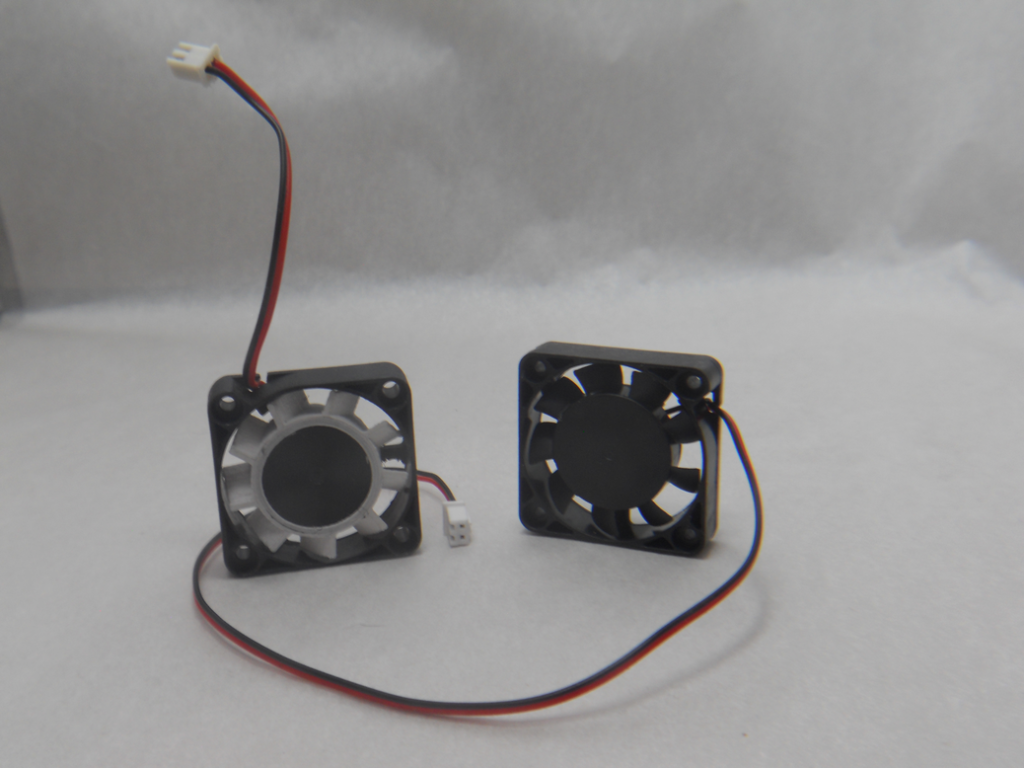
The only real fix for this problem was a replacement fan. We had to be careful when ordering one when considering its size, voltage, and pin count. We ended up with a close enough match I was able to install it with few questions – there are tear-down tutorials for in-depth instructions. The cord was way longer than it needed to be, so for my installation, wrapped it around the box behind the printhead a couple times before plugging it in.
Bed
And then there is the printer bed. Metal warps with heat cycles – especially when it’s made on the cheap. Aluminum print beds are no exception. Mine has reached the point of unusability having formed itself into somewhat of a slight bowl or saddle. Note that this is after giving it a gnarly scratch right in the middle.
This too took a replacement part. We ordered one for my specific model of printer (Maker Select Plus) and it arrived at the same time as the fan. Judging by follow-up research, borosilicate glass is preferred as a print surface, though cheaper, more thermally sensitive glass like you’d find in windows can also work as long as the operator is careful. My glass plate is affixed with four small binder clips, which I will need to mind as my favorite test print for leveling the bed sends the extruder right through them.
Takeaway
One key element I was not prepared for before printing a Benchy this week was hair spray. Makers love their Aqua Net hair spray. Another common-sense recommendation was not to use the metal spatula that came with the printer as it could damage the new bed.
Final Question
Have you ever 3D printed on glass? I look forward to hearing about your experience in the comments below or on my Socials.
Good Morning from my Robotics Lab. This is Shadow_8472, and today I’m finishing off my move from Manjaro to EndeavourOS. Let’s get started!
About Last Week
14 hours. That’s how long it took for a proper fix to Space Engineers after I posted my attempt at a high-quality walkthrough for the workaround. I feel humbled, but in a good way. Someone at Keen, the game’s studio, took the time to fix a Linux problem for a Windows game. There’s also been some other good news I’d talk more about if I understood it, but the gist is that there are people working to optimize Space Engineers’ Linux experience.
Clearing Space on Manjaro
The big push this month has been to prepare EndeavourOS for daily use and make sure it’s stable in case I need a full reinstall. With NVIDIA drivers sorted and Space Engineers well-established, it’s time to move more stuff over. These last two posts were especially important to me, so I took the extra time with them. Now, I’m back at my original endgoal: Manjaro running again.
My Manjaro installation is so full, it can finish its update – or even log in anymore. Space Engineers is a big game, so I’m uninstalling it from there. I moved over my save data and reviewed it briefly in case I ever want to see my old creations.
“Easy Diffusion” basically takes care of itself, so while it had to [re]download some files to get going again, it was an easy 12gb to free. While I was at it, I added a new model I’ve been looking at. It was as simple as download and place in the right directory as directed (see Easy Diffusion’s help section for links).
With those offloaded, I easily booted Manjaro to apply several hundred updates amounting to a non-trivial download time. I now have a working backup OS on my Upstairs Workstation again.
Takeaway
There is more to life than big projects all the time. There will always be more to hand craft. I am thankful that my computer is usable.
Good Morning from my Robotics Lab! This is Shadow_8472, and today I am offloading Space Engineers from Manjaro to EndeavourOS. Let’s get started!
Short Answer
I used Glorious Eggroll’s community version of Proton [1], but the AI update this past week and now requires a blank registry key or two added to its prefix. See the section titled “GAME UPDATE!!!” down below.
EDIT 4-18-2023: The development team just released a Hotfix in update 1.202.067 fixing the issue. 2/3 of my post is out of date only 14 hours after publication.
Background
This is a follow up/update to both last week –where I finish moving into a new EndeavourOS installation– and a post I wrote on January 18, 2021 [2], where I installed Space Engineers on Manjaro Linux and go into some detail about WINE, Proton, and the lengthy struggle I went through to install it there without fully understanding what I was doing. In case the specifics help anyone, I am running Space Engineers 1.201.014 default (Most Wanted update) on Glorious Eggroll GE-Proton7-54 on EndeavourOS with an Nvidia Geforce 970 graphics card.
I know what I’m doing a little better this time around. I even got it working first try. But that doesn’t mean I understand how everything works inside. There was an update to Space Engineers some time after my 2021 post that introduced a bug related to the audio system that would crash the game after anywhere between 5 minutes to 2 hours (ballpark average of half an hour). I was never able to diagnose it beyond a since-forgotten Discord post noting that the crash is an audio-related bug, and that it can be fixed by ripping open the .exe to kill the sound system. I happen to like sounds, so I accepted it until I gradually stopped playing.
The Dotnet Tradeoff
In more recent days, a member of the community going by G3ckobot on the developers’ Discord (Keen Software House) identified this crash as related to dotnet48, which I was quite possibly using as it showed up in a guide I linked to on GitHub I tried to follow. In my new installation, I went straight for Glorious Eggroll, and while the trade-off, as G3ckobot put it, is worse performance, the improved stability using the default wine-mono is worth it. He also suggested disabling progression in world settings to fix some lag related to the “G menu” for selecting blocks for your hotbar.
Crashes aren’t the only change I’ve noticed improvements with. The main menu plays videos like it’s supposed to. “Inventory Full” doesn’t self-overlap or cut off. Even “Exit to Windows” doesn’t throw a crash anymore. On the topic of miscellaneous bugs, there’s a new hint of static sometimes when I finish welding something.
A Note About Ship Blueprints
I’ve had one long-term goal while playing Space Engineers, and that is to perform a grand tour of the Solar System map before doing much else. I want to visit every planetary body once – even if just for a touch and go. My first attempt had a worker ship I was quite fond of designing, so I went to fetch it from my old save.
Like with any long-file path file transfer, my first move was to explore the destination directory.
When I navigated to the counterpart on Manjaro, I found myself in the exact, same place. I even made a file using the touch command in one place and it showed up in the other! A closer inspection of my file path showed that ~/.steam/steam is actually a symbolic link. Symbolic links have no concept of being mounted into another file system, so when I followed it, I landed right back in EndeavourOS’s copy of Space Engineers. It pointed to /home/shadow/.local/share/Steam, which I had to manually follow. I had to look around to find ../steamuser/Application\ Data/SpaceEngineers/, but in the end, it imported just fine.
GAME UPDATE!!!
The AI update arrived this week, and my installation broke after I was all but done writing.
Missing prerequisites
There is missing required C++ package.
You have to accept elevation dialogs from the
Steam to install prerequisites.
Within 20 minutes, I was the first one reporting it on Discord. The server went into a flurry of activity as community members pooled skills over the next four hours. A few facts were soon apparent: there are a lot of C++ packages, no logs were of help narrowing down the missing one, beta builds were working fine with Proton right up until the update dropped. I was busy with more important matters for most of it, but by the time I came back, user opekope2 posted [3]:
HERE'S THE WORKAROUND
1. Install and run protontricks
2. Navigate to SE > default prefix > regedit
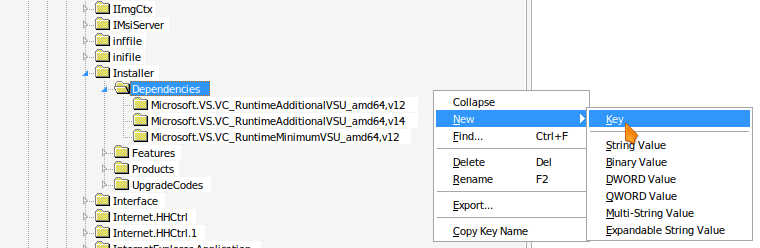
3. Under HKLM\SOFTWARE\Classes\Installer\Dependencies, create Microsoft.VS.VC_RuntimeAdditionalVSU_amd64,v14
Community consensus was that an unused dependency was listed last-minute –perhaps accidentally– that wasn’t commonly included in Proton. Since the dependency isn’t actually called, it’s OK to add a fake entry in the prefix’s registry. How to get that fake entry in there can get tricky.
How to use Winetricks instead of Protrontricks
Protontricks is a version of Winetricks geared for managing Proton prefixes instead of Wine prefixes. Protontricks is in AUR but didn’t feel like installing anything from there properly. Instead, I made a symbolic link from ~/.wine to my Proton prefix and told Winetricks to load the “default” prefix. Note: I heard good things about Proton Experimental, so I switched to it from Glorious Eggroll.
AUR: Arch User Repository
cd ~
mv .wine .wineDISABLED
ln -s .steam/steam/steamapps/compatdata/244850/pfx .wine
cd .wine
Errors about .wine and “No such file or directory” can be ignored. It just means you don’t already have a default Wine prefix. If you get an error when trying to cd into .wine, that means you will have to find where Steam puts games on your distribution and change your file path accordingly.
If everything is good so far, It is a very good idea to back up your prefix if you aren’t working with a clean one or wish not to redownload it.
cp ~/Full/Proton/Path ~/.SEbackup
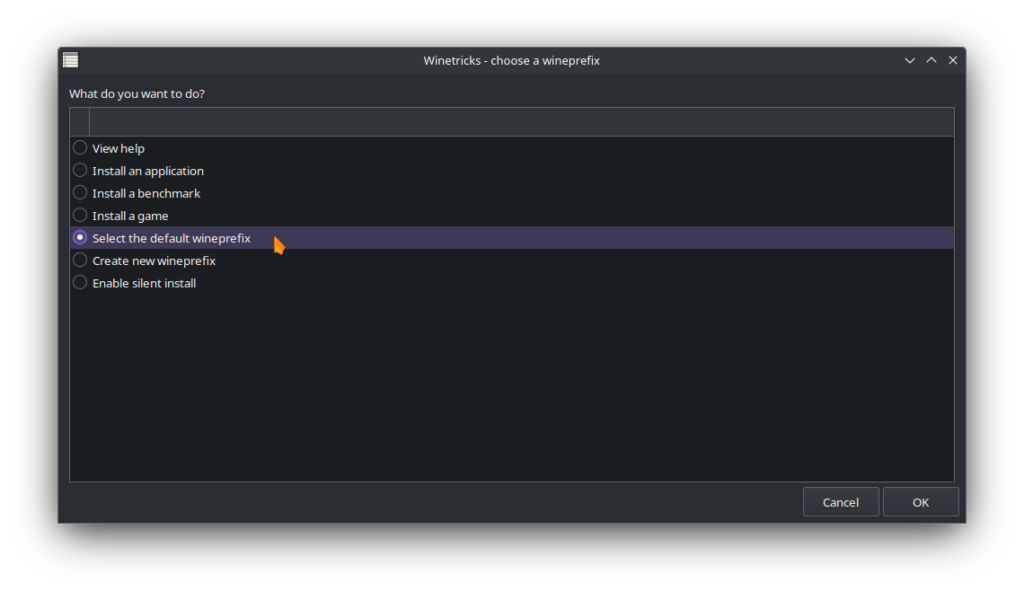
Ensure both Space Engineers and Steam are closed. Start Winetricks. Select “Select the default wineprefix.” The link you created and tested earlier will fool Winetricks into looking at Space Engineers’ prefix. Click OK.
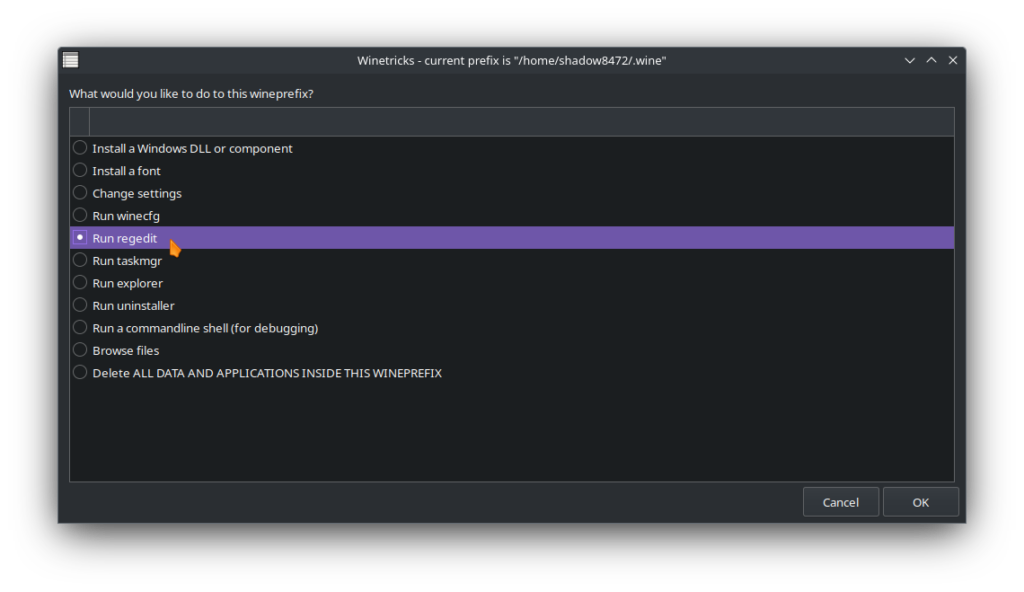
Next, select “Run regedit” and hit OK.
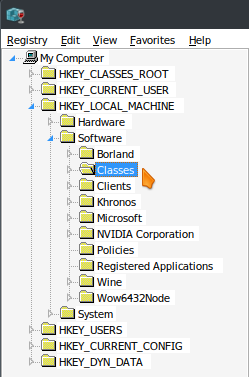
Navigate in the registry editor to HKEY_LOCAL_MACHINE\Software\Classes\Installer\Dependencies.
You the Classes folder is long. Once you scroll down to Installer and find Dependencies, you should see two keys with the folder icon (my screenshot already has the extra key). Bring up your context menu and make a New Key and name it Microsoft.VS.VC_RuntimeAdditionalVSU_amd64,v14. Do not worry about adding a value.
Space Engineers should start up now, but you may have to try a few times before you start/load a game. My record is 4. After you confirm Space Engineers is working, be sure to remove ~/.wine link and replace your original default wine prefix if you had one before!
rm .wine
mv .wineDISABLED .wine
Takeaway
I’m no stranger to easy projects expanding on me, but this was dramatic! I tried to keep up with developments in this story until the night before publication. Opekope2’s original workaround post is pinned and has been edited to include instructions for importing two keys* that will do the same job as editing the registry manually as demonstrated. As a personal experiment starting around the time this goes live, I’m adding the other key manually. I don’t expect anything to change, but as opekope2 pointed out to me, “Because that’s how it is on Windows,” [3].
* Microsoft.VS.VC_RuntimeAdditionalVSU_amd64,v14 and Microsoft.VS.VC_RuntimeMinimumVSU_amd64,v14
Final Question
Have you gotten whatever latest update of Space Engineers running on Linux? If not, I highly recommend you engage with the community on Discord [3].
As always, I look forward to hearing about your experience.